• Hello MLAers! We've re-enabled auto-approval for accounts. If you are still waiting on account approval, please check this thread for more information.

Apple 8•24 GC 1bit graphics behaviour

Hi everyone!
Probably is a silly question but... I just picked up an 8•24 GC card, and I’m wondering if something’s off: whenever I switch the display to black-and-white, I get the strange output shown in the photo. In 8-bit and 16-bit colour modes, the card works flawlessly. Want do you think ?

Thanks a lot in advance
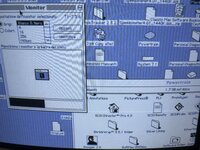
IMG_4261.jpeg
 
I posted a similar thread recently.


I believe the culprit is probably a bad VRAM ic (one of the 16 ICs in the middle of the board). I have several of these cards, so I never felt compelled to troubleshoot the issue. I would check the other color modes, switching between different desktop patterns to see if any of them show some artifacts. I found that although the issue is the most obvious in black and white mode, it does persist in higher bit-depths.
 
Yes, you’re probably right; I’d been thinking along the same lines. I actually ran a VRAM diagnostic with TechTool 2, and every test passed without any issues. Could it be a problem with the RAMDAC? Still, if it turns out to be the VRAM, I’ll have to let it go. Those VRAM chips are impossible to find, and replacing chips that close together is a nightmare.
 
Just to check: this is reproducible between monitors, right? Especially on a CRT one? I can't tell if your picture there is on a CRT or LCD
 
Yes, I tested with the following monitors: M0401Z, M1212, M2935, M1031 Portrait (worst-case scenario), and Sony Trinitron E500. All monitors were tested at a resolution of 640×480 (except, of course, the M1031). The defect is most noticeable in black and white, barely visible with 4 colors, and not visible with 16 colors or more.
 
OK - then ignore me - it looked a bit like the artefacting you get with some ADCs in more recent monitors, but that's obviously not the case here.
 
I'm leaning against a VRAM problem.

Look at the areas of pure white and pure black in the windows. There are no missing or added pixels.

Look at the edges of thin black lines, such as the large square in the Monitors control panel window. The horizontal line is clean all the way across. But, three out of four of the vertical lines look blue, although all the pixels are complete.

1751466076770.png

This suggests the visual artifacts are occurring post VRAM.
 
Exactly, I also think it’s an issue that occurs after the VRAM. Besides, if it were VRAM-related it should persist even at higher colour depths. Is it possible to find the schematic somewhere? I’ve been looking but haven’t found anything.
 
I tried two of my 8 24 GC cards (Rev A, System 7.1. With and without driver.). In B&W, both of my cards display a blue artifact repeating across the screen.

8 24 GC artifact.PNG

I'm displaying mine on an LCD screen, which is likely why it looks different than your coloring. The point is, it sure seems like this is just an artifact of the card's design rather than a defect in your board.

When I switched to @bigmessowires Mac Sync-inator, the display is perfect. No blue. So, whatever he is doing to extract the sync signal fixes the unintentional coloring.

If I find my Rev B card (different RAMDAC), I'll try it and send an update.

- David
 
Hmm I have 3 of these and only one of them has this issue. All of them are the same exact Rev A ROM (341-0812). Also, mine has the lines repeating in a different pattern than both your and the OP pictures (see my thread linked in the second post). Lastly, the issue does persist in higher bit-depths but only detectable under certain conditions such as certain desktop patterns. I found 2 desktop patterns that showed artifacts in 16 and 256 color modes.

Btw all three cards were tested on the exact same machine (IIfx) with the same monitor (M1297).
 
I just found my third card. Sadly, not a revision B.

only one of them has this issue.

Your comment made me take another look. For my third card, the artifacts fade as the card warms up. That is, they are very noticeable at cold start -- even after reaching the Finder. After sitting for a couple of minutes, the screen looks perfect. The first restart (not power cycle) causes the artifacts to reappear until just about the time the first system extension appears. But they definitely fade / drop down in intensity before the first extension appears. It isn't sudden.

After the second or third reboot, the card has warmed up enough that no artifacts appear upon restart or when the Finder appears.

The other weird thing is that upon initial cold boot (before the card has warmed up enough), clicking on a window to drag it (but don't actually drag) cause the artifacts to get worse. Letting go of the mouse decreases the artifacts. Clicking again, artifacts are worse. Something about drawing the outline (or some code loop? clicking the mouse?) triggers the artifacts. Nothing happens after the card warms up.

After the card warmed up (no artifacts), I powered down and immediately powered up. No artifacts. So, looks like temperature or maybe capacitor exercise is affecting the card.
 
All right. I have some very weird news. I powered down and let my card and computer cool off. Then, I cold started. Lots of artifacts. I let it run for ten minutes. No improvement. I rebooted. No improvement.

I realized that I did not have the 8*24 GC extension installed. I dragged it into the System Folder. Rebooted. Just before the first extension loads, the artifacts went away.

Looking through the source code, in Boot3.a. Fairly soon before the first extensions are loaded, the System makes a special call to load the 8*24GC code.

Load8Dot24GC ; <31><29>
; Load 8¥24 GC software from separate file in the control panels folder (or from the system file).

btst #6,ROM85 ; Color QuickDraw?
bnz.s @noCQD ; no CQD, no 8¥24

move.w #k8Dot24GCNameID,d0 ; get 8¥24 GC
move.l #kControlPanelFolderType,d7
move.l #'gc24',d5 ; resource ('gc24', 32)
move.w #32,d6
clr.w d3 ; clear the DontCloseOnError flag
bsr ExecuteFromSystemOrFileByName
@noCQD

I think.... there is a known display issue with the GC card and software does some sort of compensation or initialization early in startup to fix it.
 
Is there an extension for the 8•24 GC? I only have a control panel… Just to add some extra information: I tried the board with both ROM version 1.0 and version 1.1, no change. I tested it in a Quadra 700, a IIci, and an IIfx, and the same problem appears. Operating time and temperature make no difference; I ran tests lasting hours and nothing changed. If something has deteriorated over time, I’m inclined to suspect the capacitors, which in my case are all tantalum or similar. If we could find the schematic, everything would be much simpler. I’m attaching photos of the board.

IMG_4263.jpeg
 
One method I have used to determine whether it’s after the VRAM is by taking a screenshot and checking whether what shows up in the screenshot matches what is displayed. The theory being if the screenshot is clean, it’s after the VRAM (ie. on its way out to the display, like the RAMDAC) since the screenshot is dumping the screen buffer contents. Let me know if this thinking is flawed.

At first glance, this doesn’t seem to be the same artifacts caused by the 8*24 GCs incompatibility with 7.5.x as well as System 7.x with the drag and drop extension installed. But just confirming you aren’t using either?
 
I only have a control panel

That's it. 8*24 GC v7.0.1.

I just tested from a cold boot. The software definitely fixes the artifacts on my revision A with 341-0812 ROM running on a IIci with System 7.1 w/System Update 3.0. I believe 341-0812 is what you consider 1.0 ROM
 
I believe 341-0812 is what you consider 1.0 ROM
Exactly. I’ve tried both ROM 341-0812 and ROM 341-0266.
Tomorrow I’ll do a fresh install of System 7.1 Update 3 and test everything with the same ROM version you’re using. I’m curious to see if I can fix the problem the way you did. Anyway this thing is very strange :)
 
Hmm I’ll try the “faulty” card again in the next few days. But I’m pretty sure I had the control panel installed (the one that launches a yellow rocket during boot?) and it persisted to desktop. The “good” cards never had this issue, even before extensions are loaded. This was on 7.1.2.
 
I can now confirm that all three of my cards display perfectly (at least on the Dell LCD) after the software starts, although sometimes they need a minute or two to 'warm up', during which the artifacts are easily visible. After that, perfect B&W.

I also was able to shoot a video that showed clicking on the window title bar causes an increase in artifacts, letting go decreases, clicking increases, until gradually the artifacts disappear. (So -- I'm not crazy.) Clicking on the desktop did not causes an artifact change (because no drawing takes place?). Something about exercising the card (and maybe pattern generation?) affects the artifacts.

Sorry about the gross dusty screen and low volume. This was just a quick demonstration.
 
Back
Top