

Hi,
I have an old 40sc that I just finished refurbishing. It all works very well.
Here is the drive in my setup.
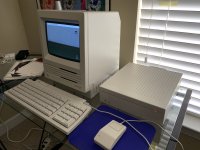
I retr0Brited the case, and changed out the hard drive. I replaced the old quantum Q250 with an IBM P-series 857mb.
The interesting thing, is that the power supply of the 40sc has permanently modified the hard drive. When I first got the IBM drive, I could plug it in to any standard power supply and it would fire up immediately. After I connected the hard disk to the power supply of the 40sc, it would no longer fire up at all. It wouldn't respond to any power supply. The drive acted dead. Then, I went ahead and connected the scsi cable and plugged it into my SE, and the drive will fire up only when the SE is on and the scsi cable is connected.
So... turn on the SC. nothing but the fan. Turn on the SE, the drive comes on. The scsi drive will still not work in any other power supply.
Everything works, and this isn't really an issue, but why has it happened?
Is this some type of power save activated by the power supply in the 40sc? Do any of the scsi experts know what this is.
BTW, tried two identical IBM drives, both of them did this.
I have an old 40sc that I just finished refurbishing. It all works very well.
Here is the drive in my setup.
I retr0Brited the case, and changed out the hard drive. I replaced the old quantum Q250 with an IBM P-series 857mb.
The interesting thing, is that the power supply of the 40sc has permanently modified the hard drive. When I first got the IBM drive, I could plug it in to any standard power supply and it would fire up immediately. After I connected the hard disk to the power supply of the 40sc, it would no longer fire up at all. It wouldn't respond to any power supply. The drive acted dead. Then, I went ahead and connected the scsi cable and plugged it into my SE, and the drive will fire up only when the SE is on and the scsi cable is connected.
So... turn on the SC. nothing but the fan. Turn on the SE, the drive comes on. The scsi drive will still not work in any other power supply.
Everything works, and this isn't really an issue, but why has it happened?
Is this some type of power save activated by the power supply in the 40sc? Do any of the scsi experts know what this is.
BTW, tried two identical IBM drives, both of them did this.
Last edited by a moderator:




