• Hello MLAers! We've re-enabled auto-approval for accounts. If you are still waiting on account approval, please check this thread for more information.

Anyone have a Powerbook 100 and a Floppy Emu?

Before we change the subject - who wants the new adapter PCB and hasn't soldered their connectors yet? I'm wondering if I should throw some more connectors into my next Digikey order...
 
Forgot to update this thread - I have five of the new PCBs that should fit directly into the Floppy Emu and the connectors to go with them - anyone who wants them, please get in touch!
 
Wouldn't that be the unsupported MacII HD20 driver on the developer disks?


Files attached.


Macintosh II HD-20 Support
6/5/87

Warning:
This software is not supported. Additionally, the hardware and even the manual (this document) is not supported. It is not a product, and is to be used at the risk of the user. Caveat Emptor!
!

Macintosh II HD-20 Support

! Warning:
Since the Macintosh II internal IWM port is not buffered (as external IWM ports are in other Macintosh products); there exists a real danger of causing severe damage to the IWM itself when installing. Taking the precautions recommended here minimizes the risk of this happening, however some damage may still occur since the Macintosh II was not designed to support the HD-20. Please read all of this document before even attempting to install any of the hardware. The greatest danger is in installation and removal. At the very least, please keep the number of times that you install/remove this hardware to a bare minimum
!

Installation:
¥ Turn both the Macintosh II and the HD-20 off. This step is paramount in avoiding costly repairs to both machines.
¥ Remove the cover of the Macintosh II.
¥ Touch the power supply in an effort to remove static electricity from your body.
¥ Remove the floppy drive cable (if your MacII is so equipped) from the internal IWM port #2 (the connector nearest to the NuBus slots).
¥ Connect the ribbon cable to the IWM port #2.
¥ Feed the ribbon cable out the rear of the machine (through an open slot access port).
¥ Replace the cover on your Macintosh II.
¥ Remove the screw and top cover of your HD-20.
¥ Touch the power supply in an effort to remove static electricity from your body.
¥ Remove the cable coming into the HD-20 at the 20 pin connector (this looks amazingly like the Macintosh II's IWM port connector).
¥ Connect the ribbon cable to the 20 pin connector inside the HD-20.
¥ Leave the HD-20 in a position where it will be least likely to cause accidental eloctrocution and where the fan is least likely to get external objects (your fingers) in it.
¥ Turn on the HD-20. (continued on next page)
¥ Turn on the Macintosh II.
¥ After booting the Macintosh II, insert the floppy drive to drive #1 (located at the far right hand side of your Mac II) and copy the file "MacIIHD20" to your system folder.
¥ Select "Restart" from the Special Menu.

Your Macintosh II will now reboot mounting the HD-20. You are now in a position to copy data from the HD-20.
!Recommendation:
Since this software is RAM-based, it is slower than the normal floppy disk driver. You are also at risk of damaging your computer when you install the hardware affiliated with this software. It is the recommendation of the author that you use this software as it was intended, to retrieve data from your HD-20 and place it on a different storage media. Nothing prevents you from using it in an "extended" fashion, except that you are running a risk and there was not enough time to properly trim the execution loops of the driver. I recommend against it.
!

After copying your data from the HD-20, you should remove it to guard against the possibility of an accidental electrocution, damage to your computer equipment, or both.

Removal:

¥ Remove the file "MacIIHD20" from your system folder.
! Warning:
This software must be removed from the system folder prior to disconnecting the HD-20. Failure to do so will require booting off an alternate system and removing the file "MacIIHD20" from your original system folder while under the alternate system.
!
¥ Turn off your Macintosh II and your HD-20.
¥ Touch the power supply of the HD-20 in an effort to remove static electricity from your body.
¥ Remove the ribbon cable from the 20 pin connector.
¥ Replace the original cable for the HD-20, replace the cover and secure it with the screw that you previously removed.
¥ Remove the cover of your Macintosh II.
¥ Touch the power supply in an effort to remove static electricity from your body. (continued on next page)
¥ Remove the ribbon cable from the IWM port #2 connector and remove the ribbon cable from the computer.
¥ Replace the cable from floppy drive #2 (if so equipped) into the IWM port.
¥ Replace the cover on your Macintosh II.

This completes the removal process.

Use:

The use of this software or hardware voids all warranties on your HD-20 and Macintosh II. Once it is in place, you may use the HD-20 as you would normally, realizing that not enough time to properly modify the driver has been given. You will experience especially long waiting times should you choose to write to the HD-20.

! Warning:
Do not connect an external floppy drive to the pass through connector of the HD-20. This software does not support such configurations. Additionally, the hardware does not support older single sided drives from the IWM port. Failure to comply will bring unexpected results.
!

You may however connect another HD-20 to the pass through connector of the HD-20. The additional HD-20 will operate as does the first.


Configuration:

You will need to have at least the following equipment. A Macintosh II equipped with a viedo card, monitor, ADB mouse, and a SCSI hard disk. This hard disk must have a system folder on it and be the "boot" system. An HD-20 in operating condition. A ribbon cable (20 conductor) with keyed "L" connectors on each end exactly with the same keying as the floppy cables inside the Macintosh II. Appropriate tools for removing the covers of both the Macintosh II and the HD-20.
 

Attachments

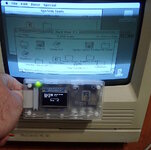
Yes! The Mac II HD 20 init mounts FloppyEMU in HD20 mode on a Macintosh SE/30 with the standard ROM. BTW: I used the System 6.0.3 System Disk image as my boot floppy disk. I have not tried other system versions.

HD20 on an SE-30.jpg

@bigmessowires

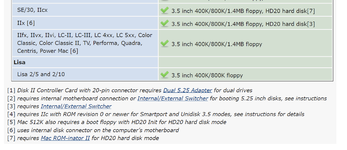
1. Why isn't the Macintosh II listed for at least floppy mode[6]
2. Does the IIx really support HD20 mode natively? Or does it need[7]
3. You could now add [8] "Can mount HD20 when booting from another drive with Mac II HD20 init" to SE/30, IIcx, II, and IIx with original ROM. Maybe some of those other computer (IIfx, LC II, IIvx, etc?)

1755547140759.png
 
1. Why isn't the Macintosh II listed for at least floppy mode[6]
I'm not @bigmessowires , but this one's easy: The Mac II doesn't have an external floppy port.

Most Macs with provisions for two internal drives (the Mac II, IIx and IIfx, and the original LC) don't have external ports, with the exception of the SE, which has room for two internal drive and has an external port, making it one of the only Macs to support up to three floppy drives (or two drives and an HD20).

That said, any dual-drive capable Mac with only one drive installed can support the Floppy EMU on the unused internal port. HD20 support varies, of course, hence the unsupported HD20 driver for the II.

Yes! The Mac II HD 20 init mounts FloppyEMU in HD20 mode on a Macintosh SE/30 with the standard ROM.
I thought the SE/30 had native HD20 support in its standard ROM?

Of course, since I've been out of the loop for awhile, it's entirely possible that I'm mistaken.

c
 
Yes! The Mac II HD 20 init mounts FloppyEMU in HD20 mode on a Macintosh SE/30 with the standard ROM.
Nice work!

Does the IIx really support HD20 mode natively? Or does it need[7]
I'd be interested to know the answer to this, too. I thought that the IIx, like the IIcx, required the ROMinator or some other nonstandard ROM for DCD support... and that the IIfx didn't support DCDs at all, probably due to the SWIM being handled by a coprocessor.

In any case, I updated my DCD support matrix on TashNotes to mention the MacIIHD20 patch according to what I understand from this thread - please correct me if I've made any mistakes.

@David Cook If you really want to be a hero, you could help me fill in the "Max Devices" column for the Macs that use MacIIHD20, using a TashTwenty... =) If it's like the original Hard Disk 20 patch, it should support four devices, but if it's like every machine post Plus, it should support two, and who knows, maybe it only supports one. Would do this myself but unlike every other retro Mac enthusiast, I haven't got an SE/30...
 
Well I'm glad I posted a query for this. :)

Nice find there superpete. I've dug through a handful of developer CDs and other CDs from the time but haven't found this one. Downloading and checking out immediately.

I wonder if we could disassemble the HD20 INIT and see how it varies from the normal HD20 INIT.
 
but this one's easy: The Mac II doesn't have an external floppy port.

Yes, but the IIx also doesn't have an external floppy port, yet is listed as supporting the Floppy EMU on the internal port. So, I was just wondering why he didn't put the same note on the II.

with the exception of the SE, which has room for two internal drive and has an external port, making it one of the only Macs to support up to three floppy drives (or two drives and an HD20).

That's an awesome factoid that I was unaware of. My first Mac was a dual-floppy SE!
 
The Portable can also support 3 floppy drives, but the special case assembly(ies) to make it possible are fabulously rare. Apparently there was some bloke in Germany that may or may not have had one.

AFAIK, you could have ordered a SE/30 without a hard drive.
 
I can confirm that the IIx does not include native support for the HD-20.

The IIx does mount an HD20 when booted from 6.0.3. However, I'm getting a crash with 6.0.8 with the Mac II HD20 init.

The IIx with HD20 also worked in 7.1! I booted this from a hard drive with Mac II HD20 in the Extensions folder). However, it had problems reading the first internal floppy drive (which was a different Floppy EMU in floppy mode). When I removed the init and rebooted, the first floppy drive read perfectly. Could be a Floppy EMU problem. Or it could be an Mac II HD20 problem.
 
For anybody searching:

To convert a disc image, made from a .BIN and .CUE files, one way to convert it into an .ISO image on Windows is the following:
  1. Download this software. https://github.com/extramaster/bchunk/releases
  2. Pull up the Command Prompt. Navigate to your download folder where you have the .BIN and .CUE files. Use the cd command to change directories.
  3. Assuming bchunk is in the same place as your download folder, your command might look like the following:
    Code:
    C:\Users\-----------\Downloads>bchunk.v1.2.1_repub.1-bin-cue-iso.exe -v "Night of the Living Disc.bin" "Night of the Living Disc.cue" "Night of the Living Disc.iso"
  4. The tool should just take a few seconds to process it.
 
Updating: My oh my that disc doesn't want to be mounted on any platform. The .bin/.cue thing didn't work, the .iso wouldn't mount, not in QEMU, not in Basilisk II, not with Toast. Ended up working as a BlueSCSI on a real machine.
 
I confirmed that the Mac IIcx does not natively support the HD20.

I confirmed that the Mac IIcx does mount the HD20 when booted from 6.0.3 with the Mac II HD20 init on a 800k floppy.

The Mac IIcx crashes when booted from 6.0.8 with the Mac II HD20 init on a 800k floppy. I'm beginning to think the 6.0.8 and 1.44 MB floppies are both incompatible with the Mac II HD20 init. However, I'm dealing with some bad floppy drives here as well. So, only my positive cases are really reliable.
 
Yes! The Mac II HD 20 init mounts FloppyEMU in HD20 mode on a Macintosh SE/30 with the standard ROM. BTW: I used the System 6.0.3 System Disk image as my boot floppy disk. I have not tried other system versions.

View attachment 90117

@bigmessowires

1. Why isn't the Macintosh II listed for at least floppy mode[6]
2. Does the IIx really support HD20 mode natively? Or does it need[7]
3. You could now add [8] "Can mount HD20 when booting from another drive with Mac II HD20 init" to SE/30, IIcx, II, and IIx with original ROM. Maybe some of those other computer (IIfx, LC II, IIvx, etc?)

View attachment 90118
Glad you could test it. Nice work!
 
Back
Top