• Hello MLAers! We've re-enabled auto-approval for accounts. If you are still waiting on account approval, please check this thread for more information.

Any thoughts on this....it arrived!!!

thanks Techknight

im not giving up on that drive - the contents of that drive is what i would love to see 

would you do me ANOTHER BIG FAVOUR and have a quick look at that link i posted above for a new networkresistor to see if it is the correct replacement - its all i could find - that one starts with 16, the blown one starts with a 6 - i dont know if it will do 

all day on the motherboard - no choice but to take out each chip - many broken pins - i am soldering individual pins/legs inplace of the broken ones - bit tricky reinserting the chip with all its legs PLUS the broken off legs that are still in the socket - but im sloooowwllly getting throught them. Testing them for connectivity and it seems to be working 

still no life out of it

but there are still allot of chips to go - some of them are soo bad  5 or 6 pins snapping off no matter how gently i raise them out of the socket

 
Heres the vid from yesterday of the hard drive controller - was too fed up to edit it and up load it - ah sure.......you have to stick at it

 
Those resistor packs you linked look fine to me, I can't find any boruns part with the exact numbers on the old chip, but they indicate it is a network of 220ohm and 330ohm resistors so it I would be surprised if they where anything different to the 4116R-3-221-331

 
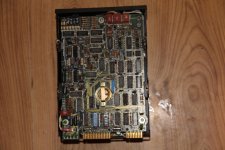
heres a pic i took when i first stripped it down - before i powered up anything - the 2 breaks in the dipswitch thingy are there - that leaves the boruns network resistor as the problem......... i hope

IMG_8445.JPG

 
Last edited by a moderator:
thanks max. I couldnt find an exaxct match either -  I have no idea about these components or their labeling. I really want this dam drive to come to life

ill order them up... theres 20.... so i have 20 chances to blow the ^&^$%n out of it !!!!

there in israel....will take a few weeks to get to ireland . Will be worth the wait 

cheers

 
Last edited by a moderator:
todays effort - starting on the motherboard

can i remove all the rom chips and boot from the memory expansion card - would save me allot of time??? - most of the rusted chips are the ram chips

 
it should spin up and run without the network resistor in place. It appears to be a buffer/filter for the data I/O. So itll need replaced if you wanna talk to the drive. But, when all else fails, stick it back in, plug old unregulated power supply back in, and figure out what blows next! whatever blows next is your bad part. LOL. 

 
Oh, and its been a very long time since I worked on Apple II, so my memory can be foggy. But, if the RAM is bad or broken, the screen should stil light up but itll be random garbage characters created by the character generator. 

 
Techknight....yet again you are bang on the money.

update on the harddrive and motherboard. Now waiting on parts. Thanks to everybody for all the help and support. This thing would be so dead without your help.......more than likely myself as well!!!

 
Once again, congrats on the progress! Hearing that ancient HDD sing (or scream, depending on your personal fondness for high-pitched mechanical whining) was so cool - please keep the updates flowing!

:)

 
I dont see a microcontroller on that drive anywhere, but the newer MFM/RLL drives have ROM and a microcontroller so when it spins up, it does a quick self-test seek test and returns home. and idles waiting for commands from the controller card. 

This drive didnt do that. So that sort of has me scratching my head But it is entirely possible that it is a "dumb" drive and the large card actually has the MCU that controls the head stepping and self-testing. Otherwise, it seems to be a regular off the shelf Profile 5MB someone took the control cards and HDD out of the case, and hacked into that AIO unit. 

I feel once the large controller card is plugged into the drive, and powered up itll perform a seek test. 

 
Last edited by a moderator:
Oh, to speed up (or slow down) your process on the motherboard, You need a known good system and start swapping in chips until you find the bad ones. you either have a trace, or a bad IC somewhere on the board. 

So take out the old corroded ICs, and stick them in a working apple II to see if it breaks it. If it does, you found a bad IC. Then move on... I do this alot with other electronics. 

 
thanks for all the support people

People refer to this monstrosity as an AIO unit - what does that mean

Techknight........there were many different sounds coming from the drive - varying  tones, pitch's - some sounded like highspeed impact (platter and head!!!!!!) but it could all be the main platter bearing being dry,,,,,,,,but as i left it run the tones and sounds became a stable consistant hum........only when i shut it down a different sound appeared - seems the same as when it was spinning up....but still an unnerving click on every rotation. was thinking of greasing the bearing but then had visions of the grease spraying all over the platter and heads........so no to that idea

i am hoping the swingarm is stationary and parked away from the platter but from my oldest 68k drives i doubt that is the case - i think only modern drives 'park' the heads off the platter

somewhat tempted to open the drive to inspect, but as i said on an earlier vid the bolts for the drive lid have a green wax on them, not broken - it has never been opened and i sure as hell do not have a dust free enviorment to safely open it - there are 4 read/write connections and looking at the size of the device im guessing there are 2 platters, 4 heads , so opening it will not show all the surfaces anyway.... so best leave it closed and airtight i guess. Even if the drive comes to life I have no idea on the life expectency of the drive.... have a load of 5.25 floppys to 'grab' all i can of the drive if i get the chance

as for the motherboard.. I have 4 x 47 logic chips with missing pins.....ordering replacments.......only way.......at least 5 sockets (cpu area) have that goo down inside them. it is not conductive(that i can see) and preserved the pins from rust. Only way to remove it properly id to remove the socket housing, clean and re install.........didnt work too well on the one i removed the other day. The cpu is one of them.......full of goo.......if that stuff has tiny conductivity i guess it will screw up stuff..........i somehow get the feeling this board might be landing on your doorstep!!!!!!!!!

i also have an osiloscope now (present from the brother) - he showed me how to use it ....but i havnt a clue what he was talking about........will look at some tutorials on how to use it..... i still cant read schematics for gods sake!!!!!

i dont have another apple ii board like this - only iie's.........already looked for doner chips.......none........robbed 1 from a floppy disk controler to bring the number down to 4

i am backing off this project now for a while.........need to........getting impaitent........must wait for replacement parts .........last time i got frustrated like this was on an se/30, socketed.......lost the head and snapped the motherboard in half,,,,,,,regreted it there and then..........so did my hands!!!

i have it all put away safely.......even all the screws!!!........i have to be paitent.........or i will destroy it.....the first drive explosion is an example of my stupidity of impaitence.........new parts should arrive within next 2 weeks.......ill keep you all updated 

lastly - as the machine is it is dangerous - will make a cardboard cutout for the back of the analog board, the same as the 68k macs to cover the connections. Am also thinking of making a cover for the back of this machine. Thinking perspex. 4 sections screwed together, will also have to mount a modern psu for the drive and control board. But I want to re install the crazy psu that came with it. Would just love to keep it as it was origionally built, except with a modern psu and a perspex rear cover. Also need to fix the boards in place so they are not 'wobbeling; around the place. Just some ideas

heres what ive been doing for the last year - special effects - Maya - this is all my work - www.pixelvfx.ie

if anyone needs some cgi give us a shout.......will be glad to help....animated logos and stuff........no fee........you helped me!!!!.......the plane crash took 4 weeks work so go easy!!

again........thank you to all here........i wish you all a happy new year from Ireland....

 
Last edited by a moderator:
Yup, AIO in this context means All In One, much like the PowerMac G3 AIO, sometimes referred to as the Molar Mac because it resembles a tooth.

Beyond that, I don't know enough to offer advice on this project. Good job getting to this point, it looks like quite the undertaking. It will be exciting to see it work.

 
Still waiting on parts.

 I have a 65C02A cpu from a apple iie  and i tried it on the board to see if it would change anything. Nothing changed

However I notice that 1 of the rom chips is getting hot (F8) and 2 ram chips. I dont think they were getting hot before Did some metering on the board and I have everything from 12 volts, to 5 volts on some rails , and then  2.8, 1.5 volts coming off some of the chips. That cant be right!!

Still have the same output on the screen - solid green square

Wondering if changing the cpu has done any more damage, I inserted it the correct way.

Opened the applle ii power supply expecting to find 2 blown foil capacitors but there were none in this. All looked ok so plugged it in and it gives out a steady 4,8 volt and a 12.2 volt.... The one thing i was sure would be blown turned out to be the only thing still working great. 

 
Last edited by a moderator:
if a Logic IC is getting hot, its bad... Or if it wasnt before, it is now. 

The fact that you have a green square means the clock signals are good, and the video raster generator is functional. But the fact that you dont have random characters means the video generator cannot access RAM or the RAM "cant be seen" for some reason. 

because DRAM will power up in a random state, and if the RAM was accessable, the screen would be full of random ASCII characters until the CPU boots and inits the RAM. 

This is what creates the "simasimac" pattern in the SE/30. the VDRAM powers up in an unknown state, and each brand of that RAM is different in its own ways. 

 
Last edited by a moderator:
still waiting on parts to arrive for this.

Wondering , if i get the whole thing working and the hard drive is still 'alive' how do i access it. Been looking for commands but cant find any for hard drives. 

is a hard drive on an apple ii treated the same as a floppy? if i load prodos from floppy would a 'catalog d2' access the hard drive if the floppy i load prodos from is d1 ?

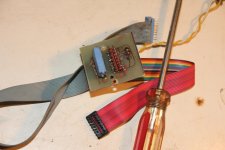
This is a picture of the keyboard / io connector that was attached to the base of the machine. The keyboard connected from under the machine. But this is a male connector so  imagine ill have to mod the connector from an apple ii keyboard. Was the io connector the joystick connector.

have to just wait for the chips.......tic tic tic !!!

IMG_8512.JPG

 
Back
Top