• Hello MLAers! We've re-enabled auto-approval for accounts. If you are still waiting on account approval, please check this thread for more information.

Any suggestions on IDE to SATA adapters for a g4 MDD?

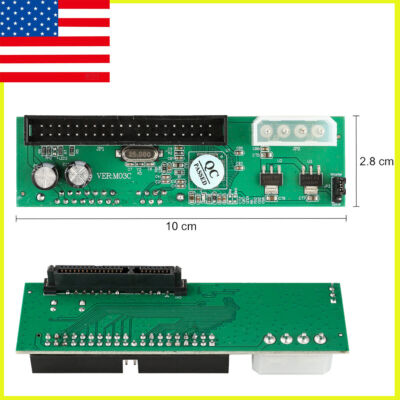
So, I am setting up my G4 MDD, and was wondering if anyone had suggestions for any kind of adapter for the IDE connectors to SATA, since I'd like to if that's even possible to achieve.

Also is anyone else having trouble with the wiki? I've been trying to read the forum rules from there but I just haven't been able to access it.
 
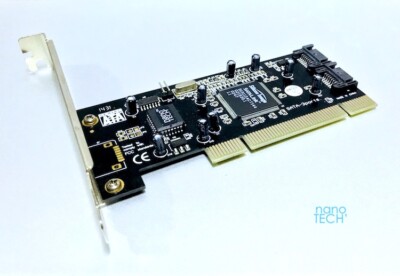
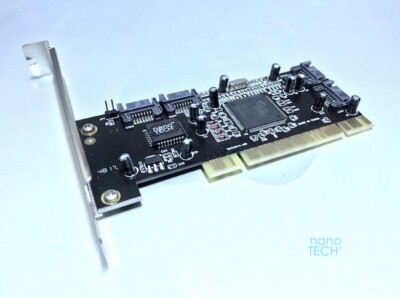
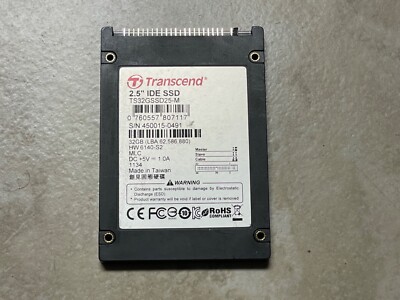
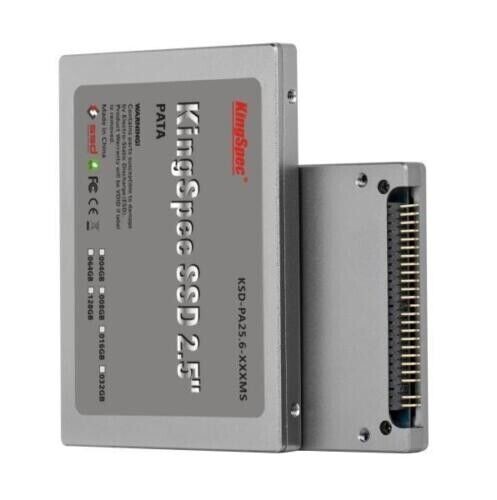
I use the generic IDE/SATA ones on eBay with 2.5" SSDs or you can install 2 port or 4 port SATA PCI cards. The 2 port ones support OS9. You can flash cheaper PCI cards yourself if cost is a big issue.


Why not get yourself a PCI SATA card?
You'll need to flash it though. There are threads here on this topic.
It will keep your IDE buses free.
 
Hey- hoping someone can help.

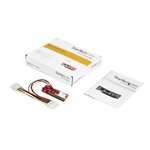
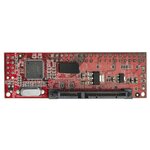
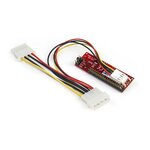
I've got an 1999 PowerMac G4 Sawtooth with its original 20gb IDE drive that really sings. I purchased a new StarTech IDE2SAT2 red adapter with a retired 120GB Kingston SATA SSD (SH103S3/120G, SATA Rev 3.0 (6Gb/s), backward compatible to SATA Rev 2.0 (3Gb/s), SandForce® SF-2281) but when I install it, nothing happens. The Mac powers up, my screen gets a signal to wake it, but literally nothing after that. No chimes, no Mac on the screen. Just black.

At first I thought the drive was an issue, but I was able to plug it into a generic USB>SATA cable, connected to Mac (running off of the old IDE drive), and the Mac saw the SSD. I formatted it, and was able to clone the IDE>SSD. So my SSD should be good to go.

I tried unplugging the IDE CD and iOmega drives thinking for some reason they might be causing a conflict, but no, no change. I moved the SSD/StarTech adapter to the IDE cable that was previously connected to the CD. No difference.

I've tried all of the jumper settings on the StarTech, but I started with MASTER. No difference.

I tried plugging in a known-good 500GB Barracuda SATA HDD to the StarTech. Nothing.

I got on the line with StarTech chat support. (Wish I could get that hour back. The computer is older than any of their chat techs.) They suggested the adapter was defective and to swap it, which I did with the seller. (Staples). Got replacement today. Same issue.

MacOs 9.2

I must be missing something. WTF?

 
Hey- hoping someone can help.

I've got an 1999 PowerMac G4 Sawtooth with its original 20gb IDE drive that really sings. I purchased a new StarTech IDE2SAT2 red adapter with a retired 120GB Kingston SATA SSD (SH103S3/120G, SATA Rev 3.0 (6Gb/s), backward compatible to SATA Rev 2.0 (3Gb/s), SandForce® SF-2281) but when I install it, nothing happens. The Mac powers up, my screen gets a signal to wake it, but literally nothing after that. No chimes, no Mac on the screen. Just black.

At first I thought the drive was an issue, but I was able to plug it into a generic USB>SATA cable, connected to Mac (running off of the old IDE drive), and the Mac saw the SSD. I formatted it, and was able to clone the IDE>SSD. So my SSD should be good to go.

I tried unplugging the IDE CD and iOmega drives thinking for some reason they might be causing a conflict, but no, no change. I moved the SSD/StarTech adapter to the IDE cable that was previously connected to the CD. No difference.

I've tried all of the jumper settings on the StarTech, but I started with MASTER. No difference.

I tried plugging in a known-good 500GB Barracuda SATA HDD to the StarTech. Nothing.

I got on the line with StarTech chat support. (Wish I could get that hour back. The computer is older than any of their chat techs.) They suggested the adapter was defective and to swap it, which I did with the seller. (Staples). Got replacement today. Same issue.

MacOs 9.2

I must be missing something. WTF?

I can't help you much, I can only tell you that some IDE-SATA adapters give me problems if in the same G4 I have a SATA card with a SIL3512 chip. I don't think it's your situation.

Have you done RESET PRAM?
 
As mentioned by @indibil... reset the PRAM and if that doesn't change things press reset the CUDA too!

(There have been problems noted with SandForce controllers.)

And the StarTechs were / are normally the most problem free adapters. (One drive, set it to Master.)
 
Hey- hoping someone can help.

I've got an 1999 PowerMac G4 Sawtooth with its original 20gb IDE drive that really sings. I purchased a new StarTech IDE2SAT2 red adapter with a retired 120GB Kingston SATA SSD (SH103S3/120G, SATA Rev 3.0 (6Gb/s), backward compatible to SATA Rev 2.0 (3Gb/s), SandForce® SF-2281) but when I install it, nothing happens. The Mac powers up, my screen gets a signal to wake it, but literally nothing after that. No chimes, no Mac on the screen. Just black.

At first I thought the drive was an issue, but I was able to plug it into a generic USB>SATA cable, connected to Mac (running off of the old IDE drive), and the Mac saw the SSD. I formatted it, and was able to clone the IDE>SSD. So my SSD should be good to go.

I tried unplugging the IDE CD and iOmega drives thinking for some reason they might be causing a conflict, but no, no change. I moved the SSD/StarTech adapter to the IDE cable that was previously connected to the CD. No difference.

I've tried all of the jumper settings on the StarTech, but I started with MASTER. No difference.

I tried plugging in a known-good 500GB Barracuda SATA HDD to the StarTech. Nothing.

I got on the line with StarTech chat support. (Wish I could get that hour back. The computer is older than any of their chat techs.) They suggested the adapter was defective and to swap it, which I did with the seller. (Staples). Got replacement today. Same issue.

MacOs 9.2

I must be missing something. WTF?
1999? Isn't that a Quicksilver? First of all if you're using an internal IDE bus you're limited to 128GB in drive size. You can hook up a larger drive but it will show up as 128GB. If you want to run SATA I would install a PCI SATA card. That would free you up from the ATA limit, although an OS9 boot partition should still not exceed 160GB. https://www.ebay.com/itm/264812274223 You can get cheaper ones and flash them to Mac but I've never had much luck with that.
So if you boot with only the SSD hooked up you still get nothing? My route if I'm not using a PCI/SATA adapter is to use a PATA/PATA adapter, an IDE/mSATA laptop size enclosure and a Samsung 128GB mSATA card. That said I've also used generic IDE/SATA adapters from eBay without issue, although in that case I still build my own mSATA SSD.
 
1999? Isn't that a Quicksilver? First of all if you're using an internal IDE bus you're limited to 128GB in drive size. You can hook up a larger drive but it will show up as 128GB. If you want to run SATA I would install a PCI SATA card. That would free you up from the ATA limit, although an OS9 boot partition should still not exceed 160GB. https://www.ebay.com/itm/264812274223 You can get cheaper ones and flash them to Mac but I've never had much luck with that.
So if you boot with only the SSD hooked up you still get nothing? My route if I'm not using a PCI/SATA adapter is to use a PATA/PATA adapter, an IDE/mSATA laptop size enclosure and a Samsung 128GB mSATA card. That said I've also used generic IDE/SATA adapters from eBay without issue, although in that case I still build my own mSATA SSD.
I would recommend the Rabbit Hole SATA Hard Card instead, as those are very easy to flash with Dosdude1’s patched Firmtek firmware patcher. They work reliably, even on a Power Computing clone, although only at 20 MB/S, since it’s sharing the same PCI bus with the video card, but it should be way faster on the MDD. It comes with a M.2 SATA SSD.

My review of the card and how to flash it is here:
 
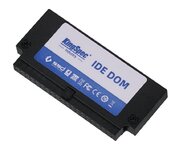
PCI SATA card is the way to go for a faster interface I'd think, but if you want to use the onboard ATA-??? interface I've got a new approach for my smaller machines. IDE Disk On Module looks great, I only wish I could find one in a lower profile.

IDE-DOM-PATA-Plug.jpg

 
Wow, what a helpful group.

I haven't reset PRAM.

To be upfront, while the Classic Mac was my tool of choice in college, I was lured to the Dark Side of Windows many years ago. We only had 1 Mac in our business, and it was for graphical stuff that I wasn't involved in. In this instance, the G4 (definitely Sawtooth) machine was in storage for years and I simply wanted it operational so that I could a) verify there was nothing on it we needed, and b) make it usable for the occasional cad/graphics stuff my other 1/2 does on occasion at home.

When I started all this, the machine wouldn't even power up, and I narrowed it down to a bad PS which I understand is no surprise. A replacement PS did the trick. Then I decided that to have it operational, I needed to get rid of the 20gb HDD that sings like a canary.
So I found the StarTech adapter, quickly realized it was the gold standard of these little gadgets, and ordered it.
While I think it would be rare for 1 to be DOA, 2 being DOA is nearly impossible.
So something else is afoot.

I do know that the adapter is getting power to the drive because when I put a SATA HDD on the adapter, it did spin up.

By resetting the PRAM, do you mean the process of removing the 1/2 AA battery, removing the power to the PS, and holding down the power button to remove all energy from the board, and then reassembling things and pushing the tiny reset button next to the battery? Or are you referring to the keyboard sequence at startup? I did the former when I was trying to figure out the PS issue. I've not done the later. I do know that after I replaced the PS, the system started up normally on the old HDD.

??
 
I’ve two recently acquired 450 MHz DP Sawtooths (Sawteeth?). One with PSU, one without. If I get the chance in the next couple of days I may run one through the paces of installing an SSD just to see if I have similar trouble(s). In the meantime, here’s a few things…

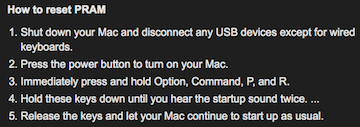
Reset PRAM

PRAM.png

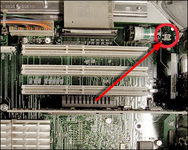
Reset CUDA

CUDA.png

Shut down the system. Remove the AC power connector from the back of the machine.
Open the side panel. Locate the CUDA reset button. Press and hold the reset button for
approximately 5 seconds. Replace side panel and plug power back into the machine.
This procedure resets the CUDA Chip back to it's defaults.
- LowEndMac

Anytime I install new hardware in any G4 - I always try to remember to at least reset the PRAM. If I encounter any problems after that, I’ll then also reset the CUDA / PMU.

*And some also advise after removing the power cord from the machine before resetting the CUDA, to wait 10 minutes before and then 10 minutes after resetting… before adding the power and power cord back. Me, I just press the front power button after first unplugging to bleed off any remaining power in the machine before then resetting the CUDA. Then I plug the power cord back in and boot.There are many various approaches noted for this procedure. Take your pick.

I do have some questions: Are you not connecting the SSD via ribbon cable to the rear “Ultra ATA” connection? And / or, are you still keeping the original 20 GB IDE drive in place on that Ultra ATA connector? IF you are attempting to use both the original HD and the new SSD on the same cable connected to the Ultra ATA - then one must be set as Master and the other as Slave. (Check jumpers on your old HD.) And some HDs require the addition of an additional jumper in this scenario. Important to know which HD you actually have for this AND its’ available jumper settings. For instance… An old 40 GB Seagate Barracuda ATA IV HD notes a two jumper setting option for “Master with non-ATA compatible slave”. (Works surprisingly well.)

In your Sawtooth, both the IDE CD and the iOmega drives were likely connected to the slower, front bus. And connecting an SSD there would only tend to diminish the OA performance of any SSD + adapter.

If you want to use both the original 20 GB IDE drive AND the new SSD together then I’d put the HD on the bottom (set as Master) and the SSD + StarTech on top of that (same cable / Ultra ATA)… set as Slave. Then I’d reformat and dual partition the SSD (if wanting OS 9 and OS X) and clean install both operating systems. Then I would drag whatever I wanted from the 20 GB HD to the appropriate partition on the new SSD.

Same as just about every MDD, Quicksilver - or even… G3 Blue & White here.;)
 
Another reset option for PPC machines is "init-nvram" from OFW 2.4. I've found this breaks my (notoriously temperamental) Beige G3s out of a deep funk. This command was beacme "reset-nvram" at some point but I don't know at what OFW version.
 
PCI SATA card is the way to go for a faster interface I'd think, but if you want to use the onboard ATA-??? interface I've got a new approach for my smaller machines. IDE Disk On Module looks great, I only wish I could find one in a lower profile.
A couple of years back, I got a 64GB DOM under the brand name Hyperdisk and it was under $50 then. I have it in a Beige G3 DT where it's compact enough to plug directly into the logic board.

Good performance (although an order of magnitude slower than PCI SATA) and excellent compatibility with Classic MacOS, OSX, Linux and NetBSD.
 
Well, I have tried 2 of them, and neither do anything with my 9.2.2 G4 Sawtooth.

Any reason either of these would NOT work? At this point, now I need to think about controllers? Geez


Back
Top