• Hello MLAers! We've re-enabled auto-approval for accounts. If you are still waiting on account approval, please check this thread for more information.

An original iMac

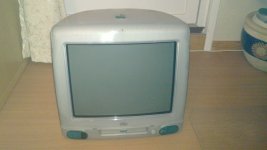
This is apparently the time of the year that keeps on giving, as my find today was an original iMac.

I quickly tested it and it powers on and boots to Mac OS 9. I will test is more once I bring it home from work.

It is in good condition, but it has a stupid etched "University blahblahblah" on it. It is very lightly etched, so I may be able to remove it.

It was quite heavy dragging it from one building to another while walking in the blizzard outside. (I work in a office building not far from the university campus, so I take regular trips there to look for stuff as well)

 
It is in good condition, but it has a stupid etched "University blahblahblah" on it. It is very lightly etched, so I may be able to remove it.
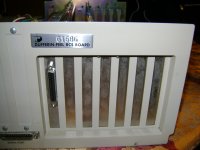
I hate it when institutions do that. Too much wonderful equipment is easily devalued that way (which kind of begs the question- who would etch a $900+ iMac, or a $5 000 mixing board)? Fortunately, the ICT admin I deal with are bright enough not to etch their very high-end equipment (although this isn't always the case, unfortunately- some spray paint a school's name on the top cover, or on the side of the unit- I've seen it mostly with TV sets, consumer-grade VHS decks, CD decks, and overhead/slide projectors), and use identification decals like this one instead:

DSC03507.JPG

Nice conquest, btw. :beige:

 
On the flip side, sometimes I think it makes it more interesting. I have an old Mac Plus with the bicycle logo burned into the side:

photoho.jpg


On the flip side, sometimes I think it makes it more interesting. I have an old Mac Plus with the bicycle logo burned into the side:
That's a pretty nifty branding.

(Of course, I'm amused by the fact that apparently that bicycle in the logo has a rod running between the front and back wheels, as represented by the dotted line, thus rendering it un-steer-able? Or maybe it's 2WD, and that's two chains?...) ;^)

 
That's pretty awesome, mcdermd, I'll have to admit that. I've never seen an etch so creative, and visually appealing before.

I don't mind the board decals I find on most of the equipment I pickup from the ICT (there was one VHS camera I brought home- a Panny AG-190- that didn't have any decals/etches on it at all, which was quite surprising in my opinion), as they do not cause any cosmetic damage to the unit. I just don't see the need to ruin good equipment by foolishly etching/painting a school name onto the casing. Usually when school equipment is no longer wanted/retired (especially the older prosumer equipment), they are sold off at auctions, etc. But who wants a mixing board, or a monitor set with "Notre Dame C.S.S." spray painted in bold yellow? (Sorry, I have no picture at the moment to demonstrate, but I'm sure you get the idea).

 
A 50/50 mix of acetone and isopropyl will take paint and Sharpie off while leaving plastic untouched. I have picked up a number of great machines from Oregon State University surplus sales.

 
I managed to remove all branding, by using a dishwashing sponge. The etching was very light, so now it looks brand new.

 
I managed to remove all branding, by using a dishwashing sponge.
Glad to hear you were able to remove the etching. Sometimes the damage is so severe that it's nearly impossible to eliminate the branding. But in mcdermd's case, and my case, sometimes it's OK to leave it on.

Btw, are you going to post some pics of the iMac anytime soon?

 
Yes, I am :-) I just have been quite busy over the weekend, so the only thing I've done with the iMac so far is to clean it and remote the branding. Pics will follow this evening or something.

 
On the flip side, sometimes I think it makes it more interesting. I have an old Mac Plus with the bicycle logo burned into the side:
photoho.jpg
My Google-fu is failing me, but that was the official Apple Education Division (or some similarly named division) logo back in the early '90s.

As for why companies/universities do that? To prevent theft. Pure and simple. They don't even think about resale value. It's just not something to think about. I mean, when the iMac came out, old Macs weren't "collectible" yet. Nobody had any reason to think of collecting them. (Yeah, a few of us nutjobs actually WERE, but we were oddballs - not something that any university or company would even knew existed.)

Yeah, they could throw a sticker on, but stickers come off easily enough. There are some that leave behind a "STOLEN" or similar when you peel them off, but that can still be removed with a little elbow grease. Perma-stick metal tags or melted-in stamps are effectively permanent. If police raid somewhere, those things will still be there easy to see.

Edit: A-HA! It was the Apple University Consortium. (Logo at that linked article.)

 
The iMac also had an anti-theft sticker on it, but it could be peeled off when heated with a hairdryer. If not heated, only a small chip would come off right where you tried to peel, and the rest would remain undamaged.

 
As for why companies/universities do that? To prevent theft.
I know why they do it, and I understand the rationale behind it. That Dufferin-Peel decal that is stamped at the back of my Amiga 2000 has a 5-digit code that is used to identify the unit, and can be punched in by an administrator on any school computer to find out where it's located, what service has been done on it, etc. Now that the unit belongs to me (it was given to be by an ICT admin whom I've known since I started high school), the code is useless, and has been wiped from the board's inventory list.

My argument is that an expensive piece of equipment does not have to be over abused with unnecessary paintings, sketches, etc (although mcdermd offers a great exception to that statement). A simple identification code - such as the one I've shown - is more than sufficient. The only advantage with ruining the equipment's cosmetic appearance is thieves may be less inclined to attempt to take that unit, then one with an identification tag.

They don't even think about resale value.
Some schools may decide to sell off their old A/V inventory (with the permission of the board admin, of course) to the general public to raise funds, etc., as some of the equipment that has been forgotten/retired is hard to find (my school still has a 16mm film projector in their A/V room, a sound board from the early 70s, and some rare Amiga-branded monitors, amongst other things), and thus valuable to collectors, etc. It's better to resell than to throw things that still work out, which, unfortunately, is the case most of the time. That's were people like you, and me come in (the "liberators") :beige:

Perma-stick metal tags or melted-in stamps are effectively permanent.
The identification tag I've shown will not come off, and I have no plans of doing so, as it will ruin the paint finish on the majority of the equipment I've received over the course of my secondary school years. These tags don't bother me, and they have no effect on my equipment. In an odd way, they're almost like keepsakes.

This is what it looks like
Nice iMac, btw, quantumii. Hopefully the plastics are not becoming overly brittle.

 
The plastics are still fine.

I am having some issues though:

I can only get it to boot from a 9.0.4 CD; and it wont install because it needs a firmware update. I cannot install the firmware update as it complains "Your disk is full" (The CD, that is)

Is there a way to update the firmware when booted from a CD? The installer says I have to before it can install, and therefore I figure it should be doable.

I burned a 8.1 CD; as well as a 9.2.1 CD, and none of them boots.

One thing that may be the reason is that the 9.0.4 CD is a different media than the two others. Is the iMac sensitive to different medias maybe?

I messed up the Mac Os 8 install that was already on it.. For shame :-)

 
Just FYI;

I got it all running again. I also upgraded the RAM to 256MB

The solution was:

Got Mac OS 8.5 , which booted fine.I installed it and upgraded the firmware with the files from the OS 9.1 CD.I then upgraded to 9.1.

Installed OS X Panther on a separate partition.

Works perfectly. I may try to shoehorn in Tiger on it as well.

So far it has shown no issues, except from the fact that the HDD is a little loud. No cracks as far as I can tell.

 
Back
Top