

• Hello MLAers! We've re-enabled auto-approval for accounts. If you are still waiting on account approval, please check this thread for more information.

A/UX dual boot problems

LarBob

6502
Hey all, I'm having issues with dual booting a regular Mac OS system + A/UX. I have the A/UX part working, the issue is that it refuses to boot from the Mac OS system disk. When I select it with the Startup control panel and reboot, it reboots off of the MacPartition anyway. Here is a picture of my partition setup (is it because the Untitled partition is an "Additional Macintosh volume"? What's the best way to fix this?)
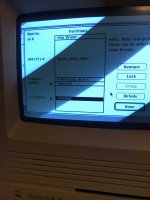
IMG_2642.jpg

 
Last edited by a moderator:
I assume MacPartition is the minimal Mac OS needed for bootstrapping A/UX?

I'm not really sure what to do here. Is there a way to boot into that minimal Mac OS and not initiate the bootstrapping process?

c

 
I assume MacPartition is the minimal Mac OS needed for bootstrapping A/UX?

I'm not really sure what to do here. Is there a way to boot into that minimal Mac OS and not initiate the bootstrapping process?

c
You can cancel the A/UX startup, but that still wouldn't fix the issue of me not being able to boot off of the other partition.

 
I tried using the "System Picker" utility, which led to a Happy Mac at reboot, then an automatic reboot, and then blinking question floppy. So no dice there.

 
Old thread, but I've been using System Picker, which not only allows you to boot from the MacPartition, but also allows you to copy the contents to a folder on another partition/ drive and boot from it like any other System folder.

 
Back
Top

