• Hello MLAers! We've re-enabled auto-approval for accounts. If you are still waiting on account approval, please check this thread for more information.

A nice SE/30, /w Options :-)

Classic mac looks odd on an LCD. lol.
You've never run Sheepshaver or Basilisk on a modern PC/laptop ? :)
Never ran sheepshaver before. And Last time I regularly used Basilisk was with an XP machine with a CRT. Now I run Win7 X64 with an LCD and basilisk is unstable with it, looks odd, and none of the network options work, such as appletalk over ethernet, CDROM, etc..

 
Its nice to have a se/30 that all is working good, W/o any spaghetti ran all over it.

It just seems lately that most of the SE/30's I'm Capping, they also need wires ran, for the video rom… the 0-7 data lines vram to mux… Scsi to glue… I mean its ok. Gotta do, What ya gotta do, to make em work… but its like we're scrapping the bottom with these SE/30 boards these days.

I acutely own 4 dead prefectly re-capped SE/30 boards.

3 of them were exchanges from customers.

Couldn't get these ones going in a reasonable amount of time, after the re-cap.

1 was a se/30 I got from ebay, that had a slight battery explosion.

So time will tell, The 3 exchanges are off to genie_mac, (I sent them home to ireland). Well not exactly home that would be in CORK he said lol...

and i guess there is a big difference between his town and the folks from Cork :) But anyways close enough for me… I think genie_mac is good at what he does! He is nice to look at these for me.


 
Looks like an early x-mas present for me so :)

And thanks for the roses but don't get your hopes up too much, like. Might have to drive down to Cork like and see if I can find the guy that build them. And ask him, like, why didn't you take more care with those via's?

 
I stupidly reversed the cable direction on a MacCon SE/30 once. It fried it the same as yours.
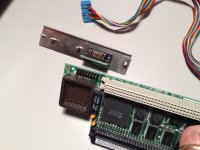
So - what is the "correct" way? I have a MacCon card with an AAUI only faceplate. I got it loose and so I don't know that the cable is plugged correctly on either end.

Looking at the solder side of the board on the NIC, one of the pins is screened with a square around one of the pins in the four corners, so I assume this is pin #1. On the blue connector for the cable, there is an arrow shape molded into the connector that also points to one of the corner pins, so I assume that that is also pin #1, and so should correspond to the "square" pin on the card.

On the AAUI daughterboard, there is no easily ID'd pin #1, so not sure which direction that should go.

If anyone can enlighten me to the correct orientation, I would appreciate it. If anyone has an RJ-45 daughterboard they can part with, that would be appreciated as well, though an AAUI dongle shouldn't be too hard to find. :)

 
That's, kind of cool… at least i know that port right off the card is just a plain AUI port.

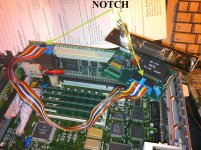
when attaching the cable to the card… the notch on the cable has to be facing upwards. Now on the AUI side… not sure.

I fix a lot of stuff for people… One of the things I do is take some pictures before I tear it apart. This has saved my bacon several times!!!!

----

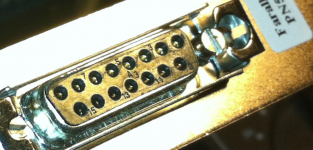
if you look closely the pins are labeled on the AUI port.

Screen Shot 2013-12-23 at 12.48.39 AM.png

looks like brown is pin 1

witch looks like all my notched cables… Floppy and SCSI too.. IDE… pin one is the last wire on the right hand side.

so you know where pin one is on the AUI.. so match it up.

Screen Shot 2013-12-23 at 12.57.07 AM.png

 
Yes - what you show matches up with what I believe to be pin 1 on the cables and the two boards.

As I said, this was not connected when I got it, and after reading about these things frying if the cable was connected wrong, I wanted to double check.

The daughterboard I have is AAUI, not AUI, so the dongle you referenced upthread isn't correct. A dig through the my networking parts bin may turn up an AAUI->RJ45 dongle, but if not, they are out there. I seem to remember having one for some long lost reason.

If the pinouts of the AAUI daughterboard would be helpful to you, let me know and I can send it along with photos.

 
The MacCon I had did not have the notched socket either.

As I recall, they marked one side of the ribbon end with white paint, though.

 
The MacCon I had did not have the notched socket either.
As I recall, they marked one side of the ribbon end with white paint, though.
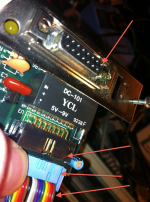
Well - you can see a white dab of paint on the "outside" side of the connector on the NIC in my photo. The AAUI daughterboard has one as well. This matches up with the square screened around the one pin on the solder side of the board.

The blue connector on the ribbon has the molded arrow which points to the brown wire which I think we all believe is pin 1.

I'm pretty confident I know how things line up at this point. Thanks everyone for their help!

 
ok cool.. oh yeah i didn't see the AAUI connector in your pic there.

I was thinking it was AUI.

so ok then… then the port on the maccon card is AAUI naturally.

because AAUI has a different pinout then AUI.

No problem though.

 
Back
Top