• Hello Guest! We're hosting a challenge to welcome vintage Intel macs to the MLA during the month of July! See this thread for more information.

A Challenge: Plastic Macbooks for July

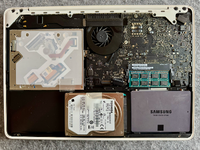
Now I'm being trolled. I spent 30 minutes digging around for compatible RAM to upgrade this thing to 8GB (it has 6 right now). Old config was 2GB in the bottom slot, 4GB in the top. I found a matching Hynix 4GB module of the same exact type and speed as the 4GB stick in there, but this MacBook will not POST with either 4GB stick in the bottom slot. It only posts with the 2GB stick in the bottom slot. 😭
 
Yeah I'm definitely getting trolled. It's fine with just about any RAM module as long as the 2GB DDR3-8500 module is in one of the slots. I've currently got it running with that module plus an 8GB 12800S DDR3L module, which is far outside what Apple ever designed this laptop with the intention of running, lol. But hey, I've got 10GB now and that's enough.

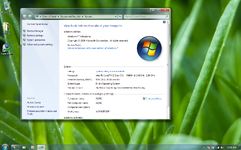
I've also decided to give up on Windows 10 and just set up my stuff on Windows 7 instead. I'd use OS X, but unfortunately my website development tools (the main thing I actually use my computer for) are all set up for Windows and it would take longer than it's worth to migrate to OS X.

1782968218632.png

Performance will be plenty in this configuration. Hardest part is gonna be the low screen resolution. The panel does look fantastic at least, it's by far the nicest 1280x800 display I've used in a laptop.
 
The best update I could give you follows below.

1782976742952.png

Delivery next week, including some sacrificial chisel tips for the soldering station and bottom barrel PC filament I'm going to attempt to use as welding rods (you can thank @Snial for encouraging me to commit plastic crimes, to my spouses' chagrin).

//wthww
 
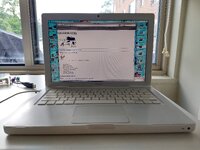
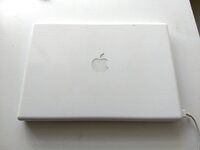
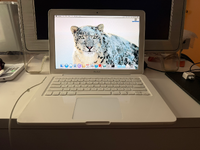
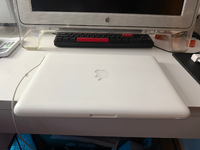
I have a plastic MacBook that I'd found in the trash a while ago. Still has all the previous owner's data on it.
Needs new CD-ROM drive, LCD (if the black blob in the northeastern corner of the screen is to be remedied), battery, ideally the RAM should be maxed out to 6 gigs and the HDD replaced with an SSD.
IMG_20260701_132619863_HDR.jpg
IMG_20260701_132655630.jpg
But guess what I'm not going to service any of those parts anytime soon because
  1. I'm lazy
  2. already have enough computers
Cool slab of plastic though.
 
We're close to the end of day 1 with the 2010 MacBook as my main computer. Core 2 Duo definitely isn't obsolete yet if you pair it with a good amount of RAM and an SSD. I'm definitely going to get sick of the limited screen resolution though, I like having a lot of desktop space.

Observations on the hardware itself: Keyboard is fantastic. Maybe the best I've found in any Intel MacBook. The speakers also hold up surprisingly well! And of course, the trackpad still beats out many modern PC laptops for the simple fact that it's glass... why is this not the standard in the big '26 is beyond me.

The battery is also holding steady-ish so far. I think it's good for about 2 hours still.

PS: Here's a sneak peak of the updated MacDat website UI that I've been cooking up for the past month :)
1783044586917.png
 
I did this challenge before the challenge was issued! A while back I got this dirty MacBook from olliec:


It cleaned up great:

1783098280976.png

1783098302881.png

I installed a 128 GB SSD. All post-2000 computers here are named for Diablo 2 uniques, this one is Snowclash. Currently running 10.6.8 for PowerPC emulation with Rosetta, but, should I install 10.9 and run Momiji? 10.14 and run Orion? I can upgrade the RAM by stealing some from a Mac Mini.

Windows XP!? Apparently these are excellent XP machines.
 
PS: Here's a sneak peak of the updated MacDat website UI that I've been cooking up for the past month :)
View attachment 100857
Ooo! Are you aiming for a somewhat Star Trek LCARS(?)-esque look? Regardless, it has a very mid-2000s feel about it, which I like.

I'm being lazy, but I have a stack of plastic MacBooks in the garage that might be suitable for something. I have the MagSafe 1 charger from my 2012 MacBook Pro, so I can still use them. Batteries are probably shot, but I won't know for sure until I try.

Not sure yet if I'm going to dual boot Snow Leopard and XP or Mavericks and 7 (I could also do Mavericks and XP or Snow Leopard and 7. I still have the means to do both, I think.

Something I just realized is that both SL and 7 were actually released the same year, 2009. Not only that, they were released within a month of one another (7 was July 22, SL August 28), so they're almost exactly the same age. I feel like 7 has aged better (unlike SL, it's still mostly usable out of the box, particularly if installing from media which has all the latest updates slipstreamed in), but that's mainly because MS supported it for far longer than Apple did SL.

Anyway, rather than do all that, I could take the easy way out and use OCLP to cram Mojave or something newer onto it, but that would miss the point! (and it wouldn't be as much fun!)

c

 
Ooo! Are you aiming for a somewhat Star Trek LCARS(?)-esque look? Regardless, it has a very mid-2000s feel about it, which I like.

I'm being lazy, but I have a stack of plastic MacBooks in the garage that might be suitable for something. I have the MagSafe 1 charger from my 2012 MacBook Pro, so I can still use them. Batteries are probably shot, but I won't know for sure until I try.

Not sure yet if I'm going to dual boot Snow Leopard and XP or Mavericks and 7 (I could also do Mavericks and XP or Snow Leopard and 7. I still have the means to do both, I think.

Something I just realized is that both SL and 7 were actually released the same year, 2009. Not only that, they were released within a month of one another (7 was July 22, SL August 28), so they're almost exactly the same age. I feel like 7 has aged better (unlike SL, it's still mostly usable out of the box, particularly if installing from media which has all the latest updates slipstreamed in), but that's mainly because MS supported it for far longer than Apple did SL.

Anyway, rather than do all that, I could take the easy way out and use OCLP to cram Mojave or something newer onto it, but that would miss the point! (and it wouldn't be as much fun!)

c

Install a large enough drive, and you can tripleboot... Am doing that with the A1286. 10.9.5 on one partition, 10.13.6 on another, and 10.15.8 on the third. 10.9 is used for Photoshop and most of my stuff. 10.13 for phone syncing, and 10.15 for when/if I need something somewhat modern.
 
Ooo! Are you aiming for a somewhat Star Trek LCARS(?)-esque look? Regardless, it has a very mid-2000s feel about it, which I like.
I'm glad you like it! I haven't seen Star Trek so I can't say that's my inspiration, but I don't mind the comparison :)
I've mainly just based it off 2000s era web design as much as I could. I'm a big fan of the frutiger aero aesthetic so I've been slowly introducing those elements to the extent that my very limited graphic design skills allow.
Anyway, rather than do all that, I could take the easy way out and use OCLP to cram Mojave or something newer onto it, but that would miss the point! (and it wouldn't be as much fun!)
Apple kneecapped most of the plastic MacBooks with a 32-bit EFI that makes running anything newer than the officially supported 10.7 Lion quite difficult. You'd need one that at least natively supports El Capitan (so, the Late 2008 or newer if memory serves) in order to run something like Mojave.


I'm on Day 3 of using the 2010 MacBook right now. I'm not sure if I'll end up doing the whole week because I may need to go back to a highres display for testing on my website (I'm getting closed to update release), but the MacBook has proven quite capable! It's always surprising to see how usable Core 2 Duo still is.
 
Took the challenge of reviving a white MacBook Core 2 Duo (polycarbonate shell). I got it a few years back cheap on eBay with a bloated battery, which I replaced. It was useful for burning period DVDs, but the last few times I tried to start it, it would not finish booting.

I tried to replace the disk with a spare SSD of unknown provenance, but that was even more painful; after ca. 10 restore attempts which were hanging at various points, gave up on the SSD.

Went back to the Toshiba hard disk, intending to format it with APFS from the start (was HFS previously). My Sierra installer on USB stick does not yet know of APFS. Network restore of High Sierra would allow formatting as APFS, but was timing out due to something like an old certificate. The problem is described here:

https://mrmacintosh.com/how-to-fix-...h-sierra-recovery-is-still-online-but-broken/

With this NVRAM fix, the High Sierra could be downloaded and installed, and now the MacBook is under observation...

IMG_9619.png
 
Almost in the club - dragged out my MacBook "BlackBook" which was a merge of parts from a white one into better black casings some years ago. Needed a HD - found a nice spinning Hitachi 500GB 7200RPM drive, which it either doesn't like or the HD is dying (powered down after it reporting 4+ hours to partition the drive), after booting from a Snow Leopard DVD.

Will try to find a spare SSD, and more RAM next. For those dual booting Windows, are you using the official BootCamp utility or other methods?

JB
 
This gives me an excuse to get my 2009 Unibody MacBook out of my storage drawer and see if it still works. The next question will be what I'm actually going to do with it. I don't know if the apps I currently use work on a version of MacOS that old.

Alternatively, I also have a 2009 Mac Mini with similar hardware. Both have 8GB RAM and SSDs. The MacBook was much easier to work on.
 
Back
Top