• Hello MLAers! We've re-enabled auto-approval for accounts. If you are still waiting on account approval, please check this thread for more information.

1GHz TiBook has two very annoying problems

EvieSigma

Young ThinkPad Apprentice
68020
The first problem (and the one I have the least idea how to solve) is the complete absence of sound at all. I get no startup chime, no alert noises, nothing, no matter how I adjust the volume.

The second problem is that even after I gave it some internal cleaning, the optical drive refuses to read a Tiger 10.4.6 DVD that works in other Macs, it just spits it back out.

Any ideas?
 
I once had a machine with the same issue as your first problem here. Took it apart and found that the speaker wasn't plugged in ... So that taught me to look for the simplest things first :)

These are easy enough to disassemble so I'd check and make sure stuff is connected properly first.
 
Well, removed the motherboard completely and reconnected everything and I still have no sound at all, so that tells me something more serious is wrong here.
 
Is the sound amplified on the 3.5" audio out?

Go for simple: clean the 3.5" jack to ensure you can dislodge the internal switch, check continuity of this.

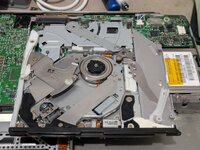
Slot loading optical drive: fancy for the time but often known to fail, these models didn't have any belts, I'd seek a replacement.
 
Is the sound amplified on the 3.5" audio out?

Go for simple: clean the 3.5" jack to ensure you can dislodge the internal switch, check continuity of this.

Slot loading optical drive: fancy for the time but often known to fail, these models didn't have any belts, I'd seek a replacement.
The internals of the optical drive were definitely not what I was expecting, I'm used to stuff like the PlayStation 4 where there are soft rubber rollers to pull the disc in.
 

Attachments

  • PXL_20251022_225900923.jpg
    PXL_20251022_225900923.jpg
    230.6 KB · Views: 11
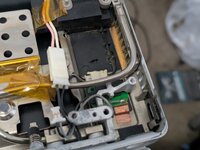
Well, I must admit, this is my fault...I did not notice that the speaker interconnect cable connector was loose on one side, likely disabling both speakers as a safety measure.

...or so I thought, as after reattaching that connector and reassembling the laptop speakers still don't work.
 

Attachments

  • PXL_20251026_200857126.jpg
    PXL_20251026_200857126.jpg
    172.1 KB · Views: 10
Is that the smaller connector? Are the pins all the way in, sometimes they get pushed out.
They certainly seemed to be when I fixed the connector...I'm starting to worry the speakers themselves have just perished for unknown reasons.
 
They certainly seemed to be when I fixed the connector...I'm starting to worry the speakers themselves have just perished for unknown reasons.
Worth driving some audio and testing voltage on those lines to see if the signal is getting to the speaker....
 
Back
Top