• Hello Guest! We're hosting a challenge to welcome vintage Intel macs to the MLA during the month of July! See this thread for more information.

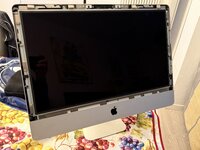
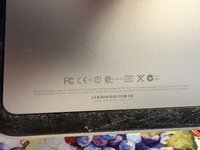
A1311

All the cables were unplugged, and the hard drive and SIMMs were removed.
I managed to get it to boot; it’s now (as expected) stuck at the “?”.

Next, I’ll install a new glass panel and an SSD.

However, as with many older iMacs, I’m having trouble creating a bootable macOS USB installer from my Apple Silicon M1.

I’ll try using an Intel Mac instead. If anyone has a solution they’ve personally tested, I’d appreciate a suggestion.
 
I just went through this with the same model. I eventually bought a copy of the DVD that came with it.
 
I really don’t know. I kind of took the easy way out. Like you, I only had an Apple silicon machine available to me and wasn’t sure how to create a thumb drive.
 
Did you try it yourself? When I attempted the same procedure on a 2011 MacBook, Internet Recovery failed with a “server not available” error. I also tried the commonly suggested workaround of changing the system date via Terminal (e.g., using date before starting the recovery), but it didn’t resolve the issue—still a dead end.

In practice, for older machines, Internet Recovery is often unreliable ... actually, it never worked for me.
 
for the records:

I used a Mac mini 2011 running High Sierra to install macOS onto an external SSD via USB. I then moved that SSD inside the iMac using a 3d printed frame.

Everything works correctly.
The only minor issue is that:
- The system identifies the Mac as a Mac mini (the icon shows a “mini”).
- The fan runs at 100%, but it can be kept quiet using a fan control app
- Lots of missing screws
- Missing SIMM access panel.
- Missing glass panel, there are some on eBay/AliExpress
- front camera not identified, I need to dig into it a bit more

It's ok since I got it for free.
 
Back
Top