• Hello MLAers! We've re-enabled auto-approval for accounts. If you are still waiting on account approval, please check this thread for more information.

Dual booting OS9 and OSX on eMac but I'm a Winbaby

So I grabbed ATI RADEON 9200 Mac Edition July 2004 and ATI OS 9 Mac Software Update January 2005 from here. Unzipped them and dropped them in the extensions folder, neither did anything after reboot. I even went back and double clicked them and it would install something but all it added was a ATi tool tray to the top tool bar. Kinda stumped here what to do.

Also, disc eject on the keyboard is not working, how do I open the disc drive in the OS? Is the function keys fixable in OS9?
15613.jpg
 
Just so we are on the same page, you got the eMac-specific package "emac-ati-drivers-img.sit (2.40 MB)" from Macintosh Garden's OS 9 page and that didn't work?
Also making sure to only extract them once on the eMac, of course, but I suspect you already know that.
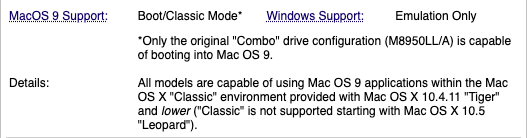
I could be mistaken, but I thought the first two ATi models of eMac had the same Radeon 7500 graphics chip, and that changed to a Radeon 9200 with the USB2.0 machine which also switched to DDR RAM, but IDK.

As seen here:
Screenshot_20251227_102507.png
 
I'd also consider an iMac G4; they can be picked up cheaply as hard to post so local sales are only the real option, or a Quicksilver G4 in the same vein where you can choose your upgrades more easily.
I might vote this suggestion too. I've got a 1ghz eMac and the combination of weight and concern about leaky caps has me defaulting to a 700mhz iMac G4. Just the other day I booted it in 9.2.2 and Deus Ex was flying
 
Just so we are on the same page, you got the eMac-specific package "emac-ati-drivers-img.sit (2.40 MB)" from Macintosh Garden's OS 9 page and that didn't work?
Also making sure to only extract them once on the eMac, of course, but I suspect you already know that.
I could be mistaken, but I thought the first two ATi models of eMac had the same Radeon 7500 graphics chip, and that changed to a Radeon 9200 with the USB2.0 machine which also switched to DDR RAM, but IDK.

As seen here:
View attachment 93677
I do not think we are on the same page, I might be in another book for how lost I am. I'm looking here "https://macintoshgarden.org/apps/ma...ive-doors-mdd#Custom_Variants_of_Mac_OS_9.2.2", it says OS 9 main page but it doesn't have the term eMac anywhere on it. Could you link the page? I've typed every permutation of ATi, eMac, and Driver into the search and i'm not finding the file you are talking about.

After I get the file, to be double dog clear, I put it on a USB drive, go to my eMac, unzip it with whatever the built in OS 9 tool is, then drag and drop it into the extensions folder? I don't have to double click it? I don't have to remove prior drivers? At this point i've dragged and dropped a lot of files into that extensions folder, I guess once I get this working i'm planning to install and SSD and reinstall OS 9 so it doesn't matter.
 
Last edited:
This is the type of information I'm looking for! I want this type of deep knowledge to have this setup the way a Mac superfan would have had it setup. A fan that holds grudges
@CC_333 : fine to be pedantic! My main point is that CW5 (or AW5) are pretty decent, but AW6, I thought wasn't that good. The important thing is that it's a good demo for a Classic Mac app that's not MS Office or MS Works. It's worth pointing out that those MS apps were widely used in the Mac world too, but they didn't really achieve the dominance they did in the Windows World. Productivity apps on a Mac included FrameMaker, NisusWriter (which I used for my MPhil Thesis), CW (mentioned). SuperPaint, MacPaint 2, PixelPaint, Photoshop, Illustrator, Painter. There's a pretty big list.

An eMac, 1GHz or 1.25GHz will also be able to run early iLife apps, stuff like Pages 2; maybe the earliest Keynote or Numbers, Omnigraffle along with iMovie (far better than the MS equivalent at the time).

I had a page about when I needed to boot my eMac in Mac OS 9.

 
Could you link the page? I've typed every permutation of ATi, eMac, and ATI into the search and i'm not finding the file you are talking about.
Download #2 on this page.

After I get the file, to be double dog clear, I put it on a USB drive, go to my eMac, unzip it with whatever the built in OS 9 tool is, then drag and drop it into the extensions folder? I don't have to double click it? I don't have to remove prior drivers? At this point i've dragged and dropped a lot of files into that extensions folder, I guess once I get this working i'm planning to install and SSD and reinstall OS 9 so it doesn't matter.
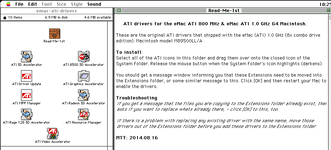
Get that .sit file to the eMac's hard drive, you may need to drag it to the hard drive instead of the desktop.... Mac OS handles stuff on the desktop weird when multiple drives are involved, I won't overload you with the details right now... Anyway, if that .sit file shows up with a c-clamp or other colour icon you can try double-clicking it. If it asks what you want to open it with, select Stuffit Expander. If it has a white generic icon you can try dragging it to Stuffit Expander... Possibly in an Internet Utilities folder, but I can't recall off the top of my head. Either way it should decompress to a .img file, this is a disk image. Commonly Stuffit automatically mounts those onto the desktop with your other disks, but if it doesn't just double click the .img file and "emac-ati-drivers" should show up on your desktop, and double click that to open it. That should open to the folder full of stuff you need.

I know this all sounds rather convoluted, it'll seem less weird when you are more familiar with the processes involved here and why things are being done this way.

If you have troubles such at the system freezing while booting, you can hold the Shift key while booting and Mac OS will boot with extensions disabled. This will allow you to do some clean-up if needed.

About the Desktop business: each drive has a hidden folder on it which contains items that are displayed on the desktop. Of course if you only have a single drive and locked/non-writable media that's all well and good, but with multiple writable drives one might lose track of what files are actually on what drive. We just want to make sure the files you are working with here always reside on a HFS or HFS+ partition and I can't remember how Mac OS 9 will be handling this particular situation if you are using a FAT formatted USB drive or what, it's been a long time since I did that. Not sure what format you are even using in the first place, which is why it's just simpler to start by copying what you need to the hard drive. Other filesystems don't properly support the way Mac OS stores it's data and things get broken, this is why we use .sit instead of .zip. You'll learn about this in due time, but lets just get you running first if possible.

Hopefully I've remembered everything correctly, someone will probably chime in if I'm wrong.

 
Download #2 on this page.

Get that .sit file to the eMac's hard drive, you may need to drag it to the hard drive instead of the desktop.... Mac OS handles stuff on the desktop weird when multiple drives are involved, I won't overload you with the details right now... Anyway, if that .sit file shows up with a c-clamp or other colour icon you can try double-clicking it. If it asks what you want to open it with, select Stuffit Expander. If it has a white generic icon you can try dragging it to Stuffit Expander... Possibly in an Internet Utilities folder, but I can't recall off the top of my head. Either way it should decompress to a .img file, this is a disk image. Commonly Stuffit automatically mounts those onto the desktop with your other disks, but if it doesn't just double click the .img file and "emac-ati-drivers" should show up on your desktop, and double click that to open it. That should open to the folder full of stuff you need.

I know this all sounds rather convoluted, it'll seem less weird when you are more familiar with the processes involved here and why things are being done this way.

If you have troubles such at the system freezing while booting, you can hold the Shift key while booting and Mac OS will boot with extensions disabled. This will allow you to do some clean-up if needed.

About the Desktop business: each drive has a hidden folder on it which contains items that are displayed on the desktop. Of course if you only have a single drive and locked/non-writable media that's all well and good, but with multiple writable drives one might lose track of what files are actually on what drive. We just want to make sure the files you are working with here always reside on a HFS or HFS+ partition and I can't remember how Mac OS 9 will be handling this particular situation if you are using a FAT formatted USB drive or what, it's been a long time since I did that. Not sure what format you are even using in the first place, which is why it's just simpler to start by copying what you need to the hard drive. Other filesystems don't properly support the way Mac OS stores it's data and things get broken, this is why we use .sit instead of .zip. You'll learn about this in due time, but lets just get you running first if possible.

Hopefully I've remembered everything correctly, someone will probably chime in if I'm wrong.

OS 9.jpg
Bro, you are a KING. I have my notepad with my detailed install directions for when I do this all again after I take this machine apart for recap and cleaning plus SSD install. Then it will be ready for final setup in my retro game room.

The media keys plus eject on the keyboard still aren't working. While I can adjust volume with the sound panel, i'd still like to be able to adjust volume with the keyboard. Also, I see no way to open the disc drive in OS9. I found an app called Eject Extras that i'm about to try, though this should have been installed on my Mac with a fresh OS9 install right? How do you search your own files on OS9? I know that is a super basic question but I'm stumped. Do we have apps like this to control the volume?
 
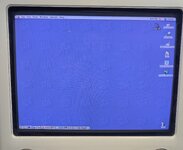
Just spent the last hour playing TR1 keyboard controls having a BLAST. I did get the Eject Extras app(?) to work, even assigned it to a key stroke. I still don't know where I should be putting things on the HD. I dragged and dropped it into Utilities and it worked. Even added the Eject widget to the uhhh dock or whatever you call the hot bar at the bottom. I wish I could find a basic, how to use OS 9 for dummies guide. This stuff is so alien compared to DOS/Win9x/NT which I'm very comfortable with.
 
That’s the Control Strip. Nice score in general.

For video game emulation in that era do early OS X, visit bannister.org, Richard Bannister’s site. He has ports of tons of emulators still hosted on his site.
 
That’s the Control Strip. Nice score in general.

For video game emulation in that era do early OS X, visit bannister.org, Richard Bannister’s site. He has ports of tons of emulators still hosted on his site.
I've given up on the dual boot dream on this machine, though this has kinda got me fired up for a nice G4 Tower, maybe one of them mirror drive door but I need to do more research. I love the Apple Cinema CRTs that go with them. Gonna start hunting for one local and maybe make that my OSX machine.

Still have a lot to learn with Mac OS. Stuff is so different. I mean, I knew it would be different but I didn't think it be as different as it is. Still trying to figure out the best way to store files. Also gotta figure out some sort of media player that will play modern rips of 4:3 content.
 
Dual boot is incredibly easy, it's not even funny. Your best bet for playing modern stuff is an older version of VLC that will run on early OS X (like 10.4).
 
Back
Top