• Hello MLAers! We've re-enabled auto-approval for accounts. If you are still waiting on account approval, please check this thread for more information.

Analog board not behaving but making a lovely test pattern

mst3k

6502
Greetings,
I have analog board problems with my newly acquired Mac Plus.
The logic board is great. Tested it in two other Mac Plus machines. Perfecto.
The CRT is fine. Tested it with a known working Mac Plus analog board and logic board.
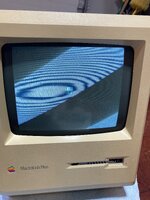
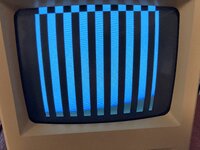
The pattern pictured was what the analog board produced when I got it.
The analog board has been recapped and I still get the same pattern.
I replaced the opto-coupler at U3 since that was shown to be a known culprit with no change in the result.
I've re-flowed all the known bad solder spots on the board.
The voltages are haywire: -10.4, +4.25, +10.46 on the external floppy connector.
Where do I go next? I've yet to replace the cabling, so that is next, but what the heck?
Any suggestions are appreciated.
Thanks.
IMG_1057.jpg
 
Yes maybe, have you tried the hair dryer trick (heating the capacitors slowly to see if the voltage increase)
 
Yup. Every capacitor has been updated.
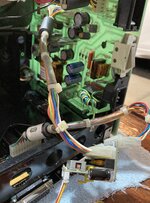
There is some black oxidation on the board underside, but I have scraped off the mask to make sure the copper is still there and the traces are intact.
 
Just because I've never used it, I hooked up my Pico PSU to the Mac Plus.
It worked great with perfect voltages.
I'm not sure what that tells me about the analog board, but it was oddly satisfying...


IMG_1059.JPGIMG_1058.JPG
 
iirc there's a potentiometer/variable resistor on the board that you can turn up with a screwdriver (be careful, high voltages nearby). Just turn that and probe the voltages while you do so until you hear the beep
 
iirc there's a potentiometer/variable resistor on the board that you can turn up with a screwdriver (be careful, high voltages nearby). Just turn that and probe the voltages while you do so until you hear the beep
Thanks for the note. I've tried adjusting the voltage with that pot without success. Turned all the way up, it still only shows about the same as before with no change to the display.

I'm not sure what it means that the Pico power drives the display just fine with correct voltages on the floppy port.
If all of the capacitors are new, then where do I look for the lost voltage on the analog board?
 
OK. I was wrong. The voltages with the PICO PSU are +11.94, +4.97, -10.88.
The computer boots with those voltages.
The voltages with the analog board are as stated above, +10.46, +4.25, -10.40.

Interestingly, turning the voltage pot does nothing. The multimeter shows no changes while adjusting the pot regardless of where the power is coming from.

Could the potentiometer be bad?

Time to cry myself to sleep and dream about solutions.
 
OK. I was wrong. The voltages with the PICO PSU are +11.94, +4.97, -10.88.
The computer boots with those voltages.
The voltages with the analog board are as stated above, +10.46, +4.25, -10.40.

Interestingly, turning the voltage pot does nothing. The multimeter shows no changes while adjusting the pot regardless of where the power is coming from.

Could the potentiometer be bad?

Time to cry myself to sleep and dream about solutions.
Odds are. With the Mac powered off and unplugged, measure that potentiometer with a multimeter, it should show some high resistance
 
Odds are. With the Mac powered off and unplugged, measure that potentiometer with a multimeter, it should show some high resistance
I had a chance today to pull the analog board and check the resistance on all the pots on the board.
Everything looks OK. I checked the voltage pot against a known working analog board and the numbers were almost the same.
So, I'm not sure why spinning that voltage potentiometer with the computer running doesn't seem to effect the voltages when taken off the floppy drive port.

I think I'll stand here and scratch my head for a bit...
 
So far...

No chime. Mac boots to screen pattern shown in first picture.
Most recent voltages at external FDD connector on board: +9.97, +4.34, -9.28
I have recapped the analog board.
I have double checked the logic board in a known working Mac Plus. It worked fine.
I have tried a known working logic board in the malfunctioning Mac Plus. The same screen problem and voltage errors results.
I have replaced all of the RAM chips (since this is what Dead Mac Scrolls says causes the screen pattern produced). No difference.
I have replaced and reseated the ROM chips with known working chips (Again a described 'solution'). No difference.
I have replaced the optocoupler at U3 (again a 'known' cause of voltage issues). No result.
I have replaced the Xener diode at CR18 (a described problem in Macintosh Repair and Upgrade Secrets). No result.
I have reflowed all of the relevant solder joints on the back of the analog board and inspected with a microscope. No result.
I have thoroughly inspected the board for broken traces. Nothing found.
I pulled a known good analog and logic board and tested the CRT in the 'bad' machine. It worked just fine. CRT OK.
I tried using a new cable from the analog board to the logic board. No result.
Adjusting the voltage pot produces no variation in output voltages, so I removed it, checked it, put in a known good one, with no result.
Some posts point to the VIA chip, but I'm not sure how a known good working logic board would benefit from a new VIA chip?).
If I use my Pico power supply and adapter, the machine boots to the desktop (leaving the 'bad' analog board installed) but the voltages still are lowish.
The board had some corrosion on it which I have removed and checked continuity where applicable.

I'm no technician or diagnostician (obviously) and my brute force techniques at problem solving this are nearing their end.
My best guess at this point is some hidden corrosion that I cannot see or find.

Everything points to the analog board, but I have no idea where to look next.

Any ideas are appreciated.
 
Back
Top