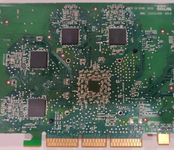
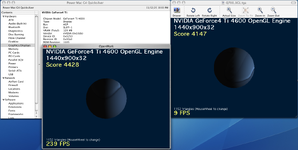
Based on the asking prices for them on eBay and elsewhere, everyone apparently loves the NVIDIA Geforce4 Ti 4600. Asking prices are not necessarily selling prices, but if you want a working one of those cards, you'll likely still end up paying a few hundred dollars. I get it, it's the fastest video card with full OS 9 support, and it was briefly the fastest card on the market for a PC or Mac, until ATI's R300 (9700 Pro) came along and took its crown (but those don't have OS 9 driver acceleration). They're also unreliable due to bad cooling, and good ones have gotten scarce.
There's a whole series of less-famous cards based on the same NV25 GPU as the Ti 4600, and since I'm a "champagne taste, beer budget" type who likes fixing broken hardware, I went looking for an NV25-based thrill at a price I was willing to pay. I found it in a couple of broken Quadro4 700 XGL cards. These were used in Dell and HP workstations during the same era as the Power Mac G4, and can sometimes be found for <$50 from e-waste recyclers at the time of writing. This post will probably send their value skyrocketing though, right?
For perspective, here's a rough, non-exhaustive overview of the NV25 series (and NV28, the 8x AGP version, in the 980 XGL and Ti 4800):
I think the Quadro4 XGL 700 was probably NVIDIA's reference design for the Ti 4200 to start with, but the vast majority of actual 4200s that hit the market were third-party cost-reduced designs with cheaper power supply circuits and slower, cheaper RAM on very different board layouts. The Quadro4 700 XGL looks just like a Ti 4400, but with only 4 of the 8 possible RAM chips populated, so it's down from 128 MB to 64 MB and the memory bandwidth is cut in half as a result of only having one bank of 4 chips. The RAM is 3.6 ns, significantly slower than the 2.8 ns RAM found on a Ti 4600.
Here's one of the cards I ended up buying. This is just the picture from the eBay listing because I didn't take any of my own beforehand:
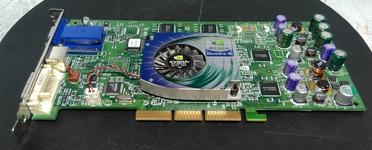
Any veteran of the capacitor plague will notice that the green through-hole cap, 5th down from the top right, is trouble. It hasn't started leaking yet, but it's bulging, so its days are numbered. That's C1267, and it was either bulging like this, or had started to leak, on every card I got. It's a Sanyo WX series, so not total junk, but this circuit design clearly works it hard.
Here's what ended up being wrong with the cards I bought:
Once I had the card working in a PC, I flashed the Mac ROM created for this card years ago by the great Arti Itra. There's a catch, though. Because the Quadro4 700 XGL has a different device ID than a Geforce4 Ti 4600, when you try booting OS X, the kernel extension won't load, and the machine hangs. The Quadro4 700 XGL's device ID, 0x25B, isn't on its whitelist. You can fix this by editing the plist files inside the necessary kexts to add device ID 0x25B to the whitelist: http://themacelite.wikidot.com/kext-mod.
I don't like having to rely on a modified kext in order for the video card to work. What if I want to reinstall OS X, or move the card to a different computer? What if I want to sell or give the card to someone else? I don't want to have to mess around with that, and I don't want to have to explain to someone else that they have to mess around with that. In a conversation about another video card along time ago, Arti asked me "why would you hardmod a card when you can softmod it?" If I had read any Bob Pease at that point in my life, I could have given him a better answer: "because my favorite programming language is...solder."
I spent a lot of time looking at differences in strap resistors populated between different card models, and through trial and error, I came up with the following steps to convert a Quadro4 700 XGL from device ID 0x25B to 0x250, the ID of a Ti 4600, which is already in the whitelist for OS X kernel extensions:
Here's the effect that moving each resistor has on the device ID, in case you are working on a different card, or want to make a different device ID for some reason:
R963 -> R962 = -8
R961 -> R960 = -4
R959 -> R958 = -2
R957 -> R956 = -1
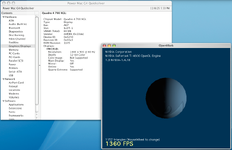
After the modifications, the card works great in unmodified OS X (and 9, of course):
After doing all this by trial and error, I learned I'd been wasting my time, because the schematic is available. Having this made it a lot easier to find replacements on Digi-Key for all the missing and damaged parts on my remaining cards. Here's a list of what I ended up buying to repair all of the scrap bin rash and replace all the through-hole electrolytic caps:
Damaged parts (often used in many more places than the one listed, see schematic):
C1411: https://www.digikey.com/en/products/detail/panasonic-electronic-components/EEE-0JA331XAP/1717728
D613: https://www.digikey.com/en/products/detail/onsemi/BAT54ALT1G/918314
L726: https://www.digikey.com/en/products/detail/inpaq-technology-co-ltd/MHC1608S221NBPDG/20486619
C1169: https://www.digikey.com/en/products/detail/samsung-electro-mechanics/CL10C101JB8NNNC/3886666
C1016: https://www.digikey.com/en/products/detail/murata-electronics/GRM1555C2A221GE01D/17855495
C1544: https://www.digikey.com/en/products/detail/kyocera-avx/KGM05CR71H104KH/6564238
C1030: https://www.digikey.com/en/products/detail/walsin-technology-corporation/0805B475K160CT/15988452
U300: https://www.digikey.com/en/products/detail/onsemi/NC7SZ08P5X/673364
C469, C990: https://www.digikey.com/en/products/detail/murata-electronics/GRM155R71H222KA01D/587234
L718: https://www.digikey.com/en/products/detail/würth-elektronik/7447860168/12726429
Replacement electrolytic caps:
C1267 (must be done, always bad): https://www.digikey.com/en/products/detail/rubycon/6-3ZLG1000MEFCCR10X12-5/5430262
C1293, C1295, C1297, C1299 (preventative): https://www.digikey.com/en/products/detail/rubycon/16ZLG470MEFC10X12-5/3563609
Recapping these is a chore because the card has massive ground and power planes that sink a lot of heat, so be ready with a decently high-wattage iron and suitable tip if you plan to attempt this.
In addition, Q200, which is near C1267, gets really hot. I bought these heatsinks and epoxied them to Q200 on my cards to hopefully extend the life of both Q200 and C1267: https://www.digikey.com/en/products/detail/assmann-wsw-components/V2016B/8826901
For the fan, you can get new old stock Geforce4 TI heatsink and fan assemblies from Surplus Sales of Nebraska: https://www.surplussales.com/items/103313/nvidia-graphics-card-cooling-fan/. Isn't that wild? Keep the Quadro4 decorative plate or swap it for the Geforce4 one, it's up to you.
To diagnose bad RAM chips on cards with video artifacts, MATS 3.41 is available. This is an old NVIDIA internal tool that runs in DOS and will test the memory and identify which channel and bank, if any, has errors. A poster named tehsiggi at VOGONS put together a nice chart of the memory channel/bank ID to chip relationship for all reference design NV25/NV28 cards here:
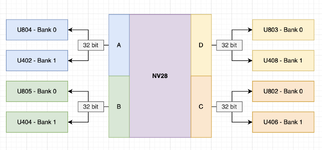
Usually the RAM chip itself isn't bad, but one or more solder joints between the BGA package and the card are damaged, so reflowing the chip with flux usually fixes it.
Now that I have a couple of working Mac-flashed Quadro4 700 XGLs, I plan to run them through their paces and try to get some benchmarks. Is one of these cards still faster than a Radeon 8500? How much slower are they than a Ti 4600? If anyone who's read this whole thing has any benchmark suggestions, please let me know.
There's a whole series of less-famous cards based on the same NV25 GPU as the Ti 4600, and since I'm a "champagne taste, beer budget" type who likes fixing broken hardware, I went looking for an NV25-based thrill at a price I was willing to pay. I found it in a couple of broken Quadro4 700 XGL cards. These were used in Dell and HP workstations during the same era as the Power Mac G4, and can sometimes be found for <$50 from e-waste recyclers at the time of writing. This post will probably send their value skyrocketing though, right?
For perspective, here's a rough, non-exhaustive overview of the NV25 series (and NV28, the 8x AGP version, in the 980 XGL and Ti 4800):
| Professional Card | Consumer Card | Memory | GPU/RAM Clocks | Device ID (Quadro) | Device ID (Geforce) |
| no direct equivalent | Geforce4 Ti 4200 | varies, 64-128 MB | 250/250 MHz, but varies | not applicable | 0x253 |
| Quadro4 700 XGL | no direct equivalent | 64 MB | 277/277 MHz | 0x25B | not applicable |
| Quadro4 750 XGL | Geforce4 Ti 4400 | 128 MB | 277/277 MHz | 0x259 | 0x251 |
| Quadro4 900 XGL | Geforce4 Ti 4600 | 128 MB | 297/324 MHz | 0x258 | 0x250 (OS X supported) |
| Quadro4 980 XGL | Geforce4 Ti 4800 | 128 MB | 297/324 MHz | 0x288 | 0x280 (OS X supported) |
I think the Quadro4 XGL 700 was probably NVIDIA's reference design for the Ti 4200 to start with, but the vast majority of actual 4200s that hit the market were third-party cost-reduced designs with cheaper power supply circuits and slower, cheaper RAM on very different board layouts. The Quadro4 700 XGL looks just like a Ti 4400, but with only 4 of the 8 possible RAM chips populated, so it's down from 128 MB to 64 MB and the memory bandwidth is cut in half as a result of only having one bank of 4 chips. The RAM is 3.6 ns, significantly slower than the 2.8 ns RAM found on a Ti 4600.
Here's one of the cards I ended up buying. This is just the picture from the eBay listing because I didn't take any of my own beforehand:
Any veteran of the capacitor plague will notice that the green through-hole cap, 5th down from the top right, is trouble. It hasn't started leaking yet, but it's bulging, so its days are numbered. That's C1267, and it was either bulging like this, or had started to leak, on every card I got. It's a Sanyo WX series, so not total junk, but this circuit design clearly works it hard.
Here's what ended up being wrong with the cards I bought:
- Noisy, dying fan bearings (some cards)
- Bulging and/or leaking C1267 (all cards)
- Broken BGA solder joints on memory, causing artifacts (only one chip on one card)
- A laundry list of parts knocked clean off the board from being chucked as e-waste (I call this scrap bin rash)
Once I had the card working in a PC, I flashed the Mac ROM created for this card years ago by the great Arti Itra. There's a catch, though. Because the Quadro4 700 XGL has a different device ID than a Geforce4 Ti 4600, when you try booting OS X, the kernel extension won't load, and the machine hangs. The Quadro4 700 XGL's device ID, 0x25B, isn't on its whitelist. You can fix this by editing the plist files inside the necessary kexts to add device ID 0x25B to the whitelist: http://themacelite.wikidot.com/kext-mod.
I don't like having to rely on a modified kext in order for the video card to work. What if I want to reinstall OS X, or move the card to a different computer? What if I want to sell or give the card to someone else? I don't want to have to mess around with that, and I don't want to have to explain to someone else that they have to mess around with that. In a conversation about another video card along time ago, Arti asked me "why would you hardmod a card when you can softmod it?" If I had read any Bob Pease at that point in my life, I could have given him a better answer: "because my favorite programming language is...solder."
I spent a lot of time looking at differences in strap resistors populated between different card models, and through trial and error, I came up with the following steps to convert a Quadro4 700 XGL from device ID 0x25B to 0x250, the ID of a Ti 4600, which is already in the whitelist for OS X kernel extensions:
- Modify the device ID in Arti's ROM and flash it to the card. I've already done this and attached the modified version to this post.
- Move R963 to R962. These are on the back of the card, upper right quadrant.
- Move R959 to R958. R959 is on the back of the card below 963 and 962, and R958 is on the front of the card, to the right of the ROM chip.
- Move R957 to R956. These are both on the front of the card, to the right of the ROM chip.
Here's the effect that moving each resistor has on the device ID, in case you are working on a different card, or want to make a different device ID for some reason:
R963 -> R962 = -8
R961 -> R960 = -4
R959 -> R958 = -2
R957 -> R956 = -1
After the modifications, the card works great in unmodified OS X (and 9, of course):
After doing all this by trial and error, I learned I'd been wasting my time, because the schematic is available. Having this made it a lot easier to find replacements on Digi-Key for all the missing and damaged parts on my remaining cards. Here's a list of what I ended up buying to repair all of the scrap bin rash and replace all the through-hole electrolytic caps:
Damaged parts (often used in many more places than the one listed, see schematic):
C1411: https://www.digikey.com/en/products/detail/panasonic-electronic-components/EEE-0JA331XAP/1717728
D613: https://www.digikey.com/en/products/detail/onsemi/BAT54ALT1G/918314
L726: https://www.digikey.com/en/products/detail/inpaq-technology-co-ltd/MHC1608S221NBPDG/20486619
C1169: https://www.digikey.com/en/products/detail/samsung-electro-mechanics/CL10C101JB8NNNC/3886666
C1016: https://www.digikey.com/en/products/detail/murata-electronics/GRM1555C2A221GE01D/17855495
C1544: https://www.digikey.com/en/products/detail/kyocera-avx/KGM05CR71H104KH/6564238
C1030: https://www.digikey.com/en/products/detail/walsin-technology-corporation/0805B475K160CT/15988452
U300: https://www.digikey.com/en/products/detail/onsemi/NC7SZ08P5X/673364
C469, C990: https://www.digikey.com/en/products/detail/murata-electronics/GRM155R71H222KA01D/587234
L718: https://www.digikey.com/en/products/detail/würth-elektronik/7447860168/12726429
Replacement electrolytic caps:
C1267 (must be done, always bad): https://www.digikey.com/en/products/detail/rubycon/6-3ZLG1000MEFCCR10X12-5/5430262
C1293, C1295, C1297, C1299 (preventative): https://www.digikey.com/en/products/detail/rubycon/16ZLG470MEFC10X12-5/3563609
Recapping these is a chore because the card has massive ground and power planes that sink a lot of heat, so be ready with a decently high-wattage iron and suitable tip if you plan to attempt this.
In addition, Q200, which is near C1267, gets really hot. I bought these heatsinks and epoxied them to Q200 on my cards to hopefully extend the life of both Q200 and C1267: https://www.digikey.com/en/products/detail/assmann-wsw-components/V2016B/8826901
For the fan, you can get new old stock Geforce4 TI heatsink and fan assemblies from Surplus Sales of Nebraska: https://www.surplussales.com/items/103313/nvidia-graphics-card-cooling-fan/. Isn't that wild? Keep the Quadro4 decorative plate or swap it for the Geforce4 one, it's up to you.
To diagnose bad RAM chips on cards with video artifacts, MATS 3.41 is available. This is an old NVIDIA internal tool that runs in DOS and will test the memory and identify which channel and bank, if any, has errors. A poster named tehsiggi at VOGONS put together a nice chart of the memory channel/bank ID to chip relationship for all reference design NV25/NV28 cards here:
Usually the RAM chip itself isn't bad, but one or more solder joints between the BGA package and the card are damaged, so reflowing the chip with flux usually fixes it.
Now that I have a couple of working Mac-flashed Quadro4 700 XGLs, I plan to run them through their paces and try to get some benchmarks. Is one of these cards still faster than a Radeon 8500? How much slower are they than a Ti 4600? If anyone who's read this whole thing has any benchmark suggestions, please let me know.
Attachments
Last edited: