
You are using an out of date browser. It may not display this or other websites correctly.
You should upgrade or use an alternative browser.
You should upgrade or use an alternative browser.
Powerbook Duo 280c + Accessories Maintenance
- Thread starter jmacz
- Start date

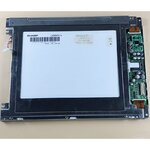
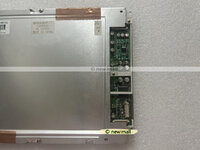


I received some full 68040s from @croissantking a few weeks back and finally got some time to perform some more work on my Duo 280c.
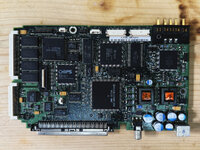
Pulled the logic board out and prepped for surgery.
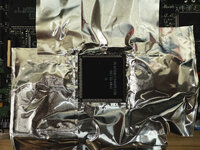
Nurse ... aluminum tape. Thanks. Flux. Thanks. Hot air nozzle. Thanks. Tweezers. Thanks.
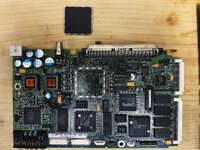
Old 68LC040 removed and pads cleaned up. New replacement full 68040 above ready to go.

Replacement soldered in place. Time to test.

Duo 280c with FPU now.
I decided to skip the overclocking. Don't need the bump and didn't want to debug any instability on this Duo 280c especially given everything is so compact without a lot of airflow.
Thanks again @croissantking for the chips! Only used one, have two left (one which needs the legs repaired). Will save those for future needs.
Pulled the logic board out and prepped for surgery.
Nurse ... aluminum tape. Thanks. Flux. Thanks. Hot air nozzle. Thanks. Tweezers. Thanks.
Old 68LC040 removed and pads cleaned up. New replacement full 68040 above ready to go.
Replacement soldered in place. Time to test.
Duo 280c with FPU now.
I decided to skip the overclocking. Don't need the bump and didn't want to debug any instability on this Duo 280c especially given everything is so compact without a lot of airflow.
Thanks again @croissantking for the chips! Only used one, have two left (one which needs the legs repaired). Will save those for future needs.
This is great! I have a duo 280c open on the bench doing some other tests and noticed how hot the stock LC040 gets without the frame, even with a small heatsink attached. I read somewhere about a cdev that funnels/reformats work to the fpu for tasks that don’t use it- not sure if this is real?
Do you know of a source (croissantking?) for full 040s in this smt package to attempt this myself?
Do you know of a source (croissantking?) for full 040s in this smt package to attempt this myself?
Last edited:
@croissantking may have some more? You'd have to check with him. If you can't find one, let me know, but I won't be able to meet up for a few weeks though. I have one left (well, two, but the second one is missing a leg and needs repairs).


Great work and good to confirm the mod works in a Duo!

Was this Rust-Oleum paint as well? I printed one and would like to get it painted. Like you, my existing battery cover was cracked and very yellow compared to the rest of the Duo.Sanded and painted. Close, not exact, but willing to live with it. The stock battery cover I had was also discolored (yellowed) so that one didn't match either.
View attachment 84350
This one in person is slightly darker.
Was this Rust-Oleum paint as well? I printed one and would like to get it painted. Like you, my existing battery cover was cracked and very yellow compared to the rest of the Duo.
Yup, Satin Charcoal Gray.
Latest update for my PowerBook Duo 280c.
I'm not the first. @techknight demonstrated his earlier this year. I stumbled upon his video while working on mine.
Took a bit to get this to work, primarily because I made a small mistake on the first PCB and had to wait for the tariff situation to calm down to try again via JLCPCB.
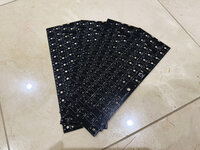
There's not much height inside the Duo chassis so it's difficult to get everything to fit. I made the PCB thickness 1.0mm. I then needed something that would allow me to use the stock keyboard screw holes to mount it so I made a 3D printed backing plate. The PCB screws into the plate and the plate screws into the Duo chassis using the 3 stock screws (screwed in from the bottom of the Duo). The backing plate is also 1.0mm. I was flipping between Kailh and Gateron low profile switches, I believe they are close in height. Chose the Gaterons.
Then I had a choice between using the stock key caps by shaving off their stems and gluing a 3D printed mx stem to them, but I felt like that would be weak. In the end, I made my own 3D printed key caps modeled after the stock key caps. Not exactly the same because the stock key caps have a taller final row of keys (the row with the space bar) but I could not reproduce that as I didn't have remaining height to do that. I added a clear notch on the caps lock key cap like stock, and 3D printed a clear light tube for it. Surprisingly, the key stabilizers on the caps lock, return, command, space bar, shift keys all work. I thought that was going to be a nightmare but my first try seems to work ok.
Unfortunately the final result has the top of the key caps about 4mm higher than the original. The lid however still closes because when the keys are depressed, they are within the top of the chassis.
The labels are black instead of white -- because I'm using decals and I don't have a printer than can print white.
I will keep an eye open for even lower profile switches. There are cherry ultra low profile switches but they were hard to get (outside of harvesting them from a brand new keyboard) and/or super pricey in low volumes.
I am not going to be selling these keyboards. I'm not a vendor and don't have time to assemble these - these are a lot of work. But once I feel like the design is solid, I will freely publish the gerber files, the 3D models for the backing plate and key caps, and provide instructions on which parts I got (the cable ribbons, ribbon connectors, brass inserts, screws, surface mount LED for the caps lock, etc).
It's MUCH nicer to type on than the stock...
I'm not the first. @techknight demonstrated his earlier this year. I stumbled upon his video while working on mine.
Took a bit to get this to work, primarily because I made a small mistake on the first PCB and had to wait for the tariff situation to calm down to try again via JLCPCB.
There's not much height inside the Duo chassis so it's difficult to get everything to fit. I made the PCB thickness 1.0mm. I then needed something that would allow me to use the stock keyboard screw holes to mount it so I made a 3D printed backing plate. The PCB screws into the plate and the plate screws into the Duo chassis using the 3 stock screws (screwed in from the bottom of the Duo). The backing plate is also 1.0mm. I was flipping between Kailh and Gateron low profile switches, I believe they are close in height. Chose the Gaterons.
Then I had a choice between using the stock key caps by shaving off their stems and gluing a 3D printed mx stem to them, but I felt like that would be weak. In the end, I made my own 3D printed key caps modeled after the stock key caps. Not exactly the same because the stock key caps have a taller final row of keys (the row with the space bar) but I could not reproduce that as I didn't have remaining height to do that. I added a clear notch on the caps lock key cap like stock, and 3D printed a clear light tube for it. Surprisingly, the key stabilizers on the caps lock, return, command, space bar, shift keys all work. I thought that was going to be a nightmare but my first try seems to work ok.
Unfortunately the final result has the top of the key caps about 4mm higher than the original. The lid however still closes because when the keys are depressed, they are within the top of the chassis.
The labels are black instead of white -- because I'm using decals and I don't have a printer than can print white.
I will keep an eye open for even lower profile switches. There are cherry ultra low profile switches but they were hard to get (outside of harvesting them from a brand new keyboard) and/or super pricey in low volumes.
I am not going to be selling these keyboards. I'm not a vendor and don't have time to assemble these - these are a lot of work. But once I feel like the design is solid, I will freely publish the gerber files, the 3D models for the backing plate and key caps, and provide instructions on which parts I got (the cable ribbons, ribbon connectors, brass inserts, screws, surface mount LED for the caps lock, etc).
It's MUCH nicer to type on than the stock...

Great video!
(and great job on the keyboard!)
(and great job on the keyboard!)
This is incredible work, including the video.
You haven’t mentioned a rationale for the project, but I’m assuming it’s to have a nicer typing feel? Maybe that plus a bit of proof of concept?
You haven’t mentioned a rationale for the project, but I’m assuming it’s to have a nicer typing feel? Maybe that plus a bit of proof of concept?


Would this would work across the entire DUO line, including the 2300?But once I feel like the design is solid, I will freely publish
I had been under the impression that all the Duos share the same keyboard but given I have only played with a 280c, I cannot be sure of that. Maybe @3lectr1cPPC knows?

I owned a 230 and a 2300c. All of them had truly awful keyboards. AFAIK the issue is the lubricant embedded in the plastic degrades which increases friction considerably. Combined with a lack of reinforcement on the underside and the "meh" quality in general is a triple combo. The trackball is cute, but those keyboards turned me off Duos forever.


They should be the same across the entire Duo line.I had been under the impression that all the Duos share the same keyboard but given I have only played with a 280c, I cannot be sure of that. Maybe @3lectr1cPPC knows?


Latest update for my PowerBook Duo 280c.
I'm not the first. @techknight demonstrated his earlier this year. I stumbled upon his video while working on mine.
Took a bit to get this to work, primarily because I made a small mistake on the first PCB and had to wait for the tariff situation to calm down to try again via JLCPCB.
View attachment 92150
There's not much height inside the Duo chassis so it's difficult to get everything to fit. I made the PCB thickness 1.0mm. I then needed something that would allow me to use the stock keyboard screw holes to mount it so I made a 3D printed backing plate. The PCB screws into the plate and the plate screws into the Duo chassis using the 3 stock screws (screwed in from the bottom of the Duo). The backing plate is also 1.0mm. I was flipping between Kailh and Gateron low profile switches, I believe they are close in height. Chose the Gaterons.
Then I had a choice between using the stock key caps by shaving off their stems and gluing a 3D printed mx stem to them, but I felt like that would be weak. In the end, I made my own 3D printed key caps modeled after the stock key caps. Not exactly the same because the stock key caps have a taller final row of keys (the row with the space bar) but I could not reproduce that as I didn't have remaining height to do that. I added a clear notch on the caps lock key cap like stock, and 3D printed a clear light tube for it. Surprisingly, the key stabilizers on the caps lock, return, command, space bar, shift keys all work. I thought that was going to be a nightmare but my first try seems to work ok.
Unfortunately the final result has the top of the key caps about 4mm higher than the original. The lid however still closes because when the keys are depressed, they are within the top of the chassis.
The labels are black instead of white -- because I'm using decals and I don't have a printer than can print white.
I will keep an eye open for even lower profile switches. There are cherry ultra low profile switches but they were hard to get (outside of harvesting them from a brand new keyboard) and/or super pricey in low volumes.
I am not going to be selling these keyboards. I'm not a vendor and don't have time to assemble these - these are a lot of work. But once I feel like the design is solid, I will freely publish the gerber files, the 3D models for the backing plate and key caps, and provide instructions on which parts I got (the cable ribbons, ribbon connectors, brass inserts, screws, surface mount LED for the caps lock, etc).
It's MUCH nicer to type on than the stock...
Glad you were able to make something work, mine never moved beyond the proof of concept stage as I am not a mechanical engineer. I ended up selling the design off to someone who is.
Similar threads
- Replies
- 8
- Views
- 507


- Replies
- 2
- Views
- 199