Hi Everyone!
This is my first post here, and I wanted to share how I ended creating a power adapter for my G4 Cube.
I'm hoping this could be a useful resource for others that are trying to make/find a power supply for their G4 Cube.
Background:
I recently bought a G4 Cube and got a better deal as the seller didn't have a power supply to provide for it. I had scoured various forums and posts to see how people had gone about making/hacking their own adapter together, and a lot of posts involved repurposing some other 28V power supply.
I was shocked to see that many of these builds had exposed AC 115/240V terminals, and wanted something that was a little safer, but also more compact! A lot of these 28V power supplies were pretty bulky, and once built could only be used for a G4 Cube.
Planning:
I was thinking about how to get the 28V DC stipulated to power a Cube, and discovered that revision 3.1 of the USB-C Power Delivery standard allowed for up to 48V at 5A, for 240W total. At 28V, it specifies a maximum power draw of 140W (at the same 5A limit). However, this information isn't useful unless I had a way to access the 28V that USB-C could provide.
IMPORTANT:
The stock Cube power supply is rated for some 8A * 28V = 224W, which is notably more than the 5A that the USB PD standard can provide. However, a lot of this headroom seems to be built in to power displays via ADC, especially the CRT Studio Display, with a rating of 113W / 28V = ~4A. Other users online have noted that a Cube draws far less than this 4A maximum, usually idling around 1A. I plan on using a flashed PC video card in my Cube, so I won't even have an ADC connector to draw this extra current. I would NOT suggest this power supply solution if you intend to still use an ADC monitor.
I remembered seeing people modding early 2010s Thinkpads to accept USB-C for charging instead of the traditional barrel plug, and did some more research to see how this was actually done. USB Decoys, or USB Trigger Boards, are small inexpensive devices with an IC to negotiate the USB PD standard with the power supply. Most of these boards only support earlier USB PD standards up to 100W, but I managed to track down one that supported 140W (28V)! The link is here. Picture as below:
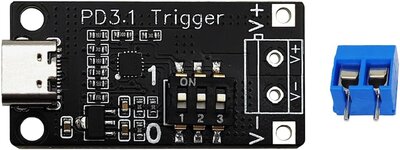
This relatively inexpensive converter board allowed me to negotiate with a USB PD compatible power adapter to get the 28V required for a Cube, I purchased this for $34.63 AUD ($22.55 USD at time of writing).
I purchased a secondhand 140W USB-C PD charger/power adapter for $40 AUD ($26.05 USD at time of writing), but this adapter will work with any USB-C PD charger/power supply rated for 140W and above.
DC Connector:
The DC power connector used by the Cube still doesn't seem to have been confirmed among the community, and unfortunately I still don't know what the name of the correct connector is. The KPPX-4C seems to match best, although I ended up buying a connector from a local supplier here. They identify it has "4 Pin Mini DIN Plug", although other sources suggest this is not a Mini DIN connector at all. Either way, I can confirm that this does fit the Cube snugly, and was available very cheaply for
$4.95 AUD ($3.22 USD at time of writing). I've included a picture below:
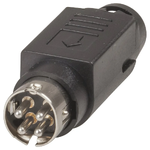
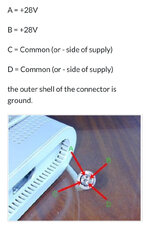
To assemble the connector I used some 16AWG cabling I already had on-hand, splitting the two cables into four inside the connector. An earlier prototype had insufficient clearance, so I opted to use a single +28V and Common outside the DC power connector. Each of these cables is rated to 15A, which is plenty for this application.
I used the below image as a reference for the pin-out, I am unsure who initially provided it.
Build:
As briefly mentioned above, the first adapter had clearance issues with the DC connector housing, so I made a second which turned out a lot better. Here is the end result:
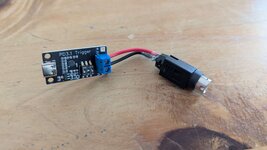
It ended up very nice and compact, although I'm currently thinking about a more robust long-term housing for peace of mind. I tested the output voltage for each pin after assembling and my multimeter confirmed that the two +DC pins were wired correctly. I accidentally shorted one of the +28V DC pins to the outer ground which made a small spark/flash, though thankfully there was no visible damage.
I eventually got around to testing with my Cube and....
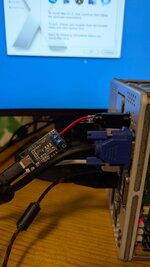
It works!
I hope this post helps someone trying to get their Cube working!
This is my first post here, and I wanted to share how I ended creating a power adapter for my G4 Cube.
I'm hoping this could be a useful resource for others that are trying to make/find a power supply for their G4 Cube.
Background:
I recently bought a G4 Cube and got a better deal as the seller didn't have a power supply to provide for it. I had scoured various forums and posts to see how people had gone about making/hacking their own adapter together, and a lot of posts involved repurposing some other 28V power supply.
I was shocked to see that many of these builds had exposed AC 115/240V terminals, and wanted something that was a little safer, but also more compact! A lot of these 28V power supplies were pretty bulky, and once built could only be used for a G4 Cube.
Planning:
I was thinking about how to get the 28V DC stipulated to power a Cube, and discovered that revision 3.1 of the USB-C Power Delivery standard allowed for up to 48V at 5A, for 240W total. At 28V, it specifies a maximum power draw of 140W (at the same 5A limit). However, this information isn't useful unless I had a way to access the 28V that USB-C could provide.
IMPORTANT:
The stock Cube power supply is rated for some 8A * 28V = 224W, which is notably more than the 5A that the USB PD standard can provide. However, a lot of this headroom seems to be built in to power displays via ADC, especially the CRT Studio Display, with a rating of 113W / 28V = ~4A. Other users online have noted that a Cube draws far less than this 4A maximum, usually idling around 1A. I plan on using a flashed PC video card in my Cube, so I won't even have an ADC connector to draw this extra current. I would NOT suggest this power supply solution if you intend to still use an ADC monitor.
I remembered seeing people modding early 2010s Thinkpads to accept USB-C for charging instead of the traditional barrel plug, and did some more research to see how this was actually done. USB Decoys, or USB Trigger Boards, are small inexpensive devices with an IC to negotiate the USB PD standard with the power supply. Most of these boards only support earlier USB PD standards up to 100W, but I managed to track down one that supported 140W (28V)! The link is here. Picture as below:
This relatively inexpensive converter board allowed me to negotiate with a USB PD compatible power adapter to get the 28V required for a Cube, I purchased this for $34.63 AUD ($22.55 USD at time of writing).
I purchased a secondhand 140W USB-C PD charger/power adapter for $40 AUD ($26.05 USD at time of writing), but this adapter will work with any USB-C PD charger/power supply rated for 140W and above.
DC Connector:
The DC power connector used by the Cube still doesn't seem to have been confirmed among the community, and unfortunately I still don't know what the name of the correct connector is. The KPPX-4C seems to match best, although I ended up buying a connector from a local supplier here. They identify it has "4 Pin Mini DIN Plug", although other sources suggest this is not a Mini DIN connector at all. Either way, I can confirm that this does fit the Cube snugly, and was available very cheaply for
$4.95 AUD ($3.22 USD at time of writing). I've included a picture below:
To assemble the connector I used some 16AWG cabling I already had on-hand, splitting the two cables into four inside the connector. An earlier prototype had insufficient clearance, so I opted to use a single +28V and Common outside the DC power connector. Each of these cables is rated to 15A, which is plenty for this application.
I used the below image as a reference for the pin-out, I am unsure who initially provided it.
Build:
As briefly mentioned above, the first adapter had clearance issues with the DC connector housing, so I made a second which turned out a lot better. Here is the end result:
It ended up very nice and compact, although I'm currently thinking about a more robust long-term housing for peace of mind. I tested the output voltage for each pin after assembling and my multimeter confirmed that the two +DC pins were wired correctly. I accidentally shorted one of the +28V DC pins to the outer ground which made a small spark/flash, though thankfully there was no visible damage.
I eventually got around to testing with my Cube and....
It works!
I hope this post helps someone trying to get their Cube working!