
-
Hello MLAers! We've re-enabled auto-approval for accounts. If you are still waiting on account approval, please check this thread for more information.
You are using an out of date browser. It may not display this or other websites correctly.
You should upgrade or use an alternative browser.
You should upgrade or use an alternative browser.
TashPad: Super Nintendo to Gravis GamePad ADB Converter
- Thread starter Tashtari
- Start date

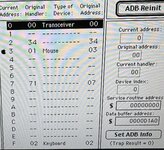
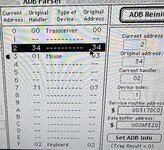
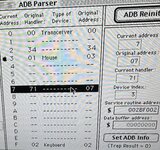

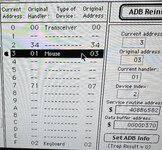

Looks like TashPad won the arbitration for address 0x2 but both devices are present and accounted for... only thing out of place is that device 2 says its original address was 0x34, which doesn't make any sense, ADB only has 16 addresses.
I'm still thinking the driver, not the Wombat. What version are you using, and is there a different one you could try?
I'm still thinking the driver, not the Wombat. What version are you using, and is there a different one you could try?

That’s what I saw with my GamePad when I sent you some notes on ADB devices (should be in your PM history):only thing out of place is that device 2 says its original address was 0x34, which doesn't make any sense, ADB only has 16 addresses.
- Advanced Gravis Mac GamePad
- Model: Y8116?
- Version: N/A
- Extension not loaded:
- Type of Device: Keyboard
- Original Address: 02
- Original Handler: 02
- Current Address: 0F
- Current Handler: 02
- Talk (Reg 1): No data (0 bytes)
- Talk (Reg 2): FFFF
- Extension loaded:
- Type of Device: “”
- Original Address: 34
- Original Handler: 34
- Current Address: 0F
- Current Handler: 34
- Talk (Reg 1): 0300
- Talk (Reg 2): FFFF
Hm, I guess it must be the driver doing that, then. Possibly it's changing something it shouldn't, though I don't expect that that specifically would cause the keyboard behavior that @opualuan is seeing.That’s what I saw with my GamePad when I sent you some notes on ADB devices

I made my own weird TashPads!
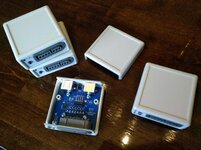
I'm a weirdo who actually enjoys SMT soldering, so I swapped the through-hole resistors, caps, and diodes for SMT parts and used some of the leftover space to add an ICSP connector. The result works great and was super fun to build. Thank you @Tashtari and @demik for this awesome project! Are you okay with me forking your repository? I thought I remembered reading something discouraging forking, but now I can't find it, so I'm not sure my memory is correct.
I'm a weirdo who actually enjoys SMT soldering, so I swapped the through-hole resistors, caps, and diodes for SMT parts and used some of the leftover space to add an ICSP connector. The result works great and was super fun to build. Thank you @Tashtari and @demik for this awesome project! Are you okay with me forking your repository? I thought I remembered reading something discouraging forking, but now I can't find it, so I'm not sure my memory is correct.
Nice builds! I don't mind you forking the repo, but you're also welcome to contribute your design to the existing one (maybe add a folder called "pcb-smt" in the root directory and put the files in there).I made my own weird TashPads!
View attachment 83824
I'm a weirdo who actually enjoys SMT soldering, so I swapped the through-hole resistors, caps, and diodes for SMT parts and used some of the leftover space to add an ICSP connector. The result works great and was super fun to build. Thank you @Tashtari and @demik for this awesome project! Are you okay with me forking your repository? I thought I remembered reading something discouraging forking, but now I can't find it, so I'm not sure my memory is correct.

As @Tashtari said, we don't mind as long as the license is respected. It's nice that you had fun with this, also nice soldering skills!I made my own weird TashPads!
View attachment 83824
I'm a weirdo who actually enjoys SMT soldering, so I swapped the through-hole resistors, caps, and diodes for SMT parts and used some of the leftover space to add an ICSP connector. The result works great and was super fun to build. Thank you @Tashtari and @demik for this awesome project! Are you okay with me forking your repository? I thought I remembered reading something discouraging forking, but now I can't find it, so I'm not sure my memory is correct.
That's exactly the wayI think the correct way to do this would be to create a fork, add my files, then submit a PR to your repo from my fork. Does that sound right?

I just built a set for myself and they worked great! Thanks @Tashtari for great project. Just played a bunch of rounds of Joust with it and was a lot of fun.Looking forward of trying them out with other games. I used this daisy chained with my ADB keyboard and mouse. I was able to power on my IIci from my keyboard without issue.
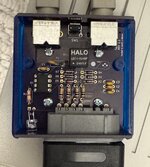
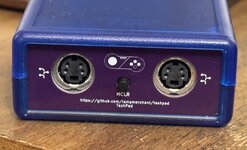

Here is some additional info that may prove helpful for those are looking to build one.
For the Nintendo connectors, I purchased it from this eBay vendor:
https://ebay.us/m/lioFXu
The back pins were not oriented in the correct direction. I fixed this by pulling the pins out slightly, rotating them and pushing them back in place. The pins that are not connected I just pulled them out completely.
Because of the all the trade tariffs, I decided to order the boards locally (I am in the US). I ordered my boards from OSHpark. The boards I received were of good quality. There are a couple of things with Oshpark. When you order, you will have to wait until they complete a full panel with other orders before they ship to fabricate and when you received them, you have clean them up by removing the leftover tabs from when they broke them off the larger panel. Shipping was free via USPS. Also, their boards are purple. I am not sure if they offer different colors.
Finally, not all Super Nintendo controllers will work with the Tashpad. I unfortunately hit that lottery when I purchased this set from Amazon. So do not get these:
iNNEXT 2 Pack Wired SNES Gamepad, SNES Controller
https://a.co/d/77Flf2o
I purchased the 8bit premium that previously mentioned and they worked right off the bat. I think it would be a good idea for those to pose which controllers worked and which ones did not to make things easier for those who want to get a set.
If anyone has some questions, please let me know!
Here is some additional info that may prove helpful for those are looking to build one.
For the Nintendo connectors, I purchased it from this eBay vendor:
https://ebay.us/m/lioFXu
The back pins were not oriented in the correct direction. I fixed this by pulling the pins out slightly, rotating them and pushing them back in place. The pins that are not connected I just pulled them out completely.
Because of the all the trade tariffs, I decided to order the boards locally (I am in the US). I ordered my boards from OSHpark. The boards I received were of good quality. There are a couple of things with Oshpark. When you order, you will have to wait until they complete a full panel with other orders before they ship to fabricate and when you received them, you have clean them up by removing the leftover tabs from when they broke them off the larger panel. Shipping was free via USPS. Also, their boards are purple. I am not sure if they offer different colors.
Finally, not all Super Nintendo controllers will work with the Tashpad. I unfortunately hit that lottery when I purchased this set from Amazon. So do not get these:
iNNEXT 2 Pack Wired SNES Gamepad, SNES Controller
https://a.co/d/77Flf2o
I purchased the 8bit premium that previously mentioned and they worked right off the bat. I think it would be a good idea for those to pose which controllers worked and which ones did not to make things easier for those who want to get a set.
If anyone has some questions, please let me know!
Nice build!
Sorry about the incompatible controller. I wonder what the issue might be, the protocol is pretty simple as I recall. If you want to send me one of the problematic controllers, I can take a look, though I don't know how soon I'll be able to get to it. Alternatively, if you've got a scope and you can get some traces that shed some light on the issue, I'd be happy to attempt to fix the issue in firmware. I'd like for this to be compatible with every SNES controller.
Sorry about the incompatible controller. I wonder what the issue might be, the protocol is pretty simple as I recall. If you want to send me one of the problematic controllers, I can take a look, though I don't know how soon I'll be able to get to it. Alternatively, if you've got a scope and you can get some traces that shed some light on the issue, I'd be happy to attempt to fix the issue in firmware. I'd like for this to be compatible with every SNES controller.
Hi @Tashtari,Nice build!
Sorry about the incompatible controller. I wonder what the issue might be, the protocol is pretty simple as I recall. If you want to send me one of the problematic controllers, I can take a look, though I don't know how soon I'll be able to get to it. Alternatively, if you've got a scope and you can get some traces that shed some light on the issue, I'd be happy to attempt to fix the issue in firmware. I'd like for this to be compatible with every SNES controller.
No worries about the controller! This is the nature of this hobby. After opened up the non working controller to tone out the cables to confirm that it was not the issue, I figured that it may be an incompatible controller. This controller is different in design from the Hyperkin. It has only a single chip as opposed the the Hyperkin which has two. There are no identifying lettering on the chip. Here is a photo of the controller PCB:
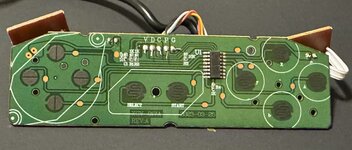
I am wondering if the resistors are the issue? I am willing to send you one controller so you can check it out (not using it anyway
 ). I also have a oscilloscope on hand, but I am still learning on how use it.
There’s a difference between NTSC and PAL SNES controllers: the pullups for the data lines are internal to NTSC consoles, but PAL puts the pullups in the controllers instead. Those resistors look to be pullups for PAL compatibility. However, the result of the difference is usually that NTSC controllers don’t work on PAL consoles, rather than the reverse. It could be that having pullups on both sides pulls the low voltage too high? I’m not sure about that, and my reading of demik’s initial post is that the adapter was designed for PAL compatibility first and NTSC second.
That's very interesting! I was not aware that there were versions of the SNES controllers for the different markets. After doing some more research, it backs up what @sfiera posted. I found a post that goes into detail of the differences and how to correct for NTSC controllers: https://gamesx.com/wiki/doku.php?id=controls:snes_con_region_fix
It seems that the resistors do play a role. The Hyperkin that I used must have been developed to be used in any market. If I can dig up the proper resistors, I may give it a shot modifying the non working ones.
It seems that the resistors do play a role. The Hyperkin that I used must have been developed to be used in any market. If I can dig up the proper resistors, I may give it a shot modifying the non working ones.
I am wondering if the resistors are the issue? I am willing to send you one controller so you can check it out (not using it anyway
There’s a difference between NTSC and PAL SNES controllers: the pullups for the data lines are internal to NTSC consoles, but PAL puts the pullups in the controllers instead. Those resistors look to be pullups for PAL compatibility. However, the result of the difference is usually that NTSC controllers don’t work on PAL consoles, rather than the reverse. It could be that having pullups on both sides pulls the low voltage too high? I’m not sure about that, and my reading of demik’s initial post is that the adapter was designed for PAL compatibility first and NTSC second.
First congratulation for your build. Interesting about the issue, this is the first time someone had an issue with controllers compatibility. Like @sfiera said, there is a few differences with PAL and NTSC controllers. Maybe some Nintendo specialist can chime in
TashPad only pull Latch with a 10kΩ resistor (R5), similar to what's visible in the PAL schematics that you can find around Internet.
Do they work on a NTSC console ?
Edit : give it a try after removing R1 and R2 on your controller (or switch to 10kΩ). May be too strong of a pullup for the PIC.
Last edited:
Similar threads

- Replies
- 44
- Views
- 9K

- Replies
- 22
- Views
- 5K

- Replies
- 82
- Views
- 18K


- Replies
- 7
- Views
- 2K
- Replies
- 146
- Views
- 29K