• Hello MLAers! We've re-enabled auto-approval for accounts. If you are still waiting on account approval, please check this thread for more information.

2560x1440@24bit (or 4K) on G4 under OS9: available options?

Trash80toHP_Mini

NIGHT STALKER
68040
Still looking to upgrade my 1600x1200 primary display for Win/Linux and my QS'02/OS9.2.2 primary workstation. Decided my sights may have been set a bit low when I asked about 1920x1200 earlier!

Is there anything in QS or MDD AGP flavors that might support 2560x1440@24bit? Lots of reasonably priced options for such displays.

I found an inexpensive 4K display with a legacy VGA connector, so I'm guessing it'll support lower, VGA connection compatible 60Hz resolutions. AOC U2879VF - LED 28" monitor Is that the way of it for 4K displays? I like the sound of PiP features and adjustments for source and sub-source inputs. Ain't that a kick in the pants? Positioning a pair of subscreen inputs on a honking 28" 4K panel like setting up a pair of CRT displays for extended desktop in the Monitors Control Panel on a 68K Mac under System 7! [:D] ]'>

Anyway, 2560x1440 might be overkill as it is. Dunno, thoughts?

 
Hi Trash,

 Be aware of flooding the bus. Just because it can do it, doesn't mean that the experience will be especially enjoyable. I learnt this the hard way with a Radius Thunder card on my IIfx. I got my IIfx to run 1600x1200 at 8-bits and it was not especially impressive. So much so that I preferred to play Civ I on 1172x852 rather than 1600x1200. The refresh rates were too slow on the latter.

I was being greedy, running a card from 1995 on a machine from 1990 on a monitor from 2005. I'm curious to hear how a 4K monitor on your QS performs.

BTW, if 3D-acceleration is not necessary, I've heard that some of the bigger AGP cards (like the nVidia GeForce 5200) will support basic graphic card functions under Mac OS 9. Maybe a 256MB Radeon 9800 XT, if anyone can confirm that it runs in Mac OS 9?

aa

 
Interesting, I'll have to try mine in the IIfx at 24bit. [}:)] ]'>  Other than messing around in Warbirds every few years I don't play games, certainly none of the 3D variety where high resolutions and frame rates would be a concern. Now that I think of it, I should set up the "family game night" trio from the rug rat's mid-Nineties middle school years for his visit next week! [:)] ]'>

Thanks for that Radeon link, K, didn't know any cards supported 2x & 4x  I'll have to pop the trunk on the MDD and see what's in there. Might be empty though, maybe I pulled the GeForce4MX I'm using in the QS from it already. Gotta find the manual from that one now.

Could be getting ahead of myself here, I've downloaded all the manuals for the HP 1080p Notebook and haven't found a list of supported resolutions yet. Found a game performance table that lists its Radeon R2 1600 performance at a couple of high resolutions and that it supports and that it does 4096×2160!

No dual channel HDMI for me though. Multiple screen desktop on a 4K display sounds like a fun thing to explore though, time for a new topic!

Multiple screen extended desktop on a 4K display?
 
I don't know if Mac OS 9 support that, but a graphic card with a DVI Dual Link output is OK for 2560x1440 and many display can use this mode.

With VGA? it's complicated, it depend from the RAMdac speed and many display cannot display in analog at native definition.

But there is a (big) problem : performance. Many graphic card for the era are too slow, even to display the desktop. 

For 4K, i think it's not possible : even with "modern" Mac, it's complicated. Actually, you must use a DisplayPort 1.2 or HDMI 2.0, tow things only available on computer from 2012 and more.

 
The G5 had some cards that could easily drive the 30-inch Cinema display. I believe the Radeons 9700 and 9800 in the later PowerBook G4 systems could as well. That display has a resolution of 2560x1600, so it's not unreasonable to believe that a Radeon 9800 in a Power Macintosh G4 could, with DVI-D, run a 2560x1440 display. Whether that configuration is compatible with Mac OS 9, I don't know off hand.

My guess is that this is easier than you think it is, it's just a matter of finding what cards had dual link DVI and supported the 30, and then narrowing that to "also ran in G4s and worked with OS 9."

 
Geforce 4 4200 and ATI 9000 were the last with OS 9 drivers that I know about. OSX is another story with more options.

To be honest OS 9 at that resolution would suck. 1080p with OS 9 is ok.

 
1080p is a horrid resolution!

I've been trying it again after having not used this monitor in 5 or 6 years. The 20" 1600x1200 Dell rocks by comparison. The only thing I have good to say about this very nice 23" HP 1080p monitor is that blu-ray looked good on it back when I had the player set up as my "Personal Theater" out in the AppleDisplay area and that it has a lot of room for my bookmarks menu, but  certainly not room for enough of a page in the vertical. Add 120 pixels to the bottom and it'll be a usable resolution for browsing and graphics work. I can look at it like I'm adding 320 pixels to the left side of the 1600 on the 4x5 20" UltraSync for my bookmarks as well.

1920x1200 it is. I said it in another thread: 1920x1080 is like being stuck for years and years in the new 640x480. That was hell the first time around and breaking out into resolutions suited to computers as opposed to playing movies will be a breath of fresh air when it comes to pass.

edit: the other good thing I should have said about the HP was that 1080p was wonderful compared to the 768 rows of 1366 pixels on the HP Mini NetBook and its successor. THAT resolution is truly evil, the new 14" Notebook is 1080p  .  .  .  ::)

 
Last edited by a moderator:
1366 x 768 is 720P (which is what my old TV uses). I have grown used to 1080P as my main monitor.

1280x1024 is still retro decent and you should be able to find old LCD monitors that use that fairly cheap.

 
1366 x 768 is 720P (which is what my old TV uses). I have grown used to 1080P as my main monitor.
Nap, that'd be 1280×720, which is a usable 1280x1024 resolution chopped off at the knees for scaling 480p DVD up to a larger screen size/pixel count. 1366x760 is half-assed 1080p downscaled for playing movies on laptop panels that are a very, very little bit better than a measly 720p for use on a computer for anything but videos.

1280x1024 is still retro decent and you should be able to find old LCD monitors that use that fairly cheap.
I've got one as my menu screen for the QS. 1080p on the new notebook will be a secondary display to the main screen which is a pivoting 1600x1200 that's a LOT better for web browsing than1080p, even in landscape mode.

2560x1440 is overreaching for the QS graphics workstation (w/MDD in waiting) apparently. I'm back to looking for a nice 1920x1200 panel to retain the 120 pixels lopped off 1080p from the knees down.

1080p is a horrid computer resolution that's not so bad a compromise for laptops as was 1366x768 which I've never even bothered to use as a second screen for the dedicated Firefox/Win7 workstation. Now I've got a 14" 1080p screen worth using in a secondary role on the new Notebook and Win10 which isn't. I guess you're not really supposed to win. ::)

 
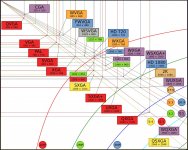
I need to scale this outdated graphic out to 8K just to see how tiny CGA (my first computer monitor after C64 on the 15" Trinitron) will look way, way, waaay up there in the corner. [}:)] ]'>

OutdatedResolutionGraphic.JPG

 
The quest for high resolutions is officially on hold until the next time the bug bites! [:)] ]'>

I decided that a segmented 3200x1200 desktop will do for the 0S9 environment for now. Found a Grade A refurb twin of (eventual replacement for) my 20" UltraSync for $119 shipped and pulled the trigger on it. The better of the two will be the main screen, hope this one has a lot less hours on it, that'd be nice.

Found the UltraSync while looking at some uber-expensive QXGA panels for medical use. Now that is one nice resolution, but G4/OS9 will never do 3K. At 21.3" the panels are way too small for computer use anyway. Scale those pixels down to a standard desktop density on a nice big panel and we're talking 4:3 flat panel Nirvana.

 
phfx_theWindowEffect_resolutionComparison.jpg.c705554dd4d2817249b8939cd8607e6a.jpg


IS there any real point for higher resolution for desktop monitors? I can see wanting 8k on a 72"+ monitor 12 feet away on a wall but a 24" monitor a foot from your face?

 
IS there any real point for higher resolution for desktop monitors?
It is a PRO toy for the foreseeable future, but that won't stop the TV companies from trying to sell you one. When you see one in person it is amazing, but unless your applications and/or media are optimized for it, then there is no reason to buy one. Dell already is marketing one, and crazy gamers are buying them.  8-o

 
love that graphic, o! CGA woud be less than 1/4 of SD and a harbinger for the wide screen mania to come.

I was thinking 4K or 8K on a desktop sized panel would make interpolation of just about any resolution indistinguishable from a native resolution display for anything a retro toy could throw into a window on it. [:)] ]'>

One look at the size of that display had me looking at the curved panels across the bottom of the page. Amazing price points for some of those, but one CAD seat jockey's comments about straight lines on the edges looking curved turned me off to the concept. He recommended sticking with flat panels for CAD and Design work. Makes sense to me for critical work.

The most affordable seems to be the usual 1080poo top to bottom, but "widened" to 2560, which would lopping the usable computer resolution this thread is about off at the knees yet again! Dell has the gall to tout it as a solution which "maximizes your multitasking potential with an expansive screen and intuitive productivity features."

I'd say they chopped off the multitasking potential of 2560x1440n at the title of this thread very effectively.

1920x1200 was looking very tempting, but tacking another 320 pixels onto the side of the main screen doesn't seem worth the effort. Next up is moving my bookmarks off and onto the 1080p lappy while using 1200x1600 portrait mode for browsing.

 
Curve monitors are a cheat product, most are simply 2x wider, and not "retina" in the Apple sense. The LG UltraFines as buggy as they are are glorious to use in 4k and 5k, and 2 of them side by side would be uber productive. The biggest problem is the 16:9 aspect ratio is crap for computer users, where as the 16:10 is far more useful, but once you get into the 4k+ region, the displays actually get larger than the largest 16:10 displays of past, you are in a different world... and broke!

 
Back
Top