• Hello MLAers! We've re-enabled auto-approval for accounts. If you are still waiting on account approval, please check this thread for more information.

Multiple screen extended desktop on a 4K display?

Trash80toHP_Mini

NIGHT STALKER
68040
Is anyone doing anything like this? Is it even possible?

Reading about PiP setup options on an interesting VGA/HDI/HDMI input 4K display*** I was wondering if such might be fun/workable as multiple displays on legacy connections. Probably can't do three at a time, but that would be very very cool if I could. HDMI on Win10/Linux Notebook (with a side order of 14" 1080p no less) QS on HDMI and something 68K on VGA on a BIG panel all at once sound like fun?

How many folks here are using a 4K desktop at all?

No way I'm gonna try this, all the blank areas involved might not be able to drive me crazy, but they'd undoubtedly bring on another episode.  [:P] ]'>

*** U2879VF, including DisplayPort, HDMI/MHL, DVI, and VGA inputs available

 
This almost certainly won't work like you want it to on a modern display.

What will happen is the VGA will accept up to 1920x1080 (most likely) and then scale it up. It will not let you do something such as split it into three-and-change 1080x2160 segments that present themselves to an OS, ot run (almost worse) four 1920x1080 desktops, one in each corner.

The DVI port will be a toss-up because you'll need DVI Dual Link for a resolution that high (you often need it for 2560x1440 as well) and you'll need a current HDMI or DisplayPort implementation.

The IBM T221 would do a version of what you want, I forget the exact way the signals were segmented, but because no single GPU and link could do 3840x2160@60 at the time of that display, it was segmented and I believe ATi had software that joined all the segments as a single logical display.

Also worth noting is that at these resolutions, the expectation is generally that you have amazing vision or that you're going to run things scaled, for an effective workspace that, on a 3480 display, looks like 1920 or 2560, approximately. (200% is default but 125 and 150 are common on Windows and Mac OS X.) This kind of display with an older computer will probably work poorly.

 
What will happen is the VGA will accept up to 1920x1080 (most likely) and then scale it up. It will not let you do something such as split it into three-and-change 1080x2160 segments that present themselves to an OS, ot run (almost worse) four 1920x1080 desktops, one in each corner.

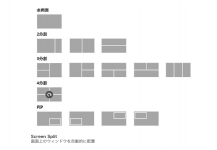
There are monitors that can do exactly what you're describing, like this LG model that has enough independent HDMI/DisplayPort plugs on it and the ability to do up to four seamless PNP cuts of various dimensions. I can actually imagine some real-life use cases for this thing; you could use it along with a keyboard/mouse switch to monitor multiple computers on one piece of glass, or, in principle, you could use it to get an effective 4k@60hz resolution out of an old computer fitted with a couple dual-DVI (single link) video cards vs. having to upgrade it to a more modern card capable of supporting 4K resolutions natively. (Which can actually *still* be a little bit of a challenge.) Just set up the machine to tile your four virtual 1920x1080 monitors in the proper arrangement and it should work reasonably well. Using the right pile of video cards, ADC-to-DVI and DVI-to-HDMI adapters it should be totally feasible to get 4K on one piece of glass from a Power Macintosh G4.

Of course, that LG monitor only works with digital inputs, so that idea isn't going to stretch back to the analog era, at least not without some external VGA-to-HDMI capture device. Also, the LG monitor is 42", which is big enough that the dot-pitch will be okay for this "one monitor replacing many" application. That wouldn't work so well on a 28" monitor, and, well, while I can't definitively say so without reading the manual I kind of doubt the AOC supports the same magic.

 
Me either, that's why I said the black areas would get to me if using it for 2 or possibly 3 inputs.

Funny you should post this very thing. On the way home for lunch I was wondering if someone might whomp up a 4K version of linked Dual-Voodoo2 PCI cards to support 4K on the huge installed base of computers that still have PCI slots to spare.

LG_43ud790_b_screen_layout.png

Middle left or rhe flip with the laptop siting on a matched desktop CPU hooked up every which way next to the panel would be to die for. [:)] ]'>

 
Funny you should post this very thing. On the way home for lunch I was wondering if someone might whomp up a 4K version of linked Dual-Voodoo2 PCI cards to support 4K on the huge installed base of computers that still have PCI slots to spare.
But Voodoo cards suck. Also, notably, even using SLI on a pair of Voodoo2's the maximum supported resolution was 1024x768. So to fill up a 4K TV you'd need 24 Voodoo2 running as 12 SLI pairs+12 more regular VGA cards to provide the base overlay layer/syncs. Then of course your TV would have to support 12 analog inputs, *plus* you'd need some sort of backend rendering software that could take apart a 3D rendering job and spread it out over your 36 PCI card (and therefore, obviously, multiple computers unless you manage to find some ridiculously huge PCI expansion boxes) render farm. (IE, something like Chromium or ClusterGL; the fact that Voodoo cards don't actually support OpenGL is another challenge.)

A pair of dual-DVI-port-equipped Radeon or GeForce cards is, therefore, obviously a little more practical of a proposition.(*)

(* note: older video cards may have texture size limits that can cause problems with multiple-monitor setups if you're really interested in 3D. For instance, Radeon cards prior to... I believe the X1x00 series, had a texture size limit of 2048x2048, which combined with their use of a unified framebuffer for dual-head meant that you could run into problems even with just a pair of 1280x1024 17" monitors side-by-side. Thus depending on what you're actually trying to render on your ancient 4K setup you might need to resort to four separate cards instead of two dual-head ones.)

 
Last edited by a moderator:
My guess is that this LG display was specifically designed this way, as an alternative to buying four 24-inch (or there-abouts) displays and mounting them in a 2x2 config, or three displays and mounting them in a 1x3 configuration. The AOC almost certainly wouldn't have this functionality. My guess, too, is that this LG display is far beyond the budget of anybody who might be interested in using it for vintage computing purposes. It's just too expensive to consider, even if you can figure out adapting VGA to DisplayPort.

The trading applications the stock image shows are synonymous with corporations that commission Intel to build pre-overclocked Xeons for things like high frequency trading. That is essentially a "money is no object" market where you're doing Excel at such an insane rate that having a dual socket Xeon and four monitors is a given minimum.

One more thought: What would sitting at a desk with a 42-inch monitor close enough that you could reasonably use one or four systems at 100% be like? 27 still feels big to me, so I imagine 42 is particularly imposing.

I have dual 24s at work, in vertical configuration, I imagine that a 42-inch display would be a bit bigger than, say, three or four of those all lined up. (I'd have to draw it out, which I can do a bit later, to get a good sense of scale.)

 
My guess, too, is that this LG display is far beyond the budget of anybody who might be interested in using it for vintage computing purposes. It's just too expensive to consider, even if you can figure out adapting VGA to DisplayPort.
That LG display costs $700. That's a little towards the premium end of the spectrum when compared to 42" 4K *TV Sets*, but for something sold as a monitor it's not bad at all. (And it's reasonably well featured for that; it even includes a USB-C port.) That price actually puts it well south of the cost of 4 discrete 22" 1080p monitors plus a quad-VESA stand to hold them in a grid configuration. This is by *no means* a product that's only aimed at "money is no object" stock traders.

EDIT: Also, believe it or not, VGA-in-to-HDMI-out adapters can be had for $20. I can't vouch for how well they work, but... that's actually pretty darn amazing.

I have dual 24s at work, in vertical configuration, I imagine that a 42-inch display would be a bit bigger than, say, three or four of those all lined up. (I'd have to draw it out, which I can do a bit later, to get a good sense of scale.)
A 42" panel is going to be narrower than two 23"-class panels set side by side (IE, I know how big that is, as for years my desktop was a Mac Pro with dual 23" Cinemas). As for height, a 42.5" panel is almost exactly as tall as a 24" diagonal 16x9 sitting on end. (In total it'll have slightly more area than three of said panels sitting side by side.) So assuming your panels are 1920x1080(or 1200) models the pixel size is going to be essentially identical. (Well, ever-so-slightly denser, but not so you'd notice.

The only gotcha I can see with it is because there are no seams it won't be possible to angle the monitor to "wrap around" your field of vision like you can with multiple smaller monitors. Honestly I don't know if that would be a deal breaker or not, I'd have to try it. I'd probably have to say it might be a little less optimal if your workflow is to divide up your work into "panes" and concentrate on each one in turn, but if you have something that would truly benefit from one giant seamless workspace I think it could work fine.

 
Last edited by a moderator:
Dunno about that, $698.99 w/free shipping on Amazon ain't all that bad if you're not as poor as I am. Looks like they've got the same technology on a $200.00 32" 1080p panel. Not sure why that might be worthwhile. That's a pitiful pittance of pixels to be parceling out to two, three or four feeds.

But like I said, there's no way I'm gonna try this on LG or any other monitor. AOC sounds like it might do two displays with its PiP modes, but wouldn't have been counting on it.

G!  ::)   Granted they suck, but I didn't say to use Voodoo2s, that's absurd. I said "someone might (as in manufacturer) whomp up a 4K version of linked Dual-Voodoo2 PCI cards." Apparently shoulda' said "like" linked 2s. Having the vidcards do the pixel parceling on any ole 4K display in a control panel on the computer should be a much more flexible setup.

Big Mohonking gamercards are already using two slots now, it'd be nice to be able to buy one PCI card capable of driving a pair of 1080p screens at more pedestrian speeds and maybe add another to do 4K that's good for any pixel hungry application outside of extreme gaming.

This high resolution stuff really interesting, but I'm back to looking at 1920x1200. There aren't many. There's stupid numbers of big 1080p monitors running up to stupid big sizes (like that 32" LG) and I'm wondering why there isn't more choice in better aspect ratios. 1920x1080 is like being stuck for years and years in the new 640x480. :p

edit: you beat me to it!

 
Last edited by a moderator:
I'll be honest, I didn't look at the pricing on that LG and I was expecting a fair bit more than $700. I didn't have a particular number in mind, but I was definitely thinking "what would Intel charge for a pair of Xeons to be installed in a system like the Dell 7910 that were 4-8 cores and clocked at 5.2GHz?" and then let my mind drift to what you'd even hook up to that system. Perhaps not a great way to guess what something would cost.

That's probably more than my employer would probably spend on a monitor for me (although, what I'd want is a 3440x1440 display anyway) but perhaps not more than I'd spend on a display for myself.

Two vertical 24-inch panels is already kind of stretching my field of vision a bit, but thank you for the frame of reference. For reference, I am using two Dell U2412Ms in 1200x1920 mode. This panel is still a smidge bigger than that configuration, but not a lot, it being the same overall number of pixels as four 1920x1080 panels.

Thinking super briefly back to the up-and-down head bobbing motion I do all day, compared to the side-to-side all my colleagues (with their 2-3 display wide configurations) -- it would be interesting to see whether one is "better" than the other. Neither is ideal, and the 42-inch might actually force both, compared to 34-inch 3440x1440 displays that would really only force left-to-right motion.

G!  : :)   Granted they suck, but I didn't say to use Voodoo2s, that's absurd. I said "someone might (as in manufacturer) whomp up a 4K version of linked Dual-Voodoo2 PCI cards." Apparently shoulda' said "like" linked 2s. Having the vidcards do the pixel parceling on any ole 4K display in a control panel on the computer should be a much more flexible setup.
When you say PCI, do you mean PCI-Express for modern computers, or are you looking for something for older PCs, or are you looking for a bigger GPU to do higher resolution for vintage Macs?

All are possible, two exist, one is pretty reasonably easy to find and "actually any good."

 
The vintage Mac thing is never gonna happen. IIRC, PCI-X is the 64bit slot on my tiny seven(?) year old ATOM board, something like that or maybe a bit newer if needs be.

I'm setting up two smaller displays on either side of a larger, KVM'd center display to work off either pair with data displayed on the odd man/computer out on the KVM setup at any given time.

I haven't seen any type of trading floor in many years, but I'd hazard a guess that the big, segmented LG and the multiple display setups it would replace would be for traders standing a bit back and looking over the shoulders of the geek in the seat.

 
Last edited by a moderator:
for PCI-having PCs you can still buy things like the PCI versions of some of the older geforce/radeon cards.

For modern computers, there are PCI-e cards all over with things like quad displayport output. My main PC at work has six or seven total display outputs, and I'm only using one graphics card -- I could put in a second one.

 
Last edited by a moderator:
Back
Top