• Hello MLAers! We've re-enabled auto-approval for accounts. If you are still waiting on account approval, please check this thread for more information.

2 Mac Plus cuties

Yesterday I visited an auction from a small company that sold kitchens and went bankrupt. As it turned out, the owner well, to say the least, liked Apple Computers. I eventually ended up with 2 Macintosh Pluses for the price of 30 euros, but if I had gotten there by car and not by foot, bus and train, I would have come home with an entire collection myself. Still, the 2 Mac Pluses were a great find. When I booted them up at home, I found that one Mac and its external hard drive worked like a charm, whereas the other Mac sadly showed a vertical white line on a black background. I don't really know how to fix this and wondered whether you guys might have an idea. Sadly, the Mac Plus repair manual does not specify this symptom and I have no idea where to start. Still, I want to bring this Mac back to life, and I am determined to do so. I am definitely going to visit more auctions in the future.

In sum, I had a fantastic day!

Cheers!

 
Sweet find!

Typically bad RAM or poorly seated ROM chips can cause this issue. For ROMs, just carefully remove and reinstall them. Being Pluses, you can pull or swap the RAM and ROMs between machines if needed. This is when its nice to have two machines with one working, eliminating the issue can go much faster.

If you want to rule out some weird voltage issues, you could swap logic boards between machines.

 
If it's a bright vertical line in the center of the screen with nothing else on the screen, that sounds like a problem with the horizontal sweep for the video. Sometimes you can "fix" this if you just whack the side of the case really hard while the Mac is on. If that fixes it, even temporarily, it means there's a bad solder joint on your analog board somewhere. Check L2, C1, and especially J1 on the analog board.

See Larry Pina's Macintosh Repair and Upgrade Secrets, page 83, for more details on a vertical line display.

 
Last edited by a moderator:
Thanksss unity and bigmessowires, I am going to give that a go!! I will report back of course.

And sadly, my dear Scutboy, a macintosh se fdhd, an iic, a lot of 14 different imac g3's, lc's and performa's. Poor me :-/

 
bigmessowires is right, I was thinking of a vertical band, not a line. I have about 40 Macs with this issue. And it was done on purpose for an art display. In all cases its a clipped wire to the CRT, easy to fix. So as suggested, check the analog board for bad solder points.

 
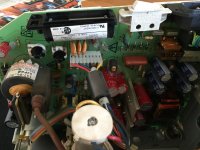
So I finally got my mac open (apparently screwdrivers needed for the opening are rare over here). The analog board looks just fine. At almost every thing on the board, however, I can find this gluelike substance. Does this have anything to do with the white line or am I completely saying stupid things here? And how might I be able to locate the clipped wire? Should more pictures be needed just tell me what pictures to take ;)

image.jpg

View attachment 4896

 
Kachinggg, the yoke connector or the wires were faulty indeed. Taped the whole thing up and pushed it a little bit around, and now the screen works perfectly. Happy Me, Happy Mac!

 
The hot glue is normal for those boards at those times.

You want to be checking on the other side of the board for solder joints that are cracked or looking dull instead of shiny - especially for the connector that you see in your first picture where the wire harness plugs in below the battery holder. Look at the joints on the other side of the board for that connector, and re-solder them if they look bad. Do the same with the other components BMOW mentions. Those location number/letters will be screened on the board.

For a quick fix, you can just use a hot solder iron and retouch the joints in question - let them melt and then re-harden - to see if it alters the behavior. This isn't a permanent fix,but will help you isolate the problem and tell you where you really need to remove and replace the old solder.

Many, many "dead" machines from this era have been brought back just by resoldering half a dozen joints on these boards.

If you can find the Pina book mentioned and/or the "Dead Mac Scrolls" they are extremely helpful in diagnosing and fixing these guys.

 
I'll second the vote for Pina's book, it is SUPER helpful for diagnosing virtually every possible failure with the original compact Mac models up to the SE. It's long out of print and can be expensive if you find an old used copy, but it's worth it. So interesting to see a book like this, from an era when people actually fixed things that were broken, instead of just throwing them in the trash. 

 
Yesss it works great now. Now of course, since my LC II power supply also went KO, I need another way to get an OS installed on the Pluses, but here in the Netherlands these 800k disks are hard to find :-/ . I'll post something in the trading section! And indeed, the repair manual is just awesome.

 
Kachinggg, the yoke connector or the wires were faulty indeed. Taped the whole thing up and pushed it a little bit around, and now the screen works perfectly. Happy Me, Happy Mac!
That means that there is a broken solder joint on the board. AS IS, it is going to last for a short while before it fails again. You need to look at the other side of the board (the solder side) and inspect the solder joints there. The yoke connection and L2 and C1 should be checked and resolder.

In resoldering, you need remove all the solder from the joint that you can before you resolder the joint. If you don't, you will end up with a "cold solder joint" that will fail quickly. After you removed the solder, clean up the area with cotton balls/swabs and acetone. Only then you can put new solder in.

 
Last edited by a moderator:
Back
Top