
-
 Hello Guest! We're hosting a challenge to welcome vintage Intel macs to the MLA during the month of July! See this thread for more information.
You are using an out of date browser. It may not display this or other websites correctly.
You should upgrade or use an alternative browser.
You should upgrade or use an alternative browser.
A Challenge: Plastic Macbooks for July
- Thread starter wthww
- Start date



Well I'm not going to play this game. But I will give you a hint (and no i haven't read the post so someone else may have already said this, but...)
A Mr Clean Magic Eraser will make the grosses white plastic MacBook look like brand spanking new again! I've seen it with my own eyes many times. It never ceases to amaze. Works on white keyed-desktop keyboards too.
Just, of course, make sure that the sponge is not dripping wet. Or you'll be out the $3.50 that macbook is actually worth.
A Mr Clean Magic Eraser will make the grosses white plastic MacBook look like brand spanking new again! I've seen it with my own eyes many times. It never ceases to amaze. Works on white keyed-desktop keyboards too.
Just, of course, make sure that the sponge is not dripping wet. Or you'll be out the $3.50 that macbook is actually worth.

Honestly I never knew! My iceBook/600 didn't get noticeably scratched and the only other ones I've come across: my own 2006 MacBook CD/1.83; my niece's MacBook 2010 and my current 2008 MacBook C2D/2.4 from my ex-workplace all have plastics in good condition!Or if you use it awhile, it'll happen for you! <snip> really hard to keep clean <snip> scratched up super easily <snip>
It turned out that this MacBook (which I think needs a proper name rather than "2008 MacBook C2D/2.4" was somewhat more scuffed than I'd thought, as these pictures demonstrate.CC_333 said:
Or if you use it awhile, it'll happen for you! <snip> really hard to keep clean <snip> scratched up super easily <snip>
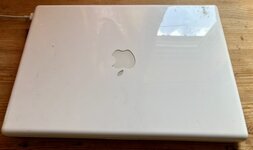
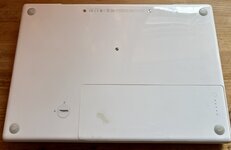
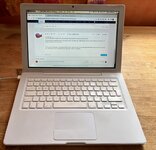
OTOH, as part of this project I've boosted the RAM by 50% to 3GB (I only had one spare 2GB 5300 DDR2 RAM module!). And this is more than fine. Under Mac OS X 10.7 with Chromium and 3 tabs open, I still have 1.47GB free!
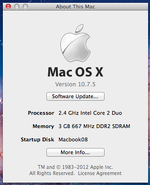
What shall I 'officially' call this Intel '08 MacBook? C2D It has to be 2 syllables:
- WhiteBook (too boring).
- cBook (not bad).
- 2Book (but it sounds like the number of MacBooks).
- DuoBook (would be a 68K Mac).
- TanCBook (has the 'C' in it; it is like a tank compared with modern MacBooks, but implies it's tan-coloured).
- IntBook?
- CIntBook.
- WIBook or WhImBook.

I'm sorry to see not! *sad MacBook optical eject noises*Well I'm not going to play this game.
Hey thanks! I guess I can dig out my copy of Snow Leopard and downgrade the WhImBook.We love to see it @Snial!

I'm currently eyeing one on eBay that needs some plastic welding work. I think it'd be fun to learnWhat's wrong with me?!?!?!
“Everything* deserves a shot at redemption” - Antman.
(* Actual quote says "Everyone", but there's a redemptive element in everything the 68KMLA does).


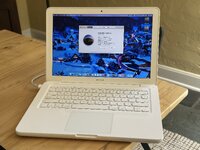
The battery may have gone dead - it isn’t immediately charging. Hopefully it will wake up after a few minutes!
Currently I have Catalina and Mavericks dual booted. You’re probably not gonna like what I’m replacing this setup with.
Looks pretty good!View attachment 100801
The battery may have gone dead - it isn’t immediately charging. Hopefully it will wake up after a few minutes!
If the battery is >10 years old (as most of them are nowadays), it is most likely dead. I'd love to be wrong, of course!
Hmm. Windows 10? Linux??Currently I have Catalina and Mavericks dual booted. You’re probably not gonna like what I’m replacing this setup with.
c
Battery woke up. It was at 86% health last time I cycled it, 200 something cycles.
Wanted to install it but of course Apple being Apple I first have to completely redo my partition map and install just Mavericks. So doing that now.
Wanted to install it but of course Apple being Apple I first have to completely redo my partition map and install just Mavericks. So doing that now.

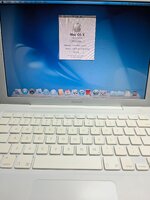
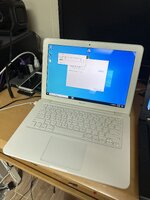
Ah, the joys of getting drivers working on an unsupported version of windows. This is already Windows install attempt 2. Attempt 1 corrupted itself when I let it get online and automatically try to install drivers...


Plug 'n Pray...
I might have to give up on Windows 10 and drop back to 7. Trying to run multiple version of the NVIDIA installer causes the laptop to crash and reboot...
Looks like the issue might be that I'm booting Windows in UEFI instead of Legacy. I hope that's all it is!
Hell yeah brother [queue Hulk Hogan holding up a white plastic macbook]there's a redemptive element in everything the 68KMLA does
The battery may have gone dead - it isn’t immediately charging. Hopefully it will wake up after a few minutes!
Woot!Battery woke up. It was at 86% health last time I cycled it, 200 something cycles.
I might have to give up on Windows 10 and drop back to 7. Trying to run multiple version of the NVIDIA installer causes the laptop to crash and reboot...
Good luck -- driver troubleshooting is the thing that *Linux* and *Windows* have in common! Le Gasp!Looks like the issue might be that I'm booting Windows in UEFI instead of Legacy. I hope that's all it is!
Thanks for the wishes of luck! "I hope that's all it is" has turned into "This MacBook won't see the installer USB when it's formatted as MBR which means I'm going to have to install Windows 7 off of DVD-ROM and then try to upgrade the install to 10 afterwards". WoohooGood luck -- driver troubleshooting is the thing that *Linux* and *Windows* have in common! Le Gasp!

@alectrona6400 @3lectr1cPPC @Snial Your MacBooks look so nice! Even the batter screw isn't completely stripped out. I'm jelly!
Mine only looks nice because it had a bad keyboard and I managed to find a NOS palmrest/keyboard to install. Here's the bottom, warped and yellowed as all of them are haha.@alectrona6400 @3lectr1cPPC @Snial Your MacBooks look so nice! Even the batter screw isn't completely stripped out. I'm jelly!
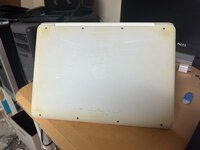
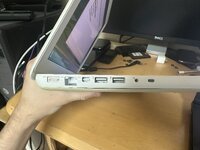
If you look closely at my earlier photos, you can see that the display bezel is also slightly yellowed.
Similar threads
- Replies
- 9
- Views
- 5K
