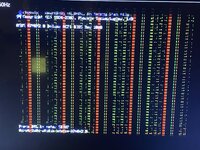
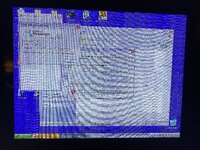
What happens if you modify the ROM to down clock the VRAM speed a little?So after my card warms up it starts to artifact as well - a sort of fine texture of yellow and blue dots over the whole screen. Very odd.


What happens if you modify the ROM to down clock the VRAM speed a little?So after my card warms up it starts to artifact as well - a sort of fine texture of yellow and blue dots over the whole screen. Very odd.

What happens if you modify the ROM to down clock the VRAM speed a little?
I didn't know how your VRAM was rated sorry, if it is faster than needed it shouldn't be that.The ROM I’ve used sets the VRAM to 250MHz, and the VRAM is rated at 3.6ns/275MHz. So it’s already clocked conservatively. Don’t you think it’s more likely that one of the chips is bad?
I put the card back in my PC and restored the original BIOS - the same corruption is there, works fine at cold boot - symptoms appear after 20 mins and get progressively worse.I didn't know how your VRAM was rated sorry, if it is faster than needed it shouldn't be that.
Although my current video card project has some VRAM that is not performing at its rated speed.
Time to start pinching components between your fingers and see which components change the artefacting. Try with both a static screen and some simple motion.The seller was nice – they refunded it and let me keep the card.
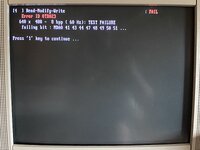
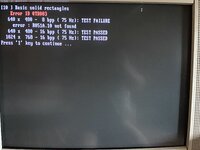
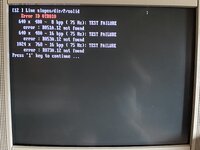
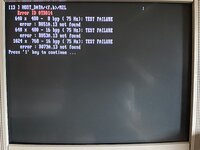
Screenshots attached. I wonder if it's more likely VRAM or the GPU.
Don’t electrolytic caps on video cards eventually go bad?

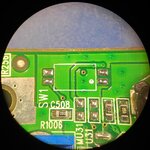
Nice work! The switch thing is also mentioned at The Mac Elite. My PC Radeon 9000 Pro card might be a bit of an oddball. Here's its switch footprint under magnification:On my first attempt I got a screen full of garbage too. My card looks the same as yours except that it has a switch populated at SW1 next to the VGA connector. I see your card has the pads, but no switch populated. Anyway, referring to @Jacques photos above, I moved switch #2 to the ‘on’ position and then the card worked fine on the next boot attempt. I didn’t have to adjust the resistors under the heatsink. So you may want to look at bridging the top two pads of your SW1 footprint (and potentially putting back R227/R229).

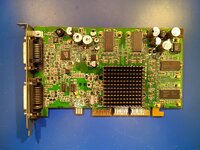
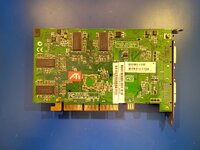
Great point. Lots of these cards, especially when sold as "untested" but sometimes even "pulled from a working environment" are e-waste and have physical damage from time spent in scrap bins.Another thing to inspect is the backside of the board - these cards get shoved in drawers or boxes and damaged. Mine had a few resistors knocked off and a couple of VRAM pins bent/shorted together when I received it off eBay.
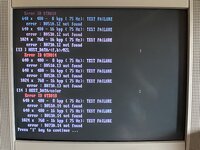
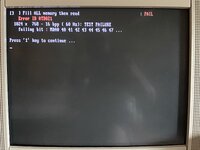
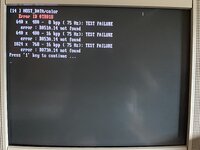
Bummer. Since you have it in a PC, you might be able to boot into DOS and use R6XMEMID to narrow down which DRAM channel(s)/bit(s) are having errors. I'm not sure what the mapping of channels to physical chips is on these cards, but there's a Radeon 9200 schematic posted at VOGONS and the 9000 is really similar, so it might not be too hard to figure out.I put the card back in my PC and restored the original BIOS - the same corruption is there, works fine at cold boot - symptoms appear after 20 mins and get progressively worse.
So it’s just a dud card.
Looks like bad vram to me, like one of my old Tseng Labs cards which had an issue with a socketed vram upgrade. As soon as I took the socketed chip out the card worked fine. Also looks a bit like the issue I had on a GTX 680 card.
Nice work! The switch thing is also mentioned at The Mac Elite. My PC Radeon 9000 Pro card might be a bit of an oddball. Here's its switch footprint under magnification:View attachment 98530
As you can see, the top pads do not connect to anything! Even if one of those dual switches was populated, the top switch (#2) wouldn't do anything. The bottom switch looks like it would ground whatever that via connects to. I did try to short that with a wire before I moved the resistors, and it had no effect.
If you ever remove the heatsink on your card, I'd be very curious to see whether it already has R228 and R230 populated vs. R227 and R229
Great point. Lots of these cards, especially when sold as "untested" but sometimes even "pulled from a working environment" are e-waste and have physical damage from time spent in scrap bins.
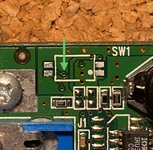
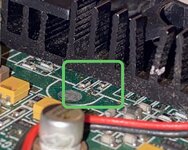
Is that switch PAL / NTSC? Does your card have video out (svideo or RCA)?Here’s my card with that switch desoldered for comparison. The via indicated with an arrow seems to go to the shared pad between R229 and R230.
View attachment 99811
Even without removing my heatsink you can just see how my resistors are set up.
View attachment 99812
Is that switch PAL / NTSC? Does your card have video out (svideo or RCA)?
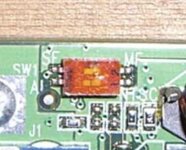
MostSignificant First, LeastSignificant First?Yes, my card has S-Video out.
My switch doesn’t have any silkscreen labelling to indicate what the switch does. But the photo of an R9000 from the Mac Elite does:
View attachment 99826
Looks like the lower switch is PAL/NTSC, while the upper switch is the Mac/PC toggle. Not sure what SF and MF stand for but I think it could be something to do with the way the ROM is presented or accessed?
Bummer. Since you have it in a PC, you might be able to boot into DOS and use R6XMEMID to narrow down which DRAM channel(s)/bit(s) are having errors. I'm not sure what the mapping of channels to physical chips is on these cards, but there's a Radeon 9200 schematic posted at VOGONS and the 9000 is really similar, so it might not be too hard to figure out.