Smoke out of the SE/30 Video ROM

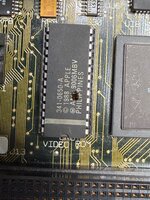
So, this SE/30 had smoke coming out of its video ROM (see cracked/dark spot on the attached picture).

What I have done so far:
- Analog board and PSU recapped and successfully tested with another SE/30 logic board
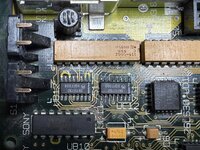
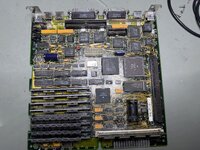
- Recapped the SE/30 logic board - there are still broken traces around the Sony chip that need to be fixed.

I don't suppose these broken traces cause the video ROM to overheat. However, I'm wondering if this symptom could be related to other broken traces? Could the video ROM just be defective and the Mac would work with a new ROM? I doubt, however, let me know what you tink.
 

Attachments

  • Video ROM.jpeg
    Video ROM.jpeg
    3.1 MB · Views: 28
  • Logic Board Sound Chip.jpeg
    Logic Board Sound Chip.jpeg
    3.2 MB · Views: 27
  • Logic Board mit neuen Caps.jpeg
    Logic Board mit neuen Caps.jpeg
    6.5 MB · Views: 26
So, my educated guess is that the soldering around C10 has shorted a 5v line to a 12v line. I have a vague recollection of someone else doing that around here. The problem is if that’s happened it may well have destroyed other components on the board too.

First thing I’d do is check for any shorts in that area. It’s particularly easy to do with tantalum’s due to the big connector they have that wraps around the component.
 
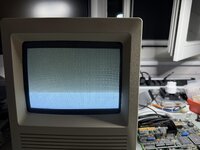
Thanks, there was indeed a solderbridge at C9! Now the Mac shows this. Would it be safe to replace the video ROM with one known working?
 

Attachments

  • IMG_0283.jpeg
    IMG_0283.jpeg
    4.2 MB · Views: 25
I guess it depends on if there’s any other potential sources of an over voltage. Might be worth probing the pins from a known working board and then comparing the voltages to that to the broken one before swapping… though personally if it were me I’d probably just swap and pray to the flying spaghetti monster that it’s not gonna fry its noodle.. I wouldn’t recommend this course of action though 🤣
 
good practice might be to check for shorts after pulling that blown rom, so +5 to Ground, +12v to Ground and +5 to +12v.
personally after i do a full recap i normally just quickly check for power rail shorts before i power on. particularly due to the cap goo often eating away solder mask and these macs often run traces under the caps. being that you've changed from electrolytic to tants and they have different pad footprints its probably more so important to check for shorts.
 
Yes, checking for shorts seems very reasonable. Here's what I noted:

+5 to Ground: 140 Ohm
+12v to Ground: 53 Ohm
+5 to +12v 140 Ohm

It looks like there are many more shorts. I'll need to investigate further.
 
Yes, checking for shorts seems very reasonable. Here's what I noted:

+5 to Ground: 140 Ohm
+12v to Ground: 53 Ohm
+5 to +12v 140 Ohm

It looks like there are many more shorts. I'll need to investigate further.
It’s plausible that original bridge has damaged other components on the board and caused the shorts there, so don’t just look for other trace related problems. A thermal camera may come in handy here’s
 
Back
Top