• Hello MLAers! We've re-enabled auto-approval for accounts. If you are still waiting on account approval, please check this thread for more information.

Picked up a few macs, don't know where to start

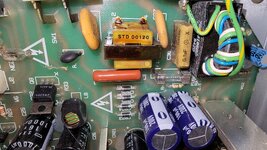
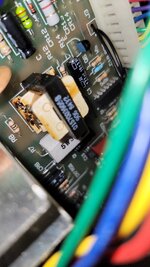
I tested the SE before I took it apart and it would turn on, red light for harddrive but a dead screen. I thought maybe if i take it apart and clean it up and clean the connectors put a new battery in maybe it will work.

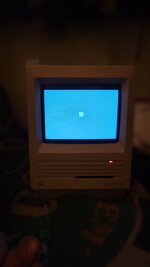
Well I got lucky I was right i put it all back together and the screen is alive! I'm pretty sure the HD is toast its red light and comes up with the ?, but thats simple ill take it all day over a bad screen.

Does it look like this is simply a case of an old dead drive?
 

Attachments

  • 20250828_203947.jpg
    20250828_203947.jpg
    793.1 KB · Views: 23
The reason the video didn’t come on until you removed the radius is because the radius was the main screen in the monitors control panel. Once it’s removed the main screen in monitors control panel reverts back to the internal screen.
 
The reason the video didn’t come on until you removed the radius is because the radius was the main screen in the monitors control panel. Once it’s removed the main screen in monitors control panel reverts back to the internal screen.
I put the radius back in though and i remember hooking it up for sure so why would it work now? maybe i fucked it up lol
 
Maybe the old battery was still good and holding settings? That would make sense, then when i cut it it reset the settings to default
 
I always thought it was strange how 2 of the same batteries could be kept in the same environment and 1 could have blew up 20 years ago and the other is still holding a charge after 38 years lol. On the SE Superdrive one i have there was a mint condition maxell in there lol lucky
 
Just cut the legs on the battery and worry about desoldering the rest of the legs until later.

Running without a battery is just better and less stressful. There are software solutions to solve the annoyances that come with it. That's why I created https://machut.net/forcey2k.html so that, if you're not bothered about an accurate date/time, you can at least have one set at boot.

But there's also a way to set the time over the network without a battery: https://68kmla.org/bb/index.php?thr...lord-the-revived-appletalk-time-server.38553/

https://macintoshgarden.org/apps/pram-auto-restore will reset PRAM to a default so you can keep your mouse settings etc in-between reboots without a battery.
 
Now I have the 128k with the same problem you fire it up and it has startup sounds but dead screen. Where do you recommend I start? I have no battery in it right now if that could be a reason, it has that oddball battery thats like a AA but the voltage is different.
 
Now I have the 128k with the same problem you fire it up and it has startup sounds but dead screen. Where do you recommend I start? I have no battery in it right now if that could be a reason, it has that oddball battery thats like a AA but the voltage is different.
Nothing to do with the battery. All Macs, bar a small number of models, run absolutely fine without a battery.

Most likely weak solder joints on the analog board, or on the power connector between the LB and AB.
 
Just cut the legs on the battery and worry about desoldering the rest of the legs until later.

Running without a battery is just better and less stressful. There are software solutions to solve the annoyances that come with it. That's why I created https://machut.net/forcey2k.html so that, if you're not bothered about an accurate date/time, you can at least have one set at boot.

But there's also a way to set the time over the network without a battery: https://68kmla.org/bb/index.php?thr...lord-the-revived-appletalk-time-server.38553/

https://macintoshgarden.org/apps/pram-auto-restore will reset PRAM to a default so you can keep your mouse settings etc in-between reboots without a battery.
I put the IIgs battery kit i found on ebay https://www.ebay.com/itm/235645917276 in it and i put the holder sitting next to the HD. So all I have to do is take the cover off to change the battery.
 
I put the IIgs battery kit i found on ebay https://www.ebay.com/itm/235645917276 in it and i put the holder sitting next to the HD. So all I have to do is take the cover off to change the battery.
Yeah... it's just another thing to remember isn't it? When you have a lot of machines, no battery is just less stress. The battery isn't as important as people think and people tend to really overthink solutions to it, so not having it there at all has always been my preference.
 
Yeah... it's just another thing to remember isn't it? When you have a lot of machines, no battery is just less stress. The battery isn't as important as people think and people tend to really overthink solutions to it, so not having it there at all has always been my preference.
I keep them out of most of my machines i just find this machine a pain in the ass to get to the battery.

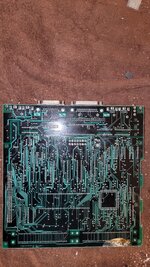
Here is the 3rd SE FDHD with the battery explosion i took pictures of the board what do you think? I think bad
 

Attachments

  • 20250828_223831.jpg
    20250828_223831.jpg
    2.3 MB · Views: 25
  • 20250828_223816.jpg
    20250828_223816.jpg
    2 MB · Views: 30
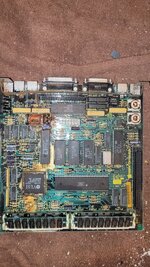
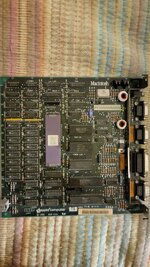
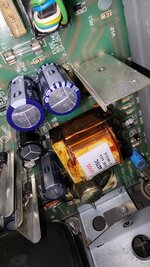
Here are some pics of the "128k" inside and the board. Someone mentioned that most were upgraded to 512k are these pictures sufficient to determine if its a 128k or a 512k? Also does anyone see anything that may cause the screen to not work? I know it could be bad solders probably is just trying to troubleshoot. Thanks
 

Attachments

  • 20250828_231351.jpg
    20250828_231351.jpg
    1.6 MB · Views: 27
  • 20250828_231243.jpg
    20250828_231243.jpg
    1.9 MB · Views: 20
  • 20250828_231234.jpg
    20250828_231234.jpg
    1.9 MB · Views: 11
  • 20250828_231222.jpg
    20250828_231222.jpg
    1 MB · Views: 14
I keep them out of most of my machines i just find this machine a pain in the ass to get to the battery.

Here is the 3rd SE FDHD with the battery explosion i took pictures of the board what do you think? I think bad
Oof, poor GLU chip. Someone will want that board for parts though, there's still some good stuff there. SWIM chip, Bourns filters, etc.
 
I keep them out of most of my machines i just find this machine a pain in the ass to get to the battery.

Here is the 3rd SE FDHD with the battery explosion i took pictures of the board what do you think? I think bad
Potentially salvagable if parts are moved to a new board, though your GLU might be dead. If you want to make it into a project, see https://maceffects.com/products/macintosh-se-reloaded-logic-board

Unfortunately this doesn't work on SE's :(
Ah, I didn't know that. Strange.

Even so, it's probably easy enough to write an AppleScript to set the mouse speed and stick that in Startup items so it runs after boot.

Or do I need to write another extension :p
 
I keep them out of most of my machines i just find this machine a pain in the ass to get to the battery.

Here is the 3rd SE FDHD with the battery explosion i took pictures of the board what do you think? I think bad
I think bad as well, maybe the Roms and SWIM can be saved.
 
Here's my thought: these machines ran for 20+ years without battery explosions. It is not like there was some massive recall in the 90s because of SEs being rendered unusable because of battery explosions. If you put a new one in there, it won't blow tomorrow. It will likely be twenty years before it is an issue. If you want to be safe, change it out after ten. The fact is that it isn't like you are going to be opening the case and pulling the battery every week. It isn't a pain at all.
 
Here's my thought: these machines ran for 20+ years without battery explosions. It is not like there was some massive recall in the 90s because of SEs being rendered unusable because of battery explosions. If you put a new one in there, it won't blow tomorrow. It will likely be twenty years before it is an issue. If you want to be safe, change it out after ten. The fact is that it isn't like you are going to be opening the case and pulling the battery every week. It isn't a pain at all.
And yet, I’ve had batteries (not in Macs) go bad and leak after just a few years. Not worth the risk in my opinion.
 
Back
Top