• Hello MLAers! We've re-enabled auto-approval for accounts. If you are still waiting on account approval, please check this thread for more information.

Picked up a few macs, don't know where to start

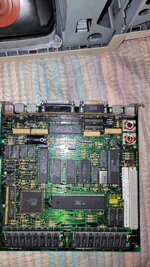
A sharp image of the motherboard means a subject matter expert can tell just by looking at the RAM area and ... is it a few resistors? Pretty sure the ROMs are the same, or at least similar. If it boots and works properly, the About the Finder... will tell you right away too.

Those LC ROMs are interesting. One of our ROM experts like David Cook could probably poke around that.
 
A sharp image of the motherboard means a subject matter expert can tell just by looking at the RAM area and ... is it a few resistors? Pretty sure the ROMs are the same, or at least similar. If it boots and works properly, the About the Finder... will tell you right away too.

Those LC ROMs are interesting. One of our ROM experts like David Cook could probably poke around that.

Will take a high quality pic of the board tomorrow thanks
 
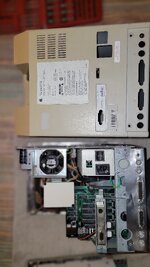
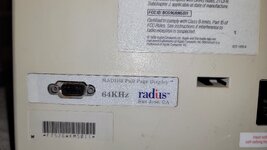
Its about bedtime now but i remembered where my driver extensions were so i opened up the non superdrive SE as i noticed it had something on the back the others didnt theres some type of expansion card in it called Radius full page display 64khz. Am not going any further on anything tonight but tomorrow ill strip down all 3 of the SEs. How common were these?
 

Attachments

  • 20250826_005434.jpg
    20250826_005434.jpg
    1.2 MB · Views: 19
  • 20250826_001526.jpg
    20250826_001526.jpg
    1.4 MB · Views: 18
You talking about these? I just popped it open to look

Yes, VERY interesting indeed!
Definitely worth a dump, though the final LC ROM has a date on it of 9/24/90 and these were made after, so there's a good chance it has the final ROM on it and they're just pre-release burns.

Dumping it from a booted OS should be fine, you don't need a ROM programmer. If the checksum is something other than 350EACF0, that means it's interesting!
 
expansion card in it called Radius full page display 64khz. <snip> How common were these?

Somewhat common, in the scheme of things. Mac SEs on their own were fine for use as word processors and not a lot else without a second display. Second displays started popping up from various companies, but the main one was Radius. Any graphic designer/studio with the budget would have one of these. My dad, being a freelancer just working for himself, could barely afford his SE and LaserWriter II, so he never had a second display even though it would've made his workload a lot easier.
 
Somewhat common, in the scheme of things. Mac SEs on their own were fine for use as word processors and not a lot else without a second display. Second displays started popping up from various companies, but the main one was Radius. Any graphic designer/studio with the budget would have one of these. My dad, being a freelancer just working for himself, could barely afford his SE and LaserWriter II, so he never had a second display even though it would've made his workload a lot easier.
Thanks for the info. I did some research myself on it, looks like it was used in conjunction with a tall long monitor the shape of a sheet of paper thus the full page. For graphics design and word processing, like you mentioned. Pretty cool stuff
 
I was curious about this card i posted on page 2 and I found the manual for it online apparently it was some kind of card for making television or something. Computer Friends Inc TV Producer heres the manual

I was just curious about it
 
For those Roms in the LC, they are pretty common indeed, the very first batch was sold with those "Confidential" tags on it, should have two LCs with them, just an early model, nothing more.
 
For those Roms in the LC, they are pretty common indeed, the very first batch was sold with those "Confidential" tags on it, should have two LCs with them, just an early model, nothing more.
Oh good to know, a bunch of people learned something not just me lol.
 
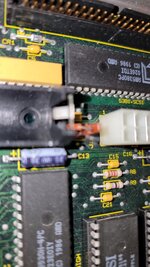
Going to break down the 3 SEs today and take the batteries out. This is my first time taking apart an SE I had a minor hiccup. I kind of breezed through a youtube video of a breakdown and it didnt show the removal of the wires off the logic board so i just did it myself as i figured it was simple enough. When pulling it out apparently the speaker wire was snagged and bent the prongs slightly to the side. No permanent damage, but annoying, and it could have been damage. So this is the first of 3 this is the one branded SE SuperDrive.

This is the nicer of the 2 fdhd models so it will be the main one id use i suppose, so I have a couple new lithium 3.6v battery that i bought fairly recently for my LC 575 and my imac g3. I am going to put one in this machine as replacing the battery in this machine is not as simple as doing it in those machines.

Looks pretty good otherwise though, I think?

What is the best way to unplug the speaker cable before removing the logic board?
 

Attachments

  • 20250826_120423.jpg
    20250826_120423.jpg
    1.2 MB · Views: 9
  • 20250826_120435.jpg
    20250826_120435.jpg
    2.3 MB · Views: 9
  • 20250826_120445.jpg
    20250826_120445.jpg
    1.7 MB · Views: 10
  • 20250826_120450.jpg
    20250826_120450.jpg
    1.2 MB · Views: 10
To answer one of my above questions, I realize now the logic board kind of swings open like a door a bit allowing you to easily disconnect and connect the speaker wire. Also to change the battery lol so no need to take all the drives out!
 
To answer one of my above questions, I realize now the logic board kind of swings open like a door a bit allowing you to easily disconnect and connect the speaker wire. Also to change the battery lol so no need to take all the drives out!
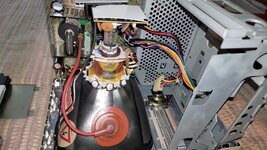
When you're taking these apart and unplugging things from the logic board, be careful that a cable you're pulling on doesn't suddenly come free and cause your hand to slam into the fragile CRT neck. If you crack or break that glass at the back of the tube, that tube is dunzo.
 
When you're taking these apart and unplugging things from the logic board, be careful that a cable you're pulling on doesn't suddenly come free and cause your hand to slam into the fragile CRT neck. If you crack or break that glass at the back of the tube, that tube is dunzo.
Thanks for the tip. I was aware of the fragility of the necks on these. The glass looks pretty damn thin. I've taken apart a good amount of CRT tvs in the past and have done minor solder repairs. I hope to take that to the next level soon..
 
I always slice the clip off of the logic board power connector on the compacts so it's easier to disconnect without accodents 😄
 
Keep posting your finds and questions, it’s a great thread watching someone go through a pile. Perhaps record a video while you go.
 
If it helps, I've taken loads of those buggers to bits at this point and you know what? I still sometimes forget the speaker connector and end up bending the pins. It's just one of those things.
 
Back
Top