• Hello MLAers! We've re-enabled auto-approval for accounts. If you are still waiting on account approval, please check this thread for more information.

Retro68 build issues.

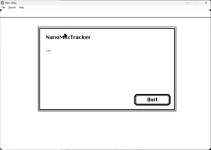
Cool! Yeah, there is no text output since I switched to using a real Mac Dialog box. The "..." static text was supposed to be replaced on the fly by status messages. But that didn't work the way I expected it. This is also due to the fact that I don't have any good guide for toolbox programming.

But I am sure one of you guys will be able to add some nice Mac-like GUI. Also a file selector would be nice.
 
Cool! Yeah, there is no text output since I switched to using a real Mac Dialog box. The "..." static text was supposed to be replaced on the fly by status messages. But that didn't work the way I expected it. This is also due to the fact that I don't have any good guide for toolbox programming.

But I am sure one of you guys will be able to add some nice Mac-like GUI. Also a file selector would be nice.
file selectors used to be braindead simple by just calling a catch-all mac rom function and supplying it with up to 4 file extensions to get the filtering, it returned a file number to you after all was said and done. Then it got updated in later OSes.
 
Cool! Yeah, there is no text output since I switched to using a real Mac Dialog box. The "..." static text was supposed to be replaced on the fly by status messages. But that didn't work the way I expected it. This is also due to the fact that I don't have any good guide for toolbox programming.

But I am sure one of you guys will be able to add some nice Mac-like GUI. Also a file selector would be nice.
I'll be able to fix that and I've been looking at it a bit. I can see you've replaced the lea's module_data in the assembly code:

/* lea module_data+PATTERN_DATA_OFFSET(%pc),%a0 */
movea.l module_ptr(%pc),%a0
 
@MIST, @Mu0n , @8bitbubsy , @noglin @bribri .

Hi folks, I'm trying to work with Retro68. I can see from this example CMake.lst how it builds an application (NanoMacTracker).

Code:
cmake_minimum_required(VERSION 3.28)
project(NanoMacTracker)

enable_language(C ASM)
 

add_application(NanoMacTracker
    nanomactracker.c
    wc_mod.s
    nanomactracker.r
   )

    # make the result as small as possible
    # by removing unused code (gc-sections)
    # and by removing macsbug function names on 68K
    # (don't do this when debugging...)
set_target_properties(NanoMacTracker PROPERTIES COMPILE_OPTIONS -ffunction-sections)
if(CMAKE_SYSTEM_NAME MATCHES Retro68)
    set_target_properties(NanoMacTracker PROPERTIES LINK_FLAGS "-Wl,-gc-sections -Wl,--mac-strip-macsbug")
else()
    set_target_properties(NanoMacTracker PROPERTIES LINK_FLAGS "-Wl,-gc-sections")
endif()

Retro68 builds a disk (.dsk) image for the application you've created, but I also want to add additional files, specifically .mod files. I can't find any documentation on the Retro68 GitHub page on what you can do with the cmake.lst stuff or how disks are built or the myriad of things I don't doubt you can do with it. Not even a doc directory. And the toughdev article doesn't cover this use case - and it's the first thing I want to do with it!!! I did check the examples too, but couldn't find anything there about adding extra files.
 
I'm glad you finally got it! That was some very good sleuthing there. It does sound like Homebrew left some x86_64 detritus behind that was messing things up.

(For what it's worth, I'll mention that I got retro68 compiling (granted in x86_64) using MacPorts instead of Homebrew. Even though MacPorts is less popular and doesn't have as many available packages, I've found it to be the better choice. Back when I used Homebrew it had a lot of issues that a good package manager really shouldn't, including but not limited to breaking already installed packages, and though it may be better now some years later, I'm still skeptical of it.)

As for the mod files, I might be able to help there because I've done a lot of digging around in retro68's guts. Most of the magic of actually assembling a working classic Mac app happens in retro68's command line tool Rez. It may do more stuff, but at the very least I believe it assembles the application (including its data and resource forks), and outputs the MacBinary and disk image versions of it. The source code for it is included, so if you really wanted, you could dig around in it and see if there's any way to expand it.

But probably a better approach is just to do it yourself. hfsutils are included as part of retro68, which is what it uses to create those disk images. You could edit your CMake file and add a step that executes after building the disk image that then copies in the other files you need into the disk image it generates, or create your own disk image from the MacBinary version of the compiled application plus whatever other files you want. hfsutils is documented here: https://linux.die.net/man/1/hfsutils and is pretty straight forward to use. How familiar are you with CMake?
 
Last edited:
I'm glad you finally got it! That was some very good sleuthing there. It does sound like Homebrew left some x86_64 detritus behind that was messing things up.
Yes, exactly. They have a policy for not producing universal libraries and includes, so this is a consequence.
(For what it's worth, I'll mention that I got retro68 compiling (granted in x86_64) using MacPorts instead of Homebrew.<snip>
I used MacPorts for PowerPC, but I didn't know it was still going for Intel and ARM64 (I have used MacPorts when setting up some PowerPC Macs in the past year).
<snip> digging around in retro68's guts.
Maybe we should turn this topic into a help guide then!
Most of the magic <snip> Rez. <snip> data and resource forks), and outputs the MacBinary and disk image versions of it <snip> hfsutils <snip> CMake file and add a step that executes after building the disk image that then copies in the other files you need into the disk image it generates <snip>. How familiar are you with CMake?
I think the HfsUtils is the way. I'm fairly familiar with that, but I don't really understand CMake even though I've used it with some ESP32 development. For example: Make just defines dependencies and allows you to run any build command, so I can see how Make could create an application bundle. However, I don't yet understand how CMake can understand how to put together a Classic Mac application add_application(NanoMacTracker nanomactracker.c wc_mod.s nanomactracker.r ) . I don't see where the post-build steps go, because add_application appears to be a later build step than set_target_properties and none of these look like command lines.
 
Regarding retro68k, I haven't tried it yet. I might want to use it for compiling the ndrv for my emulated PCI graphics card for DingusPPC. I don't have an Apple Silicon Mac so I might not run into the same problems. I'm currently still using Monterey which Homebrew does not support but most of it still works (it may cause problems for me later).
Currently, I compile the ndrv for QEMU in QEMU (used to do it in SheepShaver). Being able to compile on the host system would be nice, but I'm using the same CodeWarrior setup I've used for over 20 years, so I've got rather comfortable with it. Beats having to struggle with multiple layers of dependency hell every few years when I want to re-compile on a new host OS with new homebrew version and new build library versions....
 
@bribri . I still don't know how to incorporate hfsutils commands into CMAKE, but instead I wrote a simple shell script which calls hfsutils commands to add a .mod file to the .dsk image. That will do for now. I've been playing around with revamping the MOD tracker prep code as per my comments in the MOD Tracker thread. I wanted to test the basic processing on the host, just compiling it in GCC (well, Clang), but I haven't yet found the #defines that allow me to tell if I'm compiling for 68K under classic Mac or native. I've looked on the Retro68 home page; a couple of blog posts (like ToughDev) and also in the Retro68 header files, but still haven't found it.

It might be something as simple as _Retro68_ , but not knowing what it is, makes me reluctant to guess.
 
Sorry for my gaps in responding to this... life is busy at the moment! But I think I can help.

I think creating a shell script that does what you want is the right approach, and you can tell CMake to run it automatically every time your application is built. The general approach is something like this:

Code:
add_custom_command(
    OUTPUT ${CMAKE_CURRENT_BINARY_DIR}/<MyApplication>_with_mods.dsk
    COMMAND <path to your script here plus any arguments>
    DEPENDS <MyApplication>_APPL
    COMMENT "Creating disk image with MOD files"
)
add_custom_target(create_mod_file_disk_image ALL DEPENDS ${CMAKE_CURRENT_BINARY_DIR}/<MyApplication>.dsk)
add_dependencies(<MyApplication> create_mod_file_disk_image)

Replace any instance of <MyApplication> with the name of your project that you pass into add_application. That tells CMake the disk image generated by your script is dependent on the disk image created by Retro68 (and <MyApplication>_APPL is the name of the task that generates it), and that the entire project is dependent on this new task you're defining that calls your script and generates your disk image, and so that should run your script every time you build.

I recommend setting up your script so that it takes as one of its arguments the path of the disk image you want to generate, so that you can define it in your CMake file and make sure it's consistent, since CMake needs to know it's full path in order for all of this to work.

You can take a look at add_application.cmake in Retro68's toolchain directory to see what add_application does and how it sets everything up.

I think CMake is not the easiest build system to learn, and in spite of being an experienced developer I struggled with it and bounced off of it for years. I wish a better designed one with more clear syntax won out in the end. But at least CMake is very capable.

As for detecting when you're compiling with Retro68....

There's a number of options. You check the compiler is gcc or clang with #ifdef __GNUC__, which both compilers will define. If you need to check for clang specifically, you can look for __clang__.

You can also check if the current compiler is CodeWarrior (assuming you're using that on a classic mac) with #if (defined __MWERKS__ || defined __CWCC__). I think (but am not 100% sure) you can detect Think C / Symantec's compiler by looking for THINK_C. And I think MPW is MPW_C.

You can also just add this to your CMake file:

Code:
add_compile_definitions(RETRO_68)

and then use #ifdef RETRO_68

Hopefully that gets you what you need!

 
Sorry for my gaps in responding to this... life is busy at the moment! <snip>
Thank you very much for sparing the time, all the Cmake stuff looks very helpful!
As for detecting when you're compiling with Retro68.... <snip> add this to your CMake file:

Code:
add_compile_definitions(RETRO_68)
OK, thanks again! That'll do the job. I'm likely to define it as __Retro68__ as __MWERKS__ and the other compiler environment defines have a double '__' on either side. It's a good point about being able to compile for multiple compilers. One of the reasons I wanted to distinguish between Retro68 and a pure host test environment is that although my new code is pretty standalone, it still uses a couple of Toolbox functions (e.g. BlockMove) and rather than using clib functions (which would be wrappers for ToolBox functions on a Mac) I'd sooner define a wrapper for a clib function in this case.

-cheers from Julz
 
Sorry for my gaps in responding to this... life is busy at the moment! But I think I can help.

I tried adding the custom command making my CMakeLists.txt file:

Code:
cmake_minimum_required(VERSION 3.28)
project(NanoMacTracker)

enable_language(C ASM)
 

add_application(NanoMacTracker
    nanomactracker.c
    wc_mod.s
    nanomactracker.r
   )

    # make the result as small as possible
    # by removing unused code (gc-sections)
    # and by removing macsbug function names on 68K
    # (don't do this when debugging...)
set_target_properties(NanoMacTracker PROPERTIES COMPILE_OPTIONS -ffunction-sections)
if(CMAKE_SYSTEM_NAME MATCHES Retro68)
    set_target_properties(NanoMacTracker PROPERTIES LINK_FLAGS "-Wl,-gc-sections -Wl,--mac-strip-macsbug")
else()
    set_target_properties(NanoMacTracker PROPERTIES LINK_FLAGS "-Wl,-gc-sections")
endif()

add_custom_command(
    OUTPUT ${CMAKE_CURRENT_BINARY_DIR}/NanoMacTracker_with_mods.dsk
    COMMAND DskAddFile.sh build/NanoMacTracker.dsk axel_f.mod
    DEPENDS NanoMacTracker_APPL
    COMMENT "Creating disk image with MOD files"
)
add_custom_target(create_mod_file_disk_image ALL DEPENDS ${CMAKE_CURRENT_BINARY_DIR}/NanoMacTracker.dsk)
add_dependencies(NanoMacTracker create_mod_file_disk_image)

Unfortunately, it just created an error when I ran the cmake command:

CMake Error: The inter-target dependency graph contains the following strongly connected component (cycle):
"NanoMacTracker" of type EXECUTABLE
depends on "create_mod_file_disk_image" (strong)
"create_mod_file_disk_image" of type UTILITY
depends on "NanoMacTracker" (strong)
At least one of these targets is not a STATIC_LIBRARY. Cyclic dependencies are allowed only among static libraries.
CMake Generate step failed. Build files cannot be regenerated correctly.


This will seem like a really dumb error, but it illustrates my lack of understanding well.

Code:
add_compile_definitions(__Retro68__)
This worked though! Adding this:

#ifdef __Retro68__
#warning Retro68 defined!
#endif


to the beginning of nanomactracker.c generated:

warning: #warning Retro68 defined! [-Wcpp]

This means I can do some host-based testing!

-cheers from Julz
 
Okay, I think that one was on me, and I did tell you to set up a circular dependency.

Rather than having the custom_command be dependent on NanoMacTracker_APPL, does it work any better if it's dependent on build/NanoMacTracker.dsk ? I think that should create the right chain of dependencies, where you're telling it your script needs to run in order for the project to be considered fully built, and the command needs to run after Retro68 generates a disk image.

Failing that, you can try making the custom command be a post-build command. You'd do that like:

Code:
add_custom_command(
    TARGET NanoMacTracker
    POST_BUILD
    COMMAND DskAddFile.sh build/NanoMacTracker.dsk axel_f.mod
    COMMENT "Creating disk image with MOD files"
)
and then I don't think it would require add_custom_target and add_dependencies. But I'm not 100% sure about that! There's still a lot about CMake that I stumble over.
 
Hi Snial! Only just saw this post. I went on a Retro68 kick earlier this year, and built it on Linux and MacOS X and have used it quite a bit. I didn't have any trouble on Linux or my Apple Silicon MacBook Pro...at the time.

I was doing quite a bit of MacOS 9 coding on a Tiger G4, so wanted to have a version running there. I ran into almost exactly the same problem with the Boost library you did. I fumbled around for quite a bit in very similar ways you did, but eventually gave that up, bumping my head against Boost was very painful, when I figured out workarounds and using different ways to deal with the resource forks than Retro68's non-building library. This allowed me to use Retro68 to build PPC, but not m68k apps. (As the m68k linker uses Retro68's resource lib). https://macintoshgarden.org/apps/retro68-built-tigerbrew

Boost is a beast. I didn't have any trouble building Retro68 on my Apple Silicon machine earlier this year, but wonder if I tried a fresher build if I'd run into the same problems due to a newer version of Boost?!?

I also wasn't familiar with CMake prior to using Retro68...but by looking at the Makefiles it generates, figured out how to use Retro68 quite well without it. Using it just like any version of gcc to get an "executable", and then dealing with the resource forks (and/or converting to PEF or CODE resources) by using post linking scripts I wrote.
 
Last edited:
Yes, it does it all as a single segment, because it is just a version of gcc, which creates unix style .o files, and even an "executable" before using a custom backend on the ld linker to convert that to a Mac format. (Either CODE or PEF). Since the linking to .a files is done before conversion, you can't even link in multi segs if you somehow had them in libs, etc. You need a linker that creates multi segments.

In theory you could take code created with Retro68 (CODE resources) and use them with a different linker, like MPW's, but would probably run into symbol naming conventions, not to mention different runtimes. If you did that, you COULD have a final result with multiple segments.

Having a single segment really limits your app size when running on pre-020's like actual plain 68000's where some branch instructions can be limited to a 16 bit offset. Since Retro68's raison d'etre was targeting very low end old macs this is surprising.

A better backend for ld could be written, but it would obviously need to be smart enough to handle intersegment jumps. So wouldn't be trivial to write...but would be possible.
 
I don't remember the technical details, but I think Retro68 links stuff into a single segment in a manner that still works with 68000 macs. There's some kind of trick that allows that to work.

It also allows linking into multiple segments, if for some reason you want or need to do that. This project shows how to do that:
I think the gist of it is to add -Wl,--mac-segments to your link flags, followed by a path to a segmap file.
 
Back
Top