• Hello MLAers! We've re-enabled auto-approval for accounts. If you are still waiting on account approval, please check this thread for more information.

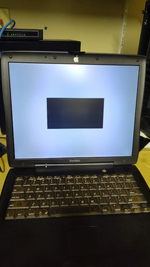
Help needed- Obscure issue with Powerbook Pismo G3. Black Square on Startup OSX 10.4.11

So, the problem is, latest startup is leading to the apple logo, (on 10.4.11) and then all of the sudden a black box appears where it would normally say login or OSX is loading. This is the issue I am having right now as I cannot enter OSX. This happened after installing Java, not sure which version (through shuriken's java updater, second option) and after the install was "sucessful" it pulled up one of those gray boxes saying that the system needs to restart unexpectedly. I have had those crashes before when installing various software so it might be an issue.

Pismo Firewire
400MHZ PPC
1GB SDRAM
6GB IDE
Firmware 4.1.8f5

Some of the issues I think could be possible culprits are:

The IDE Drive, it is small and could be the problem. I have a CF Adapter but no drives big enough.

The Pismo's heat- it gets really hot (after installing osx and the update, I could barely hold my hand on the heatsink for a few seconds)
Now, I am not sure when the fan kicks on, but it never did for what I was doing.
I did apply new thermal paste though.

And the firmware- I heard it caused issues but not really what specifically.

Finally- maybe it was just the install of Java, but it seems wierd as that was the last thing until the black box but it still crashed for some other programs.

See attached.
 

Attachments

  • Pismo.png
    Pismo.png
    717.8 KB · Views: 31
  • Pismo2.png
    Pismo2.png
    614.1 KB · Views: 25
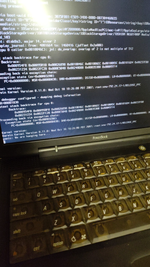
Welcome @MacPlus2300 , your pics are quite small I can't read the output of the crashlog - could you repost? I'd suggest the old IDE drive is on its way out and the javascript update bought it down.
 
oh yeah thats on my part. here you go. (by the way, the drive did sound okay. It has a few bad sectors but you might be right, if I get a new CF card I am sure it would work way better.) At least I still have one IDE drive that works.

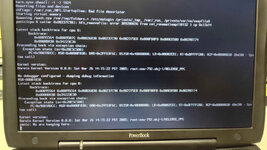
Text Conversion:

panic(cpu 0): jnl: do_overlap: overlap of 2 is not multiple of 512
Backtrace terminated - invalid frame pointer 0

Kernel loadable modules in backtrace (with dependencies):
com.apple.driver.AppleJournaledFileSystem(2.1)@0x2bb26000
dependency: com.apple.iokit.IOStorageFamily(1.5.6)@0x2baea000
dependency: com.apple.kernel.libkern(1.0)@0x2ba2c000
dependency: com.apple.kernel.mach_kernel(8.11.0)@0x0

Proceeding back via exception chain:
Exception state (sv=0x2c088280)
PC=0x00000000; MSR=0x00001030; DAR=0x00000000, DSISR=0x40000000
LR=0x00000000; R0=0x00000000 R1=0x2ffdae10 R2=0x00000000 R3=0x2fff0000
R4-R31 = 0x00000000 (all zero)

Kernel version:
Darwin Kernel Version 8.11.0:
Wed Oct 10 18:26:00 PDT 2007;
root:xnu-792.24.17.obj~1/RELEASE_PPC

panic: We are hanging here...

OKAY. Yeah... I think you are right.
after inspecting the log I can see that the journal is beyond recovery, likely due to space reasons...I'll keep the drive for a classic install.
 

Attachments

  • Pismo3.png
    Pismo3.png
    787.5 KB · Views: 25
Yeah looks like that stock HD is hosed, probably not worth keeping especially with bad blocks. Anything else in there will make the Pismo zip along.
 
Yeah looks like that stock HD is hosed, probably not worth keeping especially with bad blocks. Anything else in there will make the Pismo zip along.
Yeah, I have a few CF cards I can test with right now. I can just pop in an adaptor and reinstall everything. Thanks for the help. I might try to cleanup that drive.
 
Also, Theoretically, could i swap the G3 with a G4 processor? the BGA is the same. Would it work? If I am already upgrading I might as well continue
 
No, it’s not that simple - I’ve been soldering for years and BGA swaps for CPU and GPU, RAM are the point where I opt out. You will need significant upgrades in equipment for this to be successful. There are members on here that can possibly do the transplant if keen. You will need to change resistors and no software changes are required.

Overclocking the Pismo G3 400 CPU to 450 is also quite possible.
 
No, it’s not that simple - I’ve been soldering for years and BGA swaps for CPU and GPU, RAM are the point where I opt out. You will need significant upgrades in equipment for this to be successful. There are members on here that can possibly do the transplant if keen. You will need to change resistors and no software changes are required.

Overclocking the Pismo G3 400 CPU to 450 is also quite possible.
Interesting, I could probably do the swap with everything I have right now since I have been doing laptop bga for a while. I could try overclocking or the swap. Do you have any guides?
 
For upgrading the Pismo CPU there are a few options. A faster version of the same G3 (750S or 750L) can be installed to achieve ~550MHz. A later version of the G3 can be installed (750F or 750G) to achieve ~1GHz. An early G4 can be installed (7400 or 7410) to achieve ~550MHz with a MUCH higher memory bandwidth (and potentially larger L2 cache).

The power supply for the CPU in the Pismo is not very robust and If high temperatures are currently a problem, then some cooling improvements might be the first order of business. There have been both hardware and software changes involved in doing this.

The 7410 G4 with MPX bus conversion may be the best compromise of difficulty/speed/heat. The 750G G3 is probably the fastest.

The info about these various modifications is scattered around the forum. The SSD is low hanging fruit and will make a noticeable difference. For more involved modifications, this is probably a good thread to start with:

68kmla.org/bb/index.php?threads/imac-g3-rev-a-c-g4-cpu-upgrade.5043/
 
Yeah looks like that stock HD is hosed, probably not worth keeping especially with bad blocks. Anything else in there will make the Pismo zip along.
So, I used an IDE to SD converter and the whole 10.4 install went perfectly fine, just like the last drive. I used shuriken to download the 10.4.11 update, but it crashed right on the finish asking for a restart, and when it powered on, the black box appeared again.

Is there a firmware issue? I am running 2GB of PC133 and a 64GB Micro SDXC card. Everything should work fine. I also am cooling the processor with arctic silver now. The black box is still here. Any help would be greatly appreciated.

I didn't even mess with the Java updates yet this time. All I did was download something. Not sure what is causing this mysterious crash.
 
Yeah looks like that stock HD is hosed, probably not worth keeping especially with bad blocks. Anything else in there will make the Pismo zip along.
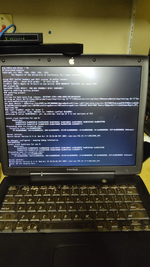
Additionaly, safe boot just powers off the system. Here is what it says
 

Attachments

  • IMG_20250727_172631281_HDR.jpg
    IMG_20250727_172631281_HDR.jpg
    238.8 KB · Views: 13
I think some of the usual troubleshooting techniques could help you narrow down the problem. Is it software, or hardware? Will it boot from install DVDs, or a known good firewire drive, etc.? If not, the the hardware could be the problem. Try different parts; remove one and then the other ram module, check cables/connectors/plugs, etc. You seem to think temperature is a factor. Point a fan at the whole computer--does it do anything different?
 
I can remember having some probs after doing Shuriken, went back to Sorbet.
maybe an error occured because something was not intstalled in strictly chronological order.
 
I think some of the usual troubleshooting techniques could help you narrow down the problem. Is it software, or hardware? Will it boot from install DVDs, or a known good firewire drive, etc.? If not, the the hardware could be the problem. Try different parts; remove one and then the other ram module, check cables/connectors/plugs, etc. You seem to think temperature is a factor. Point a fan at the whole computer--does it do anything different?
It does boot from a 10.4 install disk but fails. I used my powerbook G4 to install via firewire which worked fine. i have just been having trouble writing my own disks so i decided to use firwire. I have another pismo for parts but everything seems to be working fine. After putting some arctic silver on the processor it runs much cooler and the ram seems to work fine even switched in either slot. i cleaned out each slot and connector as well. I heard there can be problems with the latest firmware. Could that be an issue?

Edit: Do i need the pram battery????? Mine is dead. I can make a new one with coin cells if i know the voltage.
 
IIRC, the Pismo will need a pram battery to work properly ( but I don’t have a Pismo myself) the Wallstreet is playing ok without, but will have issues with backlight or contrast, the bronze don’t need a battery either (I have both and the batteries have been dead for a while now)
 
IIRC, the Pismo will need a pram battery to work properly ( but I don’t have a Pismo myself) the Wallstreet is playing ok without, but will have issues with backlight or contrast, the bronze don’t need a battery either (I have both and the batteries have been dead for a while now)
Ahh, okay, i will have to test out my own later and see if that makes a difference
 
okay, this is frustrating.
I swapped out a working pram from another system so:

1GB ram
SD to IDE adapter (64GB, SDXC)

Installed from target disk mode via another system. Used a download link from shuriken to start downloading 10.4.11, a little before the download is complete it crashed again and the black box appears once more.
 
Back
Top