• Hello MLAers! We've re-enabled auto-approval for accounts. If you are still waiting on account approval, please check this thread for more information.

Black Screen - Macintosh Plus

Hi guys,

I'm quite new to this Compact Mac-world, as the title says, when Mac is powered on, it gives the chime boot sound, but the screen is completely black. And after looking in Youtube most probably is due to need of recapping (probably the Analog Board) . Can anyone confirm or advice?

But the other question is, when inserting a floppy to the Mac, it makes a sound of something running or spinning in super speed mode, like if something would explode, does anyone have a clue about the root cause for this? (might be related to the symptoms mentioned above).

I apologize if my english or the text is not understandable.

Cheers,
AppleNerd
 
A couple of thoughts:

  1. Sorry if this sounds patronising, but we all miss things: you have found the brightness knob and checked that it's not all the way down, right?

  2. If you tap the analogue board side of the case relatively firmly, do you get any flashes of image?

The reason I ask (2) is that very often, but not always, this symptom is caused by a cracked solder joint on the connector that the LB <-> AB cable runs to on the analogue board. These solder joints are under both mechanical and thermal stress, and I'd tend to look at them before worrying too much about capacitors.

Generally the older, chunkier machines with through-hole caps are less susceptible to the kinds of cap leakage that really cause problems, although the analogue board caps can get dried out through heat. It's the SMD ones that are the machine-killers.
 
Hah; you brought back memories of pranks we used to play in the Mac Plus labs, where we'd turn the brightness down on all but one Plus, and then watch people try to figure out what was wrong.
 
the other question is, when inserting a floppy to the Mac, it makes a sound of something running or spinning in super speed mode, like if something would explode, does anyone have a clue about the root cause for this? (might be related to the symptoms mentioned above).
I'm assuming that you're hearing scuffing or whining as the disk spins? This could be the disk, but if you've never used the disk drive before, it may itself need some attention.

Sometimes, if you're reading a disk and a faint whine aligned with the rotation fades in an out, that can be a sign of a faulty diskette and you should copy its contents somewhere safe if they're important to you. You might try cleaning the disk as well.

If you get a squealing sound, the read head is making contact with the disk media and you should eject it as quickly as possible to avoid any further damage (and the disk is likely ruined).
 
Hah; you brought back memories of pranks we used to play in the Mac Plus labs, where we'd turn the brightness down on all but one Plus, and then watch people try to figure out what was wrong.
Yes, unfortunately, I already check the brightness-button though and that it's not the cause. But yea, i guess those pranks were good back in the old days :)
 
But the other question is, when inserting a floppy to the Mac, it makes a sound of something running or spinning in super speed mode, like if something would explode, does anyone have a clue about the root cause for this? (might be related to the symptoms mentioned above).
Could be a gear of the eject mechanism broke. Does the disk come out after a few seconds? When it is not a system disk, the Mac will ejects the disk. When one of the gears broke, the motor of the eject mechanism keeps spinning and that is maybe what you hear. Luckily these gears (it is just one of them) are easy to replace and can be found cheap on eBay. They are notoriously for perishing over time.
 
A couple of thoughts:

  1. Sorry if this sounds patronising, but we all miss things: you have found the brightness knob and checked that it's not all the way down, right?

  2. If you tap the analogue board side of the case relatively firmly, do you get any flashes of image?

The reason I ask (2) is that very often, but not always, this symptom is caused by a cracked solder joint on the connector that the LB <-> AB cable runs to on the analogue board. These solder joints are under both mechanical and thermal stress, and I'd tend to look at them before worrying too much about capacitors.

Generally the older, chunkier machines with through-hole caps are less susceptible to the kinds of cap leakage that really cause problems, although the analogue board caps can get dried out through heat. It's the SMD ones that are the machine-killers.
I have not dared to tap it firmly since this Mac Plus is my first baby :)
But now that you mention it , it reminded me when I use to slap my grandpa's TV's when i was a kid :D

I will try this right away.
 
Could be a gear of the eject mechanism broke. Does the disk come out after a few seconds? When it is not a system disk, the Mac will ejects the disk. When one of the gears broke, the motor of the eject mechanism keeps spinning and that is maybe what you hear. Luckily these gears (it is just one of them) are easy to replace and can be found cheap on eBay. They are notoriously for perishing over time.
THanks for the advice, that might be the case since i alway have to eject them manually , independent of which floppy I insert.
 
I'm assuming that you're hearing scuffing or whining as the disk spins? This could be the disk, but if you've never used the disk drive before, it may itself need some attention.

Sometimes, if you're reading a disk and a faint whine aligned with the rotation fades in an out, that can be a sign of a faulty diskette and you should copy its contents somewhere safe if they're important to you. You might try cleaning the disk as well.

If you get a squealing sound, the read head is making contact with the disk media and you should eject it as quickly as possible to avoid any further damage (and the disk is likely ruined).
Yes, I will check this whn i have all tools needed to open and troubleshoot
 
See my video in this comment.
I see, when you hit the computer, a fraction of a second, the boot screen. That is a sign of loose solder joints. Just a matter of reflowing them, specially these from the connectors on the analog board.

But from the floppy drive, I only hear the disk spinning and the steppenmotor of the diskheads moving. I don't hear the eject motor.
 
I see, when you hit the computer, a fraction of a second, the boot screen. That is a sign of loose solder joints. Just a matter of reflowing them, specially these from the connectors on the analog board.

But from the floppy drive, I only hear the disk spinning and the steppenmotor of the diskheads moving. I don't hear the eject motor.
Well, the flopp drive is not super crucial to me . I guess I can use Floppy Emulator in worst case. But I really want to get pass the black screen .
 
Ok, It really seems like @cheesestraws is correct on the tap- method. Any good video on the hands-on for this scenario?

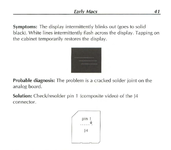
Yup, that looks like your solder joints are knackered. That's good news, because you can fix that without needing to replace any parts, you just need to remove the old solder with solder wick and put some new stuff on.

I don't know about video; I got this originally from The Dead Mac Scrolls - its page on the symptom looks like this:

Screenshot 2025-06-20 at 12.47.38.png

I'd suggest resoldering all the pins on J4 myself, if one of them is going the others are also likely to be in a parlous state. Do this before you start troubleshooting anything else seriously, because this connector also carries power to the logic board, and can cause other weird issues.

Anyone else know of a video tutorial for this?
 
Last edited:
Here is a no-video-repair. It is with a Mac 128K, but the effect and work around is the same:
That's wonderful !!

Although, the guy in the video didn't discharge the CRT (!?) which in my head is always a must when dealing with the AB.

This is how i understood the scenarios where it's needed or not discharging:
  • Removing the Floppy - No discharge of CRT needed
  • Remove the LB - No discharge of CRT needed
  • Remove the AB - Discharge of CRT is mandatory
  • Resoldering anything on the AB - Discharge of CRT is mandatory
Is this correct?
 
Thanks everyone !
And a huge thanks to @ESM-NL The resoldering of the J1 did the trick.
It took me a while because I needed some tools from the US.

My very first Fat Mac is alive and kicking.
 
Back
Top