• Hello MLAers! We've re-enabled auto-approval for accounts. If you are still waiting on account approval, please check this thread for more information.

System 7.5.5 on Mac Plus and HD20

Can you post the rest of those steps? I'm curious to see what the other steps are in those official instructions.
From what you've got there, I think System 7.0 or better was needed to either see an Apple-ROM CD-drive, or to run an extension to see a non-Apple CD-drive. Note that they don't say to boot off the CD (at least up to step 3), which tracks with my recollection that the Plus might not be capable of booting the 7.5.3r2 CD.

I'm 99.99% certain you can't launch the installer from a booted System less than 7.5.0.
 
I don't own a Mac Plus.

However I'm very certain that 7.0, maybe not with the Disk Tools System build, but a Minimal install is probably OK, is all you need. To mount the CD-ROM, all you'd need is the Apple CD-ROM extension. Whether it can boot from it, I couldn't say for sure.

It's a really tight fit, but you can get 7.0.1 on a 800KiB floppy disk.
 

Attachments

From what you've got there, I think System 7.0 or better was needed to either see an Apple-ROM CD-drive, or to run an extension to see a non-Apple CD-drive.

System 6 handles (Apple) CD-ROMs just fine. My IIsi, which runs 6.0.8, has an external CD-ROM that works great.
 
I'm very certain that 7.0, maybe not with the Disk Tools System build, but a Minimal install is probably OK, is all you need. To mount the CD-ROM, all you'd need is the Apple CD-ROM extension. Whether it can boot from it, I couldn't say for sure.

It's a really tight fit, but you can get 7.0.1 on a 800KiB floppy disk.

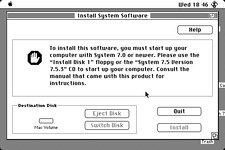
Just to re-state the problem: The 7.5.3r2 installer application requires that the computer running it be booted from System 7.5.0 or higher.
7.0 or 7.0.1 may mount the CD-ROM, but the installer will throw an error saying the computer running it has to be running 7.5.0 or higher.
 
I suppose we might need some more specifics because I can't say I can reproduce the problem.

I don't own a Mac Plus, or a SCSI CD-ROM drive. A BlueSCSI V2 should suffice though.

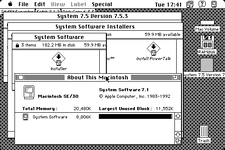
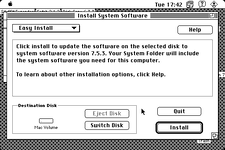
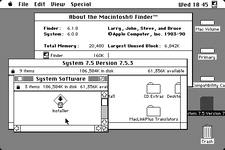
Downloaded "SYSTEM_7-5-3-RETAIL.ISO (255.30 MB)" from Mac Garden. Download #2. Put on the BlueSCSI as CD40. Results are below.

Picture 1.pngPicture 2.png
 
That's why I was asking if you can post the rest of that "Before you install" text file to see if it says anything about a booted OS limitation.
I could absolutely be remembering it wrong. You definitely have the 7.5.3r2 installer running from a booted 7.1! If I had lots of time, the next thing I'd do is go step-by-step backwards and try running it from a booted 7.0.1, and 6.0.8.

From the most recent post on the Compact Mac forum, it appears that someone swapped a 1.4MB floppy drive from a Mac SE into a Mac Plus and that works just fine? Do we know if that is the case? If that's the case and the cables all connect properly, that sounds like a smart upgrade for an "Ultimate Mac Plus" build.
 
Back in the day, I shoehorned 7.5.3r2 onto my Plus by attaching my HD SC 20 to a computer already running 7.5.3, mounting the CD, running the installer for a universal install, and then attaching the HD SC 20 back to my Plus.

But performance was horrible; I went back to 7.1 on the Plus.
 
Back in the day, I shoehorned 7.5.3r2 onto my Plus by attaching my HD SC 20 to a computer already running 7.5.3, mounting the CD, running the installer for a universal install, and then attaching the HD SC 20 back to my Plus.

But performance was horrible; I went back to 7.1 on the Plus.
Yep, that would definitely work.

That was kind of the crux of the defect report I filed against the 7.5.3r2 installer when I was a QA tester at Apple on that project. It went something like "You can't install on a Mac Plus without having some other (better) Mac available to work with to either prepare a boot hard drive, or to perform a universal install on an external target hard drive."

The engineers were like "Meh, that's okay. Nobody's going to run this on the Plus anyway." (They weren't very wrong.)

One of the QA engineers even had an Outbound (early 3rd party portable mac clone) and 7.5.3r2 installed on that just fine!

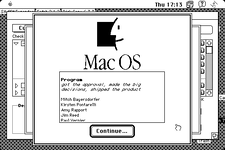
The developers included an "easter egg" in the installer. If you hold down the <Option> key when you double-click the installer, you will get a "roll credits" screen at the end of the install, with three colorful (on a color Mac) bouncing apples. The rolling credits screen lists the names of everyone involved in the development, QA, and marketing of System 7.5.3r2, which was code named "Unity" because it would install on every Macintosh from a Mac Plus to the PowerMac 9500. (I'm in the credits list.)
 
yeah I don't even like 7.5.3 on my SE/30, I avoid running it. If anything, a stripped down version with OT for connecting to Tiger over AFP, but no other reason to run it. Don't even like it on the IIci. On a 68040, it's fine, but so is 7.1, and 7.1 boots faster anyways. On a PowerPC machine I can see running it full time.

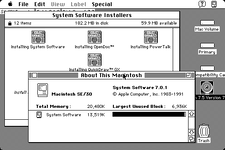
If I had lots of time, the next thing I'd do is go step-by-step backwards and try running it from a booted 7.0.1, and 6.0.8.

7.0.1
Picture 4.pngPicture 5.png

6.0.8
Screen 0.pngScreen 1.png

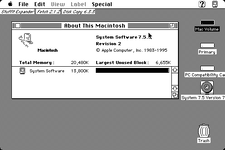
I did want to check yesterday that it actually was Rev 2, which it is.

Picture 3.png

From the most recent post on the Compact Mac forum, it appears that someone swapped a 1.4MB floppy drive from a Mac SE into a Mac Plus and that works just fine? Do we know if that is the case? If that's the case and the cables all connect properly, that sounds like a smart upgrade for an "Ultimate Mac Plus" build.

I cannot locate the post you are referring to. In any case, a SuperDrive should work just fine in a IWM only Mac, unless it's a 128K or 512K, in which case I couldn't say for sure. The other IWM only macs, namely the 512Ke, Plus, SE without the FDHD upgrade and the Mac II original should be able to use a SuperDrive just fine, they just can't use MFM and HD disks. See the link in my signature for more.

The developers included an "easter egg" in the installer. If you hold down the <Option> key when you double-click the installer, you will get a "roll credits" screen at the end of the install, with three colorful (on a color Mac) bouncing apples.

Unable to replicate, even while holding down the Option key for the entire start to stop finish of the Installer.
 
Ah, so I remembered it wrong. Thanks for running that test. So it required being booted from 7.0 or better.
So if there's a stripped down version of 7.0 from a Disk Tools disk that fits on an 800K floppy, then that should work on a Plus.

I cannot locate the post you are referring to. In any case, a SuperDrive should work just fine in a IWM only Mac, unless it's a 128K or 512K, in which case I couldn't say for sure. The other IWM only macs, namely the 512Ke, Plus, SE without the FDHD upgrade and the Mac II original should be able to use a SuperDrive just fine, they just can't use MFM and HD disks. See the link in my signature for more.

I read elsewhere yesterday after much googling that if you put a 1.4MB floppy drive into a Plus, the Plus will treat it as an 800K drive and format disks only to 800K. No idea if it would read a 1.4MB floppy disk in it. I'd need to try this out to actually test it.

Unable to replicate, even while holding down the Option key for the entire start to stop finish of the Installer.

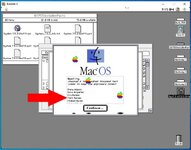
I replicated it in Basilisk II on a PC. That's me with the arrow. Fun fact: The bouncing apples have shadows at the bottom!:

UnityEasterEgg.jpg
 
I read elsewhere yesterday after much googling that if you put a 1.4MB floppy drive into a Plus, the Plus will treat it as an 800K drive and format disks only to 800K. No idea if it would read a 1.4MB floppy disk in it. I'd need to try this out to actually test it.

It won't work. If you insert a 1.44MB disk in, it won't recognize the format, and will prompt for initialization. Of course there is some leeway with formatting a HD disk as DD, but it could work, but you'll be writing 800KiB format onto a HD disk, which has historically been sketchy. But you won't be able to actually read or write a real 1.44MB or 720KiB HFS volume because the SWIM is missing along with the ROM code for it. I believe only System 6.0.3+ can actually use 1.44MB disks too, but that shouldn't be a problem since all the machines with SuperDrives started out at 6.0.3 or higher.

I replicated it in Basilisk II on a PC. That's me with the arrow. Fun fact: The bouncing apples have shadows at the bottom!:

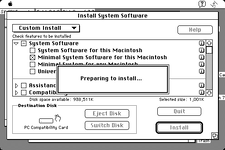
Ah much thanks. I didn't get it going on the SE/30, so I tried on the IIci, thinking there was a color requirement. Nope, works in greyscale too. And black and white. The problem was that it doesn't trigger if you select Minimal installation for this Macintosh. Tried Installation for this Macintosh and here we are.

Picture 1.png
 
It won't work.

Yep, that all tracks. 1.4 MB floppy is not happening on a Plus. Behavior if one tries it, from what I read, is as you described.

The problem was that it doesn't trigger if you select Minimal installation for this Macintosh.

That's good to know too. I think the "For this Macintosh" and "Universal" installs will trigger it. I do remember solid black apples floating around on the compact Mac screens in the labs. They always brought us great joy. I also got to test the installer over LocalTalk, which I believe was the slowest possible way to install it, with the 19 floppy install coming in second. I think the LocalTalk install takes around 14 hours if memory serves.
 
Back
Top