• Hello MLAers! We've re-enabled auto-approval for accounts. If you are still waiting on account approval, please check this thread for more information.

Two new half-life-less PowerBooks (100 and 170) - any help diagnosing?

Hi all,
I just got a couple new-old PowerBooks (100 and 170). The power supply I got with them (only 1, but it was for the right model) did not work, but when I use the one I have for my 165c (see different thread) both show some sparks of life. Boots, sounds, and one of them with a screen and active mouse (the 170).

I've tried to get the boot process and sounds they make on the videos. Is there any way any of you can help me identify what the potential for getting these fully back to life are? (Is it most likely the harddisks on both (or at least the one that the screen works on)?
 

Attachments

Both hardisks are bad or need to be repaired. at some point you should get to the blinking folder.

The 170 seems ok, the 100 screen should be recaped, and the Logic board also (so far it's working roughly)
 
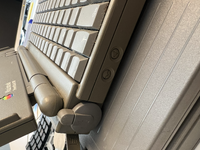
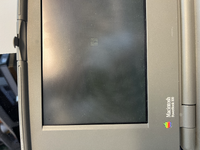
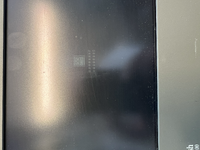
Update. The 100 has some screen action (can't find system showing). The brightness dial doesn't work, but the contrast wheel makes it possible to see this when in about a half-position. (See photos.) The trackball also works (all ways - the 170 one only works in a straight horizontal).

The two buttons on the side seems to work. When I press the left one, however, I get four beeps in sequence and the error in the last image. The other one restarts.

PS: just saw the response above, thank you!
Both hardisks are bad or need to be repaired. at some point you should get to the blinking folder.

The 170 seems ok, the 100 screen should be recaped, and the Logic board also (so far it's working roughly)
 

Attachments

  • tempImageUuQ4Qh.png
    tempImageUuQ4Qh.png
    10.9 MB · Views: 12
  • tempImage04efW0.png
    tempImage04efW0.png
    12.7 MB · Views: 13
  • tempImagegsh3MF.png
    tempImagegsh3MF.png
    9.9 MB · Views: 13
Both have life which is good! The PB170 hard disk, while spinning, sounds very dicey but see if you can format if after booting from a floppy. If after a few attempts you can't format it, time to look for an alternative. The trackball rollers are probably dirty, although the plastic collar can sometimes break on the internal clip doing this too.

The PB100 is a good start, most have dead LCDs which can be difficult to resurrect and/or LCD damage - you're more ahead than most. The contrast/brightness dials can be slid off and maybe some cleaning on the pots will resurrect, but as bibilit notes it will need a complete recap including the LCD. The CCFL LCD backlighting might also be bad but perhaps with some coaxing/warming up might decide to flicker back on.
 
Tim & Dart based PowerBooks do not get to the floppy icon if the HDD is dead and is blocking the SCSI bus, they are stuck at the gray screen

Pretty sure the 170 with display the floppy icon if you remove the HDD. Also the logic boards are fully solid, no need to recap theses
 
Concerning HDD, if you are lucky enough there is chances you can have the cover removed and have them repaired.

Conner drives are easy to repair most of the time, there is a trick to get them working again with little work. other brands are mostly only bad due to stuck heads.

those drives are more reliable than bigger ones.
 
Very thankful for your help, all - greatly appreciated!

I have a couple machines that would probably need recapping, but I can't really do that myself, so I'll have to do some more detective work to see who might be able to help me with that in Oslo (Norway).

As for booting from a floppy, that's also something I need to do to see if I can get my 165c fully going again as well (see this thread). A quick amateurish question here, as I've been trying some different option and not really gotten it done by now: how should I go about getting and making that disk? I find several system 7 downloads on Macintoshrepository etc., but I have yet to find one that I manage to open in DiskCopy and copy into a bootable disk. If you should happen to be able to guide me to the correct file (maybe different ones for the 170 and 165c?) that would also be a great help. I have a 6100 that I have finally confirmed has a working floppy drive, whereas the floppy drives on my 7300 and 7500 are both broken, unfortunately. Much trial and error and moving files between things here. :p
 
The PB100 is a good start, most have dead LCDs which can be difficult to resurrect
FYI the LCDs are almost always fine after a recap, it's the mainboard itself that doesn't always produce the -22v twist voltage after a recap.
 
FYI the LCDs are almost always fine after a recap, it's the mainboard itself that doesn't always produce the -22v twist voltage after a recap.
Not so much anymore, often the cap goo destroys the bottom row driver’s ribbon cable. In that case you’d still see the upper half of the screen. If you’re seeing nothing, chances are it’s that missing voltage if the rest of the computer seems to work.
 
FYI the LCDs are almost always fine after a recap, it's the mainboard itself that doesn't always produce the -22v twist voltage after a recap.
Right you are, forgot about that part, recently fixed mine with new inductors AND the LCD doesn't have that pink/blotch/LCD damage in the middle where the mouse ball presses.
 
Hi all,
I just got a couple new-old PowerBooks (100 and 170). The power supply I got with them (only 1, but it was for the right model) did not work, but when I use the one I have for my 165c (see different thread) both show some sparks of life. Boots, sounds, and one of them with a screen and active mouse (the 170).

I've tried to get the boot process and sounds they make on the videos. Is there any way any of you can help me identify what the potential for getting these fully back to life are? (Is it most likely the harddisks on both (or at least the one that the screen works on)?


Aside from screen issues, the PB100 is possibly failing its RAM check - that’s often what those chimes indicate.
 
Are you saying the new inductors fixed the pink/blotch?

No - nothing will fix that! What I meant is finding a PB100 without the pink blotch is rare, had to go through 4 x LCDs before I got a good one for mine. Rubber bumpers on the palm rest to try to prevent same happening to this one.
 
as I've been trying some different option and not really gotten it done by now: how should I go about getting and making that disk?

A Network Access Disk 7.5 can be quite useful for general startup purposes.
(http://download.info.apple.com/Appl...osh/Utilities/Network_Access_Disk_7.5.sea.bin)
(http://download.info.apple.com/Appl...cintosh/Utilities/Network_Access_Disk_7.5.txt)

In order to create the actual floppy, you would need a working (pre-1998) Macintosh computer with a hard disk drive and a 1.44 MB built-in floppy drive. An appropriate ready-to-use version (such as 4.0.1 or 5.5) of StuffIt Expander must already be on that Mac.

A Disk Copy 4.2 utility will be needed.
(http://download.info.apple.com/Appl...osh/Utilities/Disk_Copy/Disk_Copy_4.2.sea.bin)

To begin with, download or transfer the Network Access Disk 7.5 and Disk Copy 4.2 (MacBinary) .bin files to the working Macintosh computer. If you are using a more modern Mac or PC for the download, make sure that the .bin files are kept unaltered (may have truncated file names on a PC) until on the pre-1998 Macintosh. Do not decode or decompress anything at an earlier stage.

Once on the pre-1998 Macintosh, drag the .bin files onto the StufIt Expander program icon. This would decode the files. If not automatically done, double-click on the self-expanding archives (.sea) for decompression.

The result should be a Disk Copy 4.2 utility and a Network Access image file. You should now be able to load the image file in the Disk Copy utility, and then via the Make A Copy button create a sector-copied Network Access floppy disk.
 
Last edited:
Back
Top