Release of MacIPRpi 6.02
https://www.macip.net/
Finally the new stable release of MacIPRpi -> MacIPRpi 6.02
At the heart is now Netatalk 4.1.1 and of course running macipgw out of the box on the 172.16.2.0/24 network.
Designed to run on a Raspberry Pi, MacIPRpi 6.02 provides a complete MacIP gateway out of the box, allowing LocalTalk Macintosh computers to access the internet and share files effortlessly. Here’s everything you need to know about this release:
MacIPRpi is your Swiss Army knife for vintage Mac networking — a full-featured bridge to the modern world.
https://www.macip.net/
Finally the new stable release of MacIPRpi -> MacIPRpi 6.02
At the heart is now Netatalk 4.1.1 and of course running macipgw out of the box on the 172.16.2.0/24 network.
Designed to run on a Raspberry Pi, MacIPRpi 6.02 provides a complete MacIP gateway out of the box, allowing LocalTalk Macintosh computers to access the internet and share files effortlessly. Here’s everything you need to know about this release:
- Internet for vintage Macs
- Surf the modern web with a LocalTalk-only Mac or an emulator like Basilisk II using MacIP.
- Built-in MacIP gateway for 172.16.2./24 network, hostname mapping included.
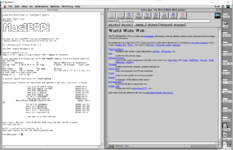
- Web Rendering Proxy (WRP) on port 8080
- Converts modern sites to images for old browsers.
- Access via http://maciprpi.local:8080 or http://gw.macip.net:8080.
- “Browser in a browser” experience — not for proxy settings.
- WebOne Proxy on port 8081
- HTTP 1.x proxy that translates HTTPS and complex pages for old clients.
- HTTP 1.1 to 1.0 converter on port 8082
- Enables very old browsers to load modern sites.
- Full cross-platform file sharing
- Works with System 6–9 Macs, macOS, Linux, Windows, iOS, Android.
- Supports AFP via Netatalk 4.1.1 and SMB via Samba.
- Login as guest or with macipgw, or use anonymous FTP.
- Shared directory is always consistent across systems.
- AFP tools and scripting
- AFP-Perl for scripting interactions with AFP shares (afp-discover.pl, afp-mdns-test.pl, etc.)
- and.... chooser.pl is an attempt to make a command line Chooser.
Code:root@maciprpi:~# chooser.pl Found AppleTalk AFP Server: maciprpi at 65280.4 (Port: 132) Found AppleTalk AFP Server: BasiliskII at 65280.123 (Port: 249) Available AFP Servers: [1] maciprpi (65280.4:132) [2] BasiliskII (65280.123:249) Choose a server (1-2): - afpfs-ng for FUSE-based AFP mounting. Example:
Code:mount_afpfs "afp://localhost/MacIPRpi DISK" /tmp/afp
- Print support
- Auto-discovers AppleTalk printers.
- Test with papd-test.sh (add --print to send a test page) or with check-maciprpi.sh --all.
- Compatible with many printers.
- Timelord time server
- Time sync via AppleTalk.
- Appears in the Chooser on vintage Macs.
- Fully usable Linux desktop
- Raspbian Pi OS Lite with LXDE desktop, kernel 6.6.51 aarch64.
- Remote desktop via X2Go or RDP (mstsc /v:maciprpi.local).
- Optional local desktop with monitor/keyboard.
- Set autologin options with raspi-config.
- Useful tools included
- nmap, aecho, nbplkup, tcpdump -i eth0 atalk
- check-maciprpi.sh for testing services and modules
Code:root@maciprpi:~# check-maciprpi.sh Usage: check-maciprpi.sh [options] Options: -a Run all tests except --print-page --help Display this help message --webone Check WebOne Proxy --url Test URLs --services Check required services --packages Installed packages --tftp Test TFTP functionality --afpfs-ng Test afpfs-ng mount --afp-perl Check afp-discover.pl --httpd Check if the HTTPD homepage is accessible --print Test print status --print-page Send a real print job --ports Test ports --samba Test Samba --tcpdump Test tcpdump to tun0, the 172.16.2.0/24 network --all Run all tests including --print-page --all-no-print Run all tests except --print-page (same as -a) Example: check-maciprpi.sh --webone --tftp Example: check-maciprpi.sh -a
- Network services
- SSH and Telnet enabled (user: macipgw, pass: macipgw; root allowed).
- Anonymous FTP uploads to /AppleShare/SHARED_DISK/FTP/incoming
- AppleTalk service discovery via Bonjour/mDNS (Avahi).
- Dynamic motd shows all detected Apple/Mac devices.
- Built-in web servers
- Historic web page on port 80 (http://maciprpi.local or http://172.16.2.1) based on the first CERN site and some useful links.
- Text-only browsers: Lynx and Elinks included.
- Disk and system utilities
- GParted pre-installed for disk management.
- RPi Monitor available at http://maciprpi.local:8888
- Splash screen control and boot options in raspi-config.
- Software management
- Use apt install <package> to add more tools.
- Lightweight image, resizes to full SD card on first boot.
- Runs on a 16GB card.
- Links, credits and many thanks to all maintainers of the used packages, like:
- MacIP gateway by jasonking3
- WRP by tenox7
- WebOne by atauenis
- Timelord revived by cheesestraws
- AFP-Perl by demonfoo
- afpfs-ng maintained by rdmark
- Netatalk: netatalk.io
MacIPRpi is your Swiss Army knife for vintage Mac networking — a full-featured bridge to the modern world.
Last edited:

 !
!