


Actually, my first attempt yesterday was via MountImage and it did not work (it worked in the sense that it mounted and I could fire up the installer, but the same error as I described in my previous post occurred). Then, I converted the DaynaPort disk image to an ISO CD image using Toast, added the Apple CD-ROM extension to my Mac Plus HDD image, attached the SCSI CD-ROM in PiSCSI and this mounted the DaynaPort disk as a CD on the desktop. Both of those methods resulted in a locked volume and it appeared to work, I saw the DaynaPort installer splash screen/logo, clicked on OK, but then I was stuck on the "Please install your DaynaPort hardware" error. Both methods resulted in the same thing for me.
I'm hoping somebody who owns a Mac Plus and have gone the DaynaPort Ethernet driver on a PiSCSI route could share their exact step by step solution to get it to work under System 6 or maybe even share their PiSCSI HDD disk image?
I'm hoping somebody who owns a Mac Plus and have gone the DaynaPort Ethernet driver on a PiSCSI route could share their exact step by step solution to get it to work under System 6 or maybe even share their PiSCSI HDD disk image?
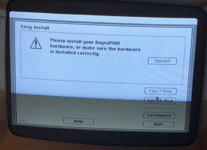
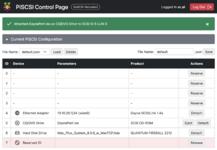

 It seems like sometimes the installer doesn't recognize the emulated SCSI device for some reason, but once you get the driver installed, it works. Enjoy!


