

• Hello MLAers! We've re-enabled auto-approval for accounts. If you are still waiting on account approval, please check this thread for more information.

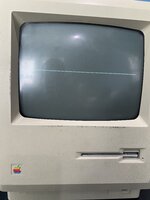
Macintosh 512k horizontal line issue

IMG_2287.jpegso for context, I just got my hands on a new old stock analog board for my Mac 512k since my old one does not work anymore (power supply part is non functional) and after installing it I’m greeted by a single horizontal line seen in the photo. I’ve already resoldered the J1 and J4 connectors with no success. I still have the old board which I can use for parts if need be.

Maybe someone can point me in the right direction on what to do next?
 
That single line indicates vertical deflection isn't working at all. If you run it very long like that it can actually burn through the CRT's phosphors and make that line permanently dark when you do fix the problem. What's happening is that a new old stock board probably needs to be recapped. Capacitors fail from age more often than from use.
 
That single line indicates vertical deflection isn't working at all. If you run it very long like that it can actually burn through the CRT's phosphors and make that line permanently dark when you do fix the problem. What's happening is that a new old stock board probably needs to be recapped. Capacitors fail from age more often than from use.
Gotcha now here’s a dumb question, I have the correct spec capacitors for the board but they are all radial. Will they work or should I play it safe and just buy a recap kit?
 
Also make sure to check your deflection coil. Set your meter to resistance and verify you have a reading across your horizontal and vertical coils. Horizontal will read around 8.2 ohms, and your vertical coil will read around 0.4 ohms. If you don't care what your recap looks like
(and there are no potential shorts), you can use either radial caps or axial as long as your capacitance and rated voltages are the same / above what your replacing (within reason). I'd try to use caps that had a similar esr. I'm not sure if any of the caps on the Analog board require low esr caps - I'd check.
 
I don't think you need to be precious about ESR on any monochrome compact's AB, at least not in my experience. But it's a good thing to watch out for in general, you're right.

I have the correct spec capacitors for the board but they are all radial

It might look a bit messy but it ought to work - there's no electrical difference between axial and radial, it's just where the wires stick out of the case.
 
Also make sure to check your deflection coil. Set your meter to resistance and verify you have a reading across your horizontal and vertical coils. Horizontal will read around 8.2 ohms, and your vertical coil will read around 0.4 ohms. If you don't care what your recap looks like
(and there are no potential shorts), you can use either radial caps or axial as long as your capacitance and rated voltages are the same / above what your replacing (within reason). I'd try to use caps that had a similar esr. I'm not sure if any of the caps on the Analog board require low esr caps - I'd check.
The CRT was working perfectly before the original analog board failed so I would think it’s fine. But I’ll still test it just in case, now since I don’t really want to screw anything up or get the the wrong readings how would I go about testing them?

Would I test them from the connector or the coils themselves?

And in terms of the recap, I did order a recap kit just before with the correct type of capacitors because it would annoy me that it wasn’t done right.
 
The trouble is you don't have sound either, this is strange as both issues are not related, except if you have a wiring issue.
 
The trouble is you don't have sound either, this is strange as both issues are not related, except if you have a wiring issue.
Good point! I missed where Cheesestraws asked that. Sound has nothing to do with the analog board monitor section. All sound amplification comes from your main motherboard. No sound could mean a bad mobo is causing your issue, or it could also mean a bad power supply, which leads us back to the analog. I'd verify all your voltages (check for any ac ripple). If everything tests ok, I'd check my speaker too.
I haven't worked on 512's, so maybe someone else can chime in on this one. Can you turn the brightness up on the monitor with the mobo unplugged and see if you have full deflection? If so, you could verify that the mobo is causing the issue.
 
I agree, checking for voltages is easy enough (at the floppy port)
if voltages are ok, try hitting the side of the AB board with a wooden stick, some broken joints are hard to see.

The fact that the floppy drive is trying but not achieving is also a sign of bad voltages.

If you are not too far from the correct figures, a potentiometer is present to crank it up (side of the AB board)
 
I agree, checking for voltages is easy enough (at the floppy port)
if voltages are ok, try hitting the side of the AB board with a wooden stick, some broken joints are hard to see.

The fact that the floppy drive is trying but not achieving is also a sign of bad voltages.

If you are not too far from the correct figures, a potentiometer is present to crank it up (side of the AB board)
Sorry about the late response I got caught up with stuff, the sound issue originated from me accidentally shorting the sound chip and frying it.

I have recapped the board but there is still no change

The deflection yoke is fine I tested it.

The voltage on the 5 & 12v rails are within a reasonable range

When I said the drive is trying I meant that it is spinning but the disk itself is bad or that it sees the disk but can’t boot from it, thinking about it I could have said that differently.
 
Last edited:
Not sure if there is any help there, but pp 49 - 50 in the dead Mac scrolls cover this condition...
It looks like the explanations on page 49 cover fixes that you have already attempted (resoldering J1 and then recapping should have addressed C5).
Page 50 covers other potential electrical issues (see excerpted text below), and since the sound issue was unrelated, one of these could be your problem.
"Check/replace burned transistor Q4 (2N4401), shorted transistor Q2 (MPSU51), open resistor R3 (1.5Q, 1/4-watt, 5%), zener diode CR15 (1N4735, ZD, 6.2V 1/2-watt) and other obviously burned parts in the vertical sweep circuit."
 
Not sure if there is any help there, but pp 49 - 50 in the dead Mac scrolls cover this condition...
It looks like the explanations on page 49 cover fixes that you have already attempted (resoldering J1 and then recapping should have addressed C5).
Page 50 covers other potential electrical issues (see excerpted text below), and since the sound issue was unrelated, one of these could be your problem.
"Check/replace burned transistor Q4 (2N4401), shorted transistor Q2 (MPSU51), open resistor R3 (1.5Q, 1/4-watt, 5%), zener diode CR15 (1N4735, ZD, 6.2V 1/2-watt) and other obviously burned parts in the vertical sweep circuit."
I’ll take another look but I didn’t see anything burnt while I was recapping the board.

I think I read somewhere that the LM324 chip may be related to this issue, however I don’t know how true that is.
 
Back
Top

