• Hello MLAers! We've re-enabled auto-approval for accounts. If you are still waiting on account approval, please check this thread for more information.

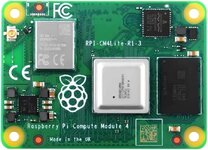
Christmas toys! RPi Compute Module 4 - Need link to Linux OS I can write to SD

Trash80toHP_Mini

NIGHT STALKER
68040
Total Pi n00b here. I'd like to get it up and running right away while I'm visiting my long distance girlfriend. So if there's a way to just copy a file over that'd be great. If not I'll have to learn how to deal with an image right off the bat. That's be good too if there's a handy link for such.

Been planning to install this setup in a PowerBook or my parts Luggable for years now. So exiting!
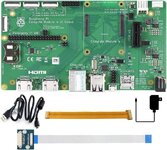
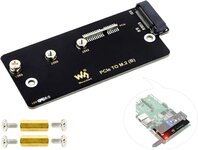
______71r0d8mHXjL._AC_SL1000_.jpg

71MY5c65FAL._AC_SL1500_.jpg

61o2dpX93WL._AC_.jpg


Plan is to be able to move the module itself between hacks that have IO board installed/configured for playtime.

For the Luggable, I should have room to install this card for USB3 and SATA?
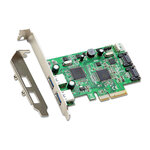
USB#-SATA3-s-l1600.jpg
CM4Lite only has USB2, so USB3 and SATA will be nice. CM5 was just released, but CM4 with its PCIe slot could be fun in a lot of ways.

So any help with finding a ready to roll Linux install would be a big help, TIA!
 
Last edited:
I've found how to links for Ubuntu Core installation, but looks like I need to get one of my Windows Books up and running again. No time for that. Might it be possible for someone to do a Pi4 installation on SD, compress it and email it to me so I can get it onto an SD card? No Win or Mac machines functional ATM, just Ubuntu. Dunno, n00bish suggestion for workaround, might it actually work?

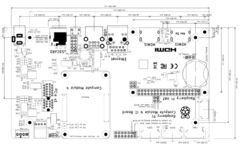
Meanwhile, the gifts keep stuffing my stocking on the mantle! Some pics aligned with ancient 3 letter agency laptop config as shown:
Screenshot 2024-12-17 at 21-02-27 Raspberry Pi Compute Module 4 IO Board - cm4io-datasheet.pdf.png
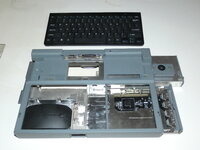
Ancient three letter agency laptop target for now:
P1000717.JPG
White cardboard represents CM4Lite IO board, lack of EMMC retains SD clot function.
Mouse Bay = Battery Bay
Space between to be inhabited by RPi Pico controller for OEM KBD and stowable trackball.
In the meantime, black wireless KBD guts will fit and I'd almost certainly use the mouse even afterward anyway.

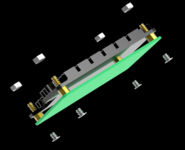
Screenshot 2024-12-18 at 12-57-47 Amazon.com GLOTRENDS Aluminum Heatsink Kits for CM4 Motherbo...png
Low profile heatsink should fit into case:
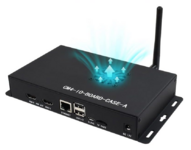
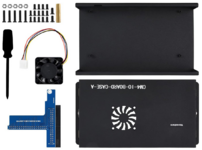
Screenshot 2024-12-18 at 13-49-27 Amazon.com Waveshare Metal Box (A) Designed for Official Ras...png
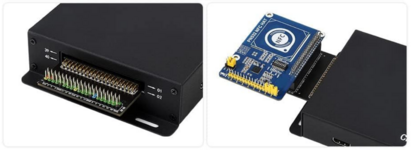
Screenshot 2024-12-18 at 13-24-39 Amazon.com Waveshare Metal Box (A) Designed for Official Ras...png

Right angle adapter from case will allow for straight thru cable extension.
Hat housing will be removable HDD Bay on accordion'd hat extension cable.

Screenshot 2024-12-18 at 13-19-04 61SemtlI9CL._AC_SL1164_.jpg (JPEG Image 960 × 1130 pixels) —...png

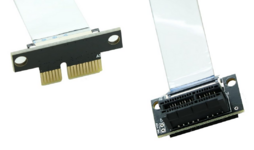
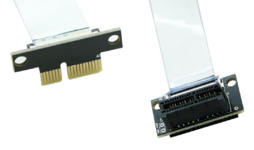
30cm PCIe extension will allow multifunction card to be installed in removable Floppy bay. Hoping for driver availability?
Backplane cover plates match height of FDD bezel perfectly, top and bottom need to be trimmed

Screenshot 2024-12-18 at 12-54-58 Amazon.com Sintech PCI-e Express 1X Riser Extend Angled Card...png
So far so good, we'll see whatever else I'll need to get Ubuntu Core up and running in current target laptop eventually. :)
 

Attachments

  • Screenshot 2024-12-18 at 12-54-58 Amazon.com Sintech PCI-e Express 1X Riser Extend Angled Card...png
    Screenshot 2024-12-18 at 12-54-58 Amazon.com Sintech PCI-e Express 1X Riser Extend Angled Card...png
    397.4 KB · Views: 3
Last edited:
Forgot to mention, I've got boxes-n-boxes full of Rainbow era trade goods trinkets to send one or two out in appreciation for help with that compressed installation file workaround if feasible. ;)
 
Don't know how yet, utilities I've found so far are for Win and Mac. Haven't used Ubuntu in a decade, just started again until I can fix three failed/failing Windows drives. Got linkage?
 
dd is what you need and it's already installed.

dd if=yourimagefile of=/dev/yourcarddevice

Make sure you have the correct card device or you could trash your boot disk.
 
Make sure you have the correct card device or you could trash your boot disk.
Risk my laptop's boot disk? That ain't happening as I've only the one fairly modern machine up and running ATM. Not really a big deal if I don't have a boot image on SD for the trip. CM4Lite may just arrive on the second, my day to skedaddle for home, but hoping for earlier.

The batch she's gifting me is in the first post and should arrive up there for Christmas. The stuff I ordered in the second post will arrive on Saturday, Amazon demons willing. :cautious:
 
Risk my laptop's boot disk? That ain't happening.

In other words, if your boost disk is /dev/sda, don't specify it as the output device or that's where your image will be written.

It's not hard to avoid, just take care. Before plugging in your SD card, get a list of your disks with:

Code:
ls /dev/sd*

Insert the card and repeat the command to see the new card device. It could be /dev/sdb for example. Then use that as your output device.
 
Back
Top