• Hello MLAers! We've re-enabled auto-approval for accounts. If you are still waiting on account approval, please check this thread for more information.

64-Pin 4MB SIMMs for Apple Display Card 8*24 GC

Targa 2000 has those modules, and it comes in Nubus, PCI, and EISA formats. The ones I snagged were from AVID Nubus cards.

The EISA Targa 2000 board you have is nice, took me a while to find a Nubus model with those special I/O cables and I don't think I have the EISA one.

I assume not a Targa 1000 or Targa 2000 Pro? I am having trouble finding any Targa board with modules like that, other than an 8-bit ISA VMX which I assume has some sort of standard memory on it?
 
According to the RasterOps Horizon 24 manual, it technically supports up to 256MB of GWORLD memory. After toning out all of the lines on my own 1MB (4MB compatible PCB) SIMM, I came up with the attached pinout for the GWORLD SIMM. My SIMM has 8 256k x 8 DRAM chips on it in SOJ-26 packages. As some others have previously seen, it does appear that address line 9 is connected to the SIMM connector, meaning 4MB is possible. However, I also noticed that pin 59 on the SIMM wasn't connected to any of the memory chips or other lines. Pin 59 on all 4 SIMM sockets is, however, attached to pin 269 on the main RasterOps chip (RGS50228S41 on my card). I did find some internal docs on the Horizon 24, but after checking the pinout against my own chip, it does not appear that the development docs are accurate to the production chips (5v and GND are not in the right locations). If this mystery line is actually an additional address line (as it appears to be), it should be possible to put 16MB SIMMs in the Horizon 24, giving it 64MB of total GWORLD/RAM disk memory.
Depending on how much free time I end up with this winter, I may try putting a PCB together to test my theory; but I at least wanted to share the work I had done so far.

Screenshot 2024-12-04 at 1.17.53 AM.png
 
As far as I can tell, the 8*24 GC and SuperMac Thunder/24 will both only accept up to 4MB SIMMs. The SuperMac card will also only accept 2 4MB SIMMS, not 4. The RasterOps Horizon 24 (and possibly the PaintBoard Professional, but I haven't seen any definitive docs or card photos to prove it) is the only card that supports more than 8MB of GWORLD. The GWORLD SIMMs don't seem to have any presence detect functionality on them, so it would be up to address line probing or jumpers on the card to configure it (maybe that is what the mystery jumper on the Horizon 24 does?).

Siliconinsider makes some great stuff, so if you are looking for just 1MB GWORLD SIMMs, I would definitely recommend their store. It does look like they are currently out of stock, but I have run into that before when buying from them and everything I have waitlisted so far has come back up eventually. I don't plan on doing any batch runs of new SIMMs (I don't want to track down old DRAMs or de-solder a bunch from my big box of memory), but I'll definitely have leftover blank PCBs that I'd send out for free if I get them working. I'll also open source the schematics/board/gerber files so someone else can make more if desired.
 
I think the Supermac card is stuck at 8MB Gworld so only 2 x 4MB SIMMs work and I have never seen any of a different size anyway.

LEM says the 8.24GC can use 2x4MB SIMMs same as used on the IIfx for 10MB total Gworld (I guess there is 2MB on the card).
 
Hey everyone, sorry for letting things up in the air for a while.
I actually now have a working 4MB design, my original PCB had an issue with A9 which was not impacting the 1MB SIMM.
My supplier ran out of 1Mx4 RAM chips. I have been looking for options but I hope I can have a batch made by early next year.

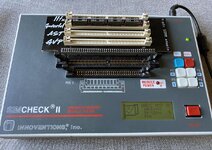
IMG_1612.JPG
 
@Siliconinsider they seem to work great! Thanks so much! I inserted two 4MB modules in my Thunder/24. They seem to need to be staggered (slots 1 and 3).

What would be the best way to test the functionality of these? I believe Finder uses GWorld? So if it is working that's a good sign?

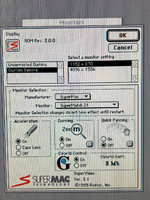
gworld.jpeg
 
Try Photoshop 2.5x and load a large picture and scroll around.
But firstly you have to put a GWorld plug-in into Plug-ins folder :) GWorld was a mess at the time.

Unfortunately, the implementation of non-local GWorld memory on some video boards is incompatible with some of the code produced by Apple's development tools. In particular, a conflict appears to exist between the GWorld memory on some boards and a construct known as "32-bit everything". Adobe PhotoshopŞ 2.5 uses 32-bit everything, and hence, by default it declines to use non-local GWorld memory.

So how do I tell if my video board's implementation of non-local GWorld memory is compatible with 32-bit everything? Well, the cases of incompatibility we have seen generally result in crashes soon after launch. Hence, you can try installing this plug-in, and if the program boots successfully, your video board is probably compatible. If the program crashes on boot, then your video board is almost certainly incompatible.
 
Larger than what fits in VRAM I would assume (to see if the picture is cached in GWORLD RAM or paged to the HD).

Uncompressed scanner capture on high settings makes large graphics files.
 
I have placed 16MB in my SuperMac Thunder/24 and can confirm that only 8MB are seen, so 8MB seems to be the maximum amount of GWORLD RAM supported.

I have a RasterOps as well, I need to find the drivers and test it, there's some damaged pins on a QFP so it may need a little bit of repair before I can try it out.
 
Back
Top