• Hello MLAers! We've re-enabled auto-approval for accounts. If you are still waiting on account approval, please check this thread for more information.

Portable issue

If a signal is switching between high and low the multimeter probably won't be fast enough to track it, but a steady signal like something that is staying on or off it should be able to see. Just put the negative probe on a good ground point like the shielding on the various ports or the negative leg of one of the axial capacitors, and then you can probe around with the positive probe.

SYS_PWR* for example is active low, so it's "true" when down towards 0V and "false" at 5V.

The MOSFET controlling the powered-on +5V is controlled by SYS_PWR* connected to the gate of the MOSFET. At 5V no current will flow, and near 0V current will flow allowing power to the main +5V.
View attachment 77507

Simulation

View attachment 77511
ok, so I get 5v at source always on, and 5v gate sys pwr, but 0 at the drain powered on.
 
Last edited:
ok, so I went over tech by androda hybrid check and all check out except my q1. The resistance seems off. My voltage at q16 pin 2 is 5.2volts. Power manager resistance is fine. So maybe q1 is burnt out? Also, the he says the fuse should have zero resistance or no connection. I am getting 0.5ohms and continuity. Is that off?
 
Last edited:
ok, so I went over tech by androda hybrid check and all check out except my q1. The resistance seems off. My voltage at q16 pin 2 is 5.2volts. Power manager resistance is fine. So maybe q1 is burnt out? Also, the he says the fuse should have zero resistance or no connection. I am getting 0.5ohms and continuity. Is that off?

Q1 is just for charging, so it won't really affect turning on the computer unless the battery needs charging.

0.5Ω sounds perfectly fine for the fuse. If it was more than maybe 10Ω it would be a little suspicious but that fuse sounds fine.

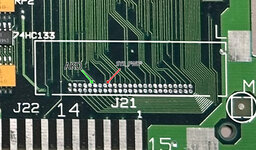
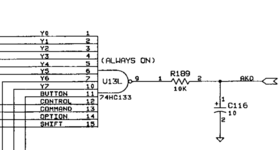
Since SYS_PWR* appears to be high and assuming the gate at Q11 is still connected to the power manager, it seems that the power manager is not trying to turn on the computer. Typically when the power manager is working properly it should turn on when it keyboard input, which is detected by the AKD signal going high.

One thing you could try is connecting AKD to +5V, preferably through a resistor, maybe 1kΩ, and see if that turns the computer on.

You could also try connecting SYS_PWR* to ground with a resistor. While that's grounded that should turn on the powered-on +5V and you should at least see some sign of the computer trying to start.

Screenshot 2024-08-28 at 2.47.18 PM.jpg
 
Q1 is just for charging, so it won't really affect turning on the computer unless the battery needs charging.

0.5Ω sounds perfectly fine for the fuse. If it was more than maybe 10Ω it would be a little suspicious but that fuse sounds fine.

Since SYS_PWR* appears to be high and assuming the gate at Q11 is still connected to the power manager, it seems that the power manager is not trying to turn on the computer. Typically when the power manager is working properly it should turn on when it keyboard input, which is detected by the AKD signal going high.

One thing you could try is connecting AKD to +5V, preferably through a resistor, maybe 1kΩ, and see if that turns the computer on.

You could also try connecting SYS_PWR* to ground with a resistor. While that's grounded that should turn on the powered-on +5V and you should at least see some sign of the computer trying to start.

View attachment 77649
So, good news. It works. So now what?? I tried the above. So anyways, not sure what needs to be done to fix it starting by keyboard??
 

Attachments

  • C13FA794-1638-4E1B-9BFA-82FA9A232E10.jpeg
    C13FA794-1638-4E1B-9BFA-82FA9A232E10.jpeg
    2.3 MB · Views: 15
  • D3CD718E-046C-4268-8022-4F3C0BE97A3B.jpeg
    D3CD718E-046C-4268-8022-4F3C0BE97A3B.jpeg
    2.4 MB · Views: 15
So, good news. It works. So now what?? I tried the above. So anyways, not sure what needs to be done to fix it starting by keyboard??
You mean that forcing AKD high turns it on?

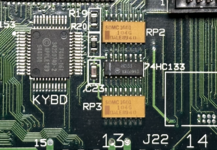
It seems like the 74HC133 at U13L may be bad, either that or a bad trace. If you can check pin 16 for 5V to make sure it's getting power, and check continuity between pin 9 and R189 then between R189 and AKD. R189 is on the backside so if it's too tricky you may just want to test resistance between pin 9 of U13L and AKD which should be around 10KΩ.

If all that looks good then the 74HC133 may just need to be replaced.


Screenshot 2024-10-13 at 12.47.51 PM.pngScreenshot 2024-10-13 at 12.56.58 PM.png
 
You mean that forcing AKD high turns it on?

It seems like the 74HC133 at U13L may be bad, either that or a bad trace. If you can check pin 16 for 5V to make sure it's getting power, and check continuity between pin 9 and R189 then between R189 and AKD. R189 is on the backside so if it's too tricky you may just want to test resistance between pin 9 of U13L and AKD which should be around 10KΩ.

If all that looks good then the 74HC133 may just need to be replaced.


View attachment 79577View attachment 79578
I will check again. I know that two ends of the resistor touched to round pads on the diagram you posted. Will make sure it was actually the akd
You mean that forcing AKD high turns it on?

It seems like the 74HC133 at U13L may be bad, either that or a bad trace. If you can check pin 16 for 5V to make sure it's getting power, and check continuity between pin 9 and R189 then between R189 and AKD. R189 is on the backside so if it's too tricky you may just want to test resistance between pin 9 of U13L and AKD which should be around 10KΩ.

If all that looks good then the 74HC133 may just need to be replaced.


View attachment 79577View attachment 79578
ok, so i get 5v at pin 16. I get some resistance from pin 9 to r189. I get nothing from r189 to akd.
 
You mean that forcing AKD high turns it on?

It seems like the 74HC133 at U13L may be bad, either that or a bad trace. If you can check pin 16 for 5V to make sure it's getting power, and check continuity between pin 9 and R189 then between R189 and AKD. R189 is on the backside so if it's too tricky you may just want to test resistance between pin 9 of U13L and AKD which should be around 10KΩ.

If all that looks good then the 74HC133 may just need to be replaced.


View attachment 79577View attachment 79578
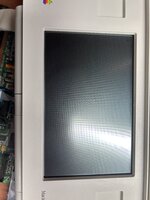
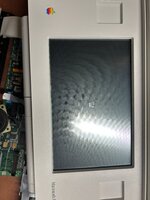
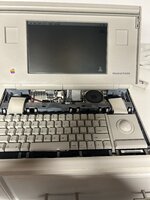
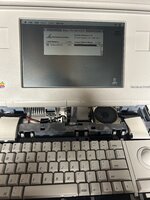
Ok, replaced the hc133 from a powerbook 100 that was known to be working. Unit has powered on with keyboard but it isnt perfect. Not sure if Battery is fully charged
 
You rock! All good:) thanks for all your help on this.. means a lot to me and my collection:)
 

Attachments

  • F1E68E43-0DCF-4C27-9415-DF426D7CD62F.jpeg
    F1E68E43-0DCF-4C27-9415-DF426D7CD62F.jpeg
    1.9 MB · Views: 11
  • 268EA54A-AF9E-4C2D-8032-674EDECFBAB4.jpeg
    268EA54A-AF9E-4C2D-8032-674EDECFBAB4.jpeg
    1.7 MB · Views: 11
Back
Top