• Hello MLAers! We've re-enabled auto-approval for accounts. If you are still waiting on account approval, please check this thread for more information.

G4 Powerlogix Series 100 1Ghz CPU L3 Cache Enabling Issue (G4 Cube)

MTL

6502
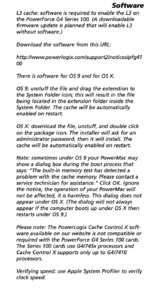
Hello all, I recently purchased a G4 Cube and scored a 1Ghz Powerlogix CPU upgrade card along with it. I've installed it and it's been running with no issues inside my Cube. I am aware that there is L3 cache on this card as I have check on everymac.com, but I haven't found a way to enable it.
Screenshot 2024-09-01 at 10.46.28 PM.png
What I have tried:
- I've tried downloading all versions of CPU Director, but I keep getting a specific error about not being able to load the current KEXT version for it. (This happened for all versions of CPU Director I've tried). My calendar and clock are all correct.

View attachment IMG_4955.JPG
- I've tried downloading the CD cdr file from macintosh repository, but there seems to be no drivers contained in the cdr that allow me to install to enable the L3 Cache. (Could I have missed it? I don't think so..)

If anyone could help find a way to enable the L3 cache on my board, I'd appreciate it very much!
 
Hi MTL,

It sounds to me like your OS install is hosed, have you reinstalled it then the last version of CPU Director? HD is good? The correct KEXT installation should enable the L3 cache. The Apple CHUD tools may also be of benefit here.

JB
 
CPU Director only supports up to Mac OS X 10.4.9. Would be nice if OWC released the source code so we can update it for Mac OS X 10.4.11 and 10.5.8.

Did you try enabling the L3 cache in Mac OS 9 or earlier? Does CPU Director show what registers are used to enable L3 cache? If the registers are changed in Open Firmware, does Open Firmware still function and can it boot OS 9 or OS X?
 
Hello all, I recently purchased a G4 Cube and scored a 1Ghz Powerlogix CPU upgrade card along with it. I've installed it and it's been running with no issues inside my Cube. I am aware that there is L3 cache on this card as I have check on everymac.com, but I haven't found a way to enable it.
View attachment 77839
What I have tried:
- I've tried downloading all versions of CPU Director, but I keep getting a specific error about not being able to load the current KEXT version for it. (This happened for all versions of CPU Director I've tried). My calendar and clock are all correct.

View attachment 77840
- I've tried downloading the CD cdr file from macintosh repository, but there seems to be no drivers contained in the cdr that allow me to install to enable the L3 Cache. (Could I have missed it? I don't think so..)

If anyone could help find a way to enable the L3 cache on my board, I'd appreciate it very much!

you should not need any sort of Cache enabler for that CPU, if it indeed uses a 7455, then as as long as your on the latest BootROM for your G4 cube 4.1.9 IIRC, then it should just work OOB

so double check your BootROM version I would say


also you have checked system profiler right? (I would also check the "Diagnostics" tab)
 
Success! Reinstalling a LOWER version of Mac OS (Mac OS 10.3) DID allow me to enable the L3 Cache using CPU Director. Thanks everyone for helping me diagnose and solve my issue!

View attachment IMG_4957.JPG
CPU Director only supports up to Mac OS X 10.4.9. Would be nice if OWC released the source code so we can update it for Mac OS X 10.4.11 and 10.5.8.

Did you try enabling the L3 cache in Mac OS 9 or earlier? Does CPU Director show what registers are used to enable L3 cache? If the registers are changed in Open Firmware, does Open Firmware still function and can it boot OS 9 or OS X?
 
Success! Reinstalling a LOWER version of Mac OS (Mac OS 10.3) DID allow me to enable the L3 Cache using CPU Director. Thanks everyone for helping me diagnose and solve my issue!

View attachment 77859
but that shouldn't be needed in the first place, I would still boot up into 10.4.11 or 10.5.8 and see what system profiler reports for your machine
 
Nope, there doesn't seem to be anything there either

thats very curious! this reminds me my PowerMac G4 Dual 1Ghz Quicksilver, who's L3 cache will not show up for love-nor-money, (I have been meaning to investigate that one further)

unless for whatever reason PowerLogix did not use standard Apple CPU descriptor methods*, then it should just work OOB without the need for any enabler...

*that is to say all G4 Apple CPU cards and most 3rd party ones at least those with L3 cache etc, will contain some sort of small SPD type EEPROM that contains data that tells the BootROM and OS, what the CPU card is, what hardware it contains, and how it should be configured
 
Last edited:
thats very curious! this reminds me my PowerMac G4 Dual 1Ghz Quicksilver, who's L3 cache will not show up for love-nor-money, (I have been meaning to investigate that one further)

unless for whatever reason PowerLogix did not use standard Apple CPU descriptor methods*, then it should just work OOB without the need for any enabler...

*that is to say all G4 Apple CPU cards and most 3rd party ones at least those with L3 cache etc, will contain some sort of small SPD type EEPROM that contains data that tells the BootROM and OS, what the CPU card is, what hardware it contains, and how it should be configured
Hmm, I've came back to my Cube to reinstall OS 10.4 one last time just to see if I botched the install or if there were weird things going on, and funnily enough the diagnostics tab now does report back that the power on self-test did fail. The failure type it listed was the L3 cache. That's also interesting that your dual 1GHz's L3 Cache won't show..
View attachment IMG_4961.JPG
 
Last edited:
Hmm, I've came back to my Cube to reinstall OS 10.4 one last time just to see if I botched the install or if there were weird things going on, and funnily enough the diagnostics tab now does report back that the power on self-test did fail. The failure type it listed was the L3 cache. That's also interesting that your dual 1GHz's L3 Cache won't show..
View attachment 77868
View attachment IMG_4962.JPG
And then it's gone.. Currently at the moment I am unable to replicate the diagnosis error I got from earlier.
 
Success! Reinstalling a LOWER version of Mac OS (Mac OS 10.3) DID allow me to enable the L3 Cache using CPU Director. Thanks everyone for helping me diagnose and solve my issue!
Your image from CPU Director shows a register named `L3CR` needs to be set to 0x9F024300:
Double check the CPU manual to verify that the value represents the following settings:
Backside cache type: Pipelined synchronous (PB2)
Backside cache size: 2 MB
Backside cache ratio: 250 MHz [4:1]
Backside cache status: On

Many versions of Open Firmware have methods to get and set the L3CR register (l3cr@ and l3cr!).

G4 AGP Sawtooth
G4 Cube
G4 FW 800
G4 Mirrored Drive Doors
G4 Quicksilver
G5 Quad
iBook G3
iBook G3 Snow
iBook G4
iBook G4 (Early 2004)
Mac Mini G4
PowerBook G3 Pismo
PowerBook G4 DLSD

You have Open Firmware 4.1.9f1 which does have those methods. l3cr@ is used for setting properties of a l2-cache device (not l3-cache). L3CR is checked only for cpu with PVR 8000xxxx and 8001xxxx and only if they have L2CR MSB set and L3CR MSB set.

In Open Firmware, check the following:
Code:
: dumpcpuinfo
cr
." pvr:" pvr@ . cr
." l2cr:" l2cr@ . cr
." l3cr:" l3cr@ . cr
." fat-v'ger?:" fat-v'ger? . cr
;

dumpcpuinfo
 
Success! Reinstalling a LOWER version of Mac OS (Mac OS 10.3) DID allow me to enable the L3 Cache using CPU Director. Thanks everyone for helping me diagnose and solve my issue!
How do you know that L3 cache wasn't enabled previously?
Without using CPU Director, how do you know if L3 cache is enabled?
 
How do you know that L3 cache wasn't enabled previously?
Without using CPU Director, how do you know if L3 cache is enabled?
I have always assumed the L3 cache wasn't enabled because it never showed up in the "About this Mac" page or the system profiler page. They never displayed the L3 cache prior to me installing CPU Director in 10.3.5.
 
Your image from CPU Director shows a register named `L3CR` needs to be set to 0x9F024300:
Double check the CPU manual to verify that the value represents the following settings:
Backside cache type: Pipelined synchronous (PB2)
Backside cache size: 2 MB
Backside cache ratio: 250 MHz [4:1]
Backside cache status: On

Many versions of Open Firmware have methods to get and set the L3CR register (l3cr@ and l3cr!).

G4 AGP Sawtooth
G4 Cube
G4 FW 800
G4 Mirrored Drive Doors
G4 Quicksilver
G5 Quad
iBook G3
iBook G3 Snow
iBook G4
iBook G4 (Early 2004)
Mac Mini G4
PowerBook G3 Pismo
PowerBook G4 DLSD

You have Open Firmware 4.1.9f1 which does have those methods. l3cr@ is used for setting properties of a l2-cache device (not l3-cache). L3CR is checked only for cpu with PVR 8000xxxx and 8001xxxx and only if they have L2CR MSB set and L3CR MSB set.

In Open Firmware, check the following:
Code:
: dumpcpuinfo
cr
." pvr:" pvr@ . cr
." l2cr:" l2cr@ . cr
." l3cr:" l3cr@ . cr
." fat-v'ger?:" fat-v'ger? . cr
;

dumpcpuinfo
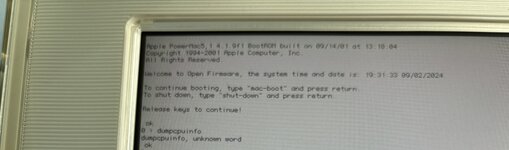
I'm currently in Open Firmware, but when I input the "dumpcpuinfo" command, it tells me that it is an "unknown word". Am I doing something wrong
index.php
here? I'm not too well versed in Open Firmware commands so I apologize for my lack of understanding.

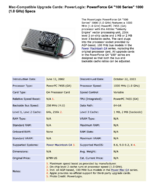
I've also checked Powerlogix's manual for the CPU and this is what it had to say for the L3 Cache.

Screenshot 2024-09-02 at 4.38.20 PM.png
 

Attachments

  • IMG_4963.jpg
    IMG_4963.jpg
    2.4 MB · Views: 61
I've typed all the lines and this is what I got. View attachment 77879
So L3CR isn't enabled in Open Firmware.
Does someone have a G4 Mac where L3CR is enabled in Open Firmware?

L3CR is not affected by Open Firmware code but it is affected by HwInit code which happens before Open Firmware. I don't know what the code changes in the L3CR or what's required to make it do the changes. Perhaps it's reading the L3 cache info from the config-block as described in the Configblk_2.5.15.pdf document. I'm not sure if that document is 100% accurate. It does not match the layout of the config block used by the G4 Cube (the Cube has firmware 419f1 but the config block in the document is 436f1). If we assume it does match, then the config block for the G4 Cube has an empty L3 cache section.

Code could be added to the PowerLogix/NewerTech firmware patchers (NewerTech is the newer version) to modify the config block info but you need to figure out what bytes of the config block need to be changed - by understanding the HwInit code.

On my B&W G3 with G4 upgrade, the Sonnet kernel extension outputs this during boot:
Code:
SonnetCache PVR=0x80010303 HID1=0x00003880 PClk=1000000000 L2CR=0x00000000 L3CR=0x00000000 L3 2M... 1M Pass L2CR=0x80000000 L3CR=0x8F030300 MSSCR0=0x00008000 MSSCR0=0x01008000

It appears to enable both caches. So maybe you could try the Sonnet software instead of PowerLogix for later Mac OS X versions.
 
So L3CR isn't enabled in Open Firmware.
Does someone have a G4 Mac where L3CR is enabled in Open Firmware?

L3CR is not affected by Open Firmware code but it is affected by HwInit code which happens before Open Firmware. I don't know what the code changes in the L3CR or what's required to make it do the changes. Perhaps it's reading the L3 cache info from the config-block as described in the Configblk_2.5.15.pdf document. I'm not sure if that document is 100% accurate. It does not match the layout of the config block used by the G4 Cube (the Cube has firmware 419f1 but the config block in the document is 436f1). If we assume it does match, then the config block for the G4 Cube has an empty L3 cache section.

Code could be added to the PowerLogix/NewerTech firmware patchers (NewerTech is the newer version) to modify the config block info but you need to figure out what bytes of the config block need to be changed - by understanding the HwInit code.

On my B&W G3 with G4 upgrade, the Sonnet kernel extension outputs this during boot:
Code:
SonnetCache PVR=0x80010303 HID1=0x00003880 PClk=1000000000 L2CR=0x00000000 L3CR=0x00000000 L3 2M... 1M Pass L2CR=0x80000000 L3CR=0x8F030300 MSSCR0=0x00008000 MSSCR0=0x01008000

It appears to enable both caches. So maybe you could try the Sonnet software instead of PowerLogix for later Mac OS X versions.
Ah I see. I did some separate poking around and did find a version of CPU director that worked for 10.4. I do remember trying this exact version I'm using currently right now on 10.4.11 before and it gave me the KEXT error I mentioned at the top of the thread, so I'll just be sticking to the base 10.4 install. The L3 cache seems to be enabled and its been running with no issues.

View attachment IMG_4966.JPG
 
Last edited:
Back
Top