• Hello MLAers! We've re-enabled auto-approval for accounts. If you are still waiting on account approval, please check this thread for more information.

Startup key combinations

Ttpilot

6502
I have a Color Classic Mystic upgrade running System 8.1 on BlueSCSI. Is there a startup key combination to force a boot on a particular SCSI device? The only stuff I’ve been able to find is for M series and Intel Macs
 
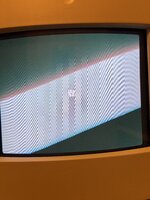
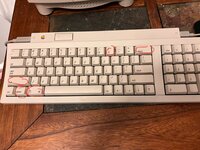
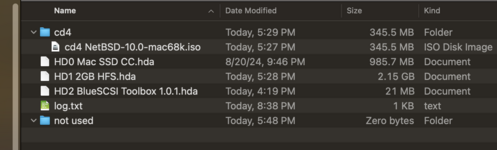
Nope. Those keys just result in a 'no bootable device' image on start. The SCSI ID 0 image is bootable. It works if it's the only image on the SD card. When the other images are included it doesn't work. The other images, including a CD image in the CD4 folder, are not bootable. On a different SD I use it works if there is a bootable cd image in the cd folder, such as 'cd4 os_8-1_retail.iso'. Additional cd images cause a failure in that case, too. Maybe it's a glitch in how Blue SCSI works

IMG_7489.jpeg IMG_7490.jpeg files.png

Here is the text from the log.txt file on the SD card:

Platform: BlueSCSI
FW Version: 2024.05.21-rel May 21 2024 21:21:44
I2C Supported
Flash chip size: 2048 kB

=== SD Card Info ===
SD card detected, FAT32 volume size: 29518 MB
SD Name: SD32G, MID: 0x27, OID: 0x50 0x48

=== Global Config ===
Config file bluescsi.ini not found, using defaults
Active configuration:
-- SCSI ID: 4 using Optical image directory 'CD4'
-- Opening 'CD4/cd4 NetBSD-10.0-mac68k.iso' for ID: 4

=== Finding images in / ===
== Opening /HD0 Mac SSD CC.hda for ID: 0 LUN: 0
---- Image ready
== Opening /HD1 2GB HFS.hda for ID: 1 LUN: 0
---- WARNING: file /HD1 2GB HFS.hda is fragmented, see https://github.com/BlueSCSI/BlueSCSI-v2/wiki/Image-File-Fragmentation
---- Image ready
== Opening /HD2 BlueSCSI Toolbox 1.0.1.hda for ID: 2 LUN: 0
---- Image ready

=== ROM Drive ===
Platform supports ROM drive up to 1692 kB
---- ROM drive image not detected

=== Configured SCSI Devices ===
* ID: 0, BlockSize: 512, Type: Fixed, Quirks: Apple, Size: 962560kB
* ID: 1, BlockSize: 512, Type: Fixed, Quirks: Apple, Size: 2097152kB
* ID: 2, BlockSize: 512, Type: Fixed, Quirks: Apple, Size: 20544kB
* ID: 4, BlockSize: 2048, Type: Optical, Quirks: Apple, Size: 337376kB

Initialization complete!
INFO: Pico Voltage: 3.243V.
 
Can’t you use the Startup Disk Control Panel to select your startup drive?
Not when the system won't start. When it does (with only one bootable image) I have double checked the startup disk on the control panel. I'm still wondering if this is more of an issue with Blue SCSI. Normally, it's great, but it does have its glitches. I suppose I'll have to take it up with those folks
 
It has been a really long time since I tried NetBSD for Mac but I don't think that image is a bootable. See http://www.netbsd.org/ports/mac68k/booter-manual/index.html. The first CD image, by name, should be picked on startup. Try renaming the OS 8 disk to get it higher in priority.

You might also consider the BlueSCSI Discord channel for help.

I was just looking at the possibility of NetBSD for fun, since my machine can't do A/UX. I thought of the option of renaming the 8.1 image as well, just haven't tried that yet. I'll follow up with the guys on the discord channel too. Thanks
 
Back
Top