
I believe that was @croissantkingI think @joshc or @CircuitBored helped resolve the problem (driver on the boot floppy was 4.3, but 4.2 is better and in fact later ones, such as 5.x are progressively worse for 68K Macs).

-
 Hello Guest! We're hosting a challenge to welcome vintage Intel macs to the MLA during the month of July! See this thread for more information.
 -
We've made some quality of life improvements to the Trading Post. More info here.
You are using an out of date browser. It may not display this or other websites correctly.
You should upgrade or use an alternative browser.
You should upgrade or use an alternative browser.
Using Zip drive as HDD for Macintosh Plus
- Thread starter Jon146
- Start date

Thanks, sorry, I'm pretty bad with remembering who is who! Oh right, I've just remembered what @croissantking looks like! Gotcha!I believe that was @croissantking


HI all. Have iomega zip driver 4.2 on zip with system 7.01. Have booted from a floppy and the zip appears on desktop OK but on restart from ZIP drive it starts to boot get splash with happy MAC for about 2 seconds and all looks good then crashes to black screen with error. Have tried on SE and it works also tried on second Plus MB same result, also tried a different zip disk and drive. Its at the I Have To fix this stage out of principle not necessarily need. Also tried setting up 6.08 on another zip disk same problem!!!


Thanks, sorry, I'm pretty bad with remembering who is who! Oh right, I've just remembered what @croissantking looks like! Gotcha!
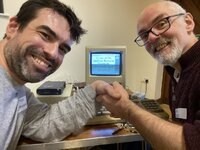
A joyous moment! Do you remember how you did it? Did you use FWB or something to downgrade the boot partition driver? Or did you use your PB1400? Or maybe boot on the external SCSI HD; then remove the System file from the Zip drive and then copy a new one back to bless it?
I think I used my PB1400 to back up the contents of your not-quite-yet-bootable Zip, then I reformatted the Zip disk using Apple HD SC Setup. So it uses Apple’s driver and appears like a SCSI hard drive to the Mac Plus.A joyous moment! Do you remember how you did it? Did you use FWB or something to downgrade the boot partition driver? Or did you use your PB1400? Or maybe boot on the external SCSI HD; then remove the System file from the Zip drive and then copy a new one back to bless it?
So, I think we have a solution:@Fred1212
I am trying to use a zip 100 to boot a plus. It starts to boot but crashes at a sad mac with error 0F0063. Anyone come across this? thanks
So, going back to your original issue. Not sure exactly what facilities you have. So, if you have a secondary SCSI drive, then it's fairly simple to copy everything you need from the Zip disk to the other SCSI drive, reformat with Apple HD SC Setup and then copy back. If you just have floppies, then it'd depend on how much space you have.I think I used my PB1400 to back up the contents of your not-quite-yet-bootable Zip, then I reformatted the Zip disk using Apple HD SC Setup. So it uses Apple’s driver and appears like a SCSI hard drive to the Mac Plus.
Another solution is if you have a 100MB USB Zip drive. You can then use HFS Utils on a Linux machine to copy everything from the Plus's Zip disk to Linux; then reformat the Zip disk on the Plus using HD SC Setup, then use HFS Utils to copy back.
Patched version, of course.reformat with Apple HD SC Setup
Yes, this ought to work.
Aaaah, is the patched version easy to obtain?Patched version, of course.
Aaaah, is the patched version easy to obtain?
Cool! So, does that mean you can just [Update] to update the driver instead of having to [Initialise]?
That’s a good question, to which I don’t know the answer!Cool! So, does that mean you can just [Update] to update the driver instead of having to [Initialise]?
Hmmm. Then maybe I should have a go at testing it.That’s a good question, to which I don’t know the answer!
Hi everyone thanks for all the info. Firstly I followed the process and initialised the zip disk with patched hd setup 7.53 then reloaded the system folder back onto disk. Didn't boot first try so I booted the Plus from an external floppy that had the iomega driver on it and I could see the zip on the desktop. Took the system folder out and put on desktop then back onto zip restarted and it booted. I had a iomega driver in the system folder on the Zip disk which now didn't load, so the zip drive is using the apple driver from the HD setup initialization. Excellent result, it now works. Cheers to all
Brilliant! And great to see you using Floppies! What OS did you use on the Floppy disk, and can you provide a screenshot of the system folder?Hi everyone thanks for all the info. Firstly I followed the process and initialised the zip disk with patched hd setup 7.53 then reloaded the system folder back onto disk. Didn't boot first try so I booted the Plus from an external floppy that had the iomega driver on it and I could see the zip on the desktop. Took the system folder out and put on desktop then back onto zip restarted and it booted. I had a iomega driver in the system folder on the Zip disk which now didn't load, so the zip drive is using the apple driver from the HD setup initialization. Excellent result, it now works. Cheers to all
It should look like thisHello! Can anyone help me set up an Iomega Zip drive as a HDD for my Macintosh Plus? I have pieced a few instructions together from my research on the web. This is the process I’m trying to get working:
As stated, I am stuck on step 6 above with the Iomega driver failing to load. Does anyone know why this is happening?
- Make system disks of 6.0.7 or 6.0.8 (I have both).
- Create a start disk (I made one for 6.0.8)
- Make an Iomega Zip 4.2 installation disk (I have this)
- Insert the Zip 4.2 installation disk and drag the Iomega driver to the start disk
- Open the start disk and drag the driver to the system folder
- With Zip drive connected to the SCSI port, restart the Mac Plus with the start disk (you should notice the Iomega driver load at the bottom of the screen) —> ***I am stuck here, the driver appears at the bottom of the screen while booting up, but it has a giant X through it.
- Put a zip disk in the zip drive, the Mac will ask if you want to initialize it - agree to it
- Once complete it will mount
- Eject the start disk and insert the system tools disk
- Open system disk an click on system install and install system 6.0.8 to the Zip drive
- Drag the Iomega driver to the system folder on the zip disk system folder
- Restart the computer with only the zip disk drive connected and it should boot
The Zip drive model I have is Z100P2 with a SCSI interface. I have seen some things on the internet about switching to ID 6 and making sure the end point is switched on. I do not have these switches on my Zip drive. Would this be an issue?
I also read this thread “Zip drive and Mac Plus”, but it doesn’t help me with my driver problem.
Thanks for your help!
- Jon
Attachments
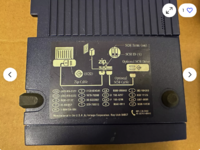
Unfortunately, that's a parallel port Zip drive. It looks like it has a SCSI port, but it's not really.The Zip drive model I have is Z100P2 with a SCSI interface. I have seen some things on the internet about switching to ID 6 and making sure the end point is switched on. I do not have these switches on my Zip drive. Would this be an issue?

Resurrecting my Iomega Zip 100 parallel-port drive – Linux comes to the rescue
Back in 1998 I purchased what was then a state-of-the-art storage medium: an external Iomega Zip 100 drive, which used removable 100 MB ‘SuperFloppy’ disks. Until 2002 I backed up my im…
 fitzcarraldoblog.wordpress.com
Similar threads
- Replies
- 6
- Views
- 519


- Replies
- 10
- Views
- 2K


