• Hello MLAers! We've re-enabled auto-approval for accounts. If you are still waiting on account approval, please check this thread for more information.

New acquisitions: MacPro 2010 and XServe 2009

LaPorta

68LC040
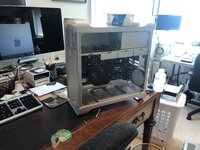
Happened upon a 2010 Mac Pro with three 512 GB SSDs, ATI Radeon RX 580, a bunch of OWC RAM, and dual 2.93 GHz processors (highest twin processor config that year) all for under $250 including the shipping off eBay. It was in fairly decent shape, aside of some nicks on the handles. Of course, UPS tossed it around, and despite some styrofoam, the front panel got pushed in. Been flattening it back out, but the real challenge is the darned DVD doors, which are a pain to work on with without any damage. I’ve clipped metal and adjusted things but they still bind a bit. I’m sure I’ll get it eventually.
IMG_5414.jpeg

Next, this morning I picked up the last year model XServe. Got this from a school for $80. They were cleaning out old items and no one had purchased this yet, so I jumped on it. They destroyed the HD so I’ll need a new one. Anyone have experience with these?
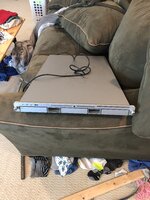

IMG_5413.jpeg
 
The 2010 cMP is a great machine. Id buy a pair of 3.46ghz 6cores off ebay, you can get a pair for real cheap, I think I paid something like 40 euros two years ago.
 
XServe ... Anyone have experience with these?
My Xserve memory is a bit hazy, but I think the drive type depends partly on whether or not you have the optional RAID card installed. But either way, the drive connector will give you a pretty good idea of what's needed. Be on the lookout for internal backup batteries used for write cache (RAID card option). Earlier Xserves weren't too picky about drive types, not sure about last-gen models. But when these things were new, I bought official parts because (A) it wasn't my money, and (B) because the value of the data was much greater than any savings I might realize by using some other random drive.
 
For which?
The Mac Pro.

Mine was a 2009, so a bit older, but technically more or less the same as 2010-2012, so it commanded pretty mcuh th same price at the time. Only problem is that the 2009s require delidded CPUs (lidded ones work, but fitment is a pain, and I actually had to replace the CPU tray shortly after I got it because I goofed one of the CPU sockets and killed a RAM slot or two).

I actually could have gotten a 2009 from new back in February 2009 if I had waited; Apple released it about two weeks after I got my 2008 (and at a few hundred dollars cheaper, to add insult to injury). I think I got IIvx-ed!

It's OK though. I don't regret getting the '08, as it can actually run Mac OS X 10.4 natively with some drivers borrowed from an early aluminum iMac, which happened to have the same GPU (Radeon HD 2600) and came stock with a special version of 10.4 that contained the correct drivers.

c
 
Last edited:
I always felt regret that I did not get a 2010 in 2010. It would have been worth much more to me in the long run than the 2010 iMac that I finally gave away in 2020.
 
I got mine in 2015 too and it was the payment for a job I did. It started out as a basic model (lowest speed 12 core) then…. Well, it went downhill since then
 
The G5 Xserve models are noisy. I'm not sure about the Intel ones.

Haven't tried replacing the hard drives in mine. I bought a couple extra drive trays a few years back, but haven't used them yet. They seem to have an odd connector inside, so I don't know if they are missing something or if I'm looking at it wrong or something.
 
for a home file server you’d be better off with something a bit newer, it’ll be quieter and less power hungry. xserves aren’t really that useful for anything anymore in my opinion.
 
The two reasons I acquired it are:

1. So I have one.
2. So it didn’t get thrown out.

Finding a use for it would be icing on the cake.
 
Finally got the 2010s shutter issue taken care of, so I’m reassembling now. Question is now that I’ve got an RX 580 in this thing, is there any way in creation I can run 10.6 on it?
 
Finding a use for it would be icing on the cake.
An idea I have had for years, maybe decades now, that I've never actually gotten around to doing is setting up a Mac as a webserver to use for recipes (among other in-house things) where you'd have the server where ever and then you'd have a Mac in or near the kitchen where you could pull up recipes.

Do you have a server rack for it? I looked at desktop server enclosures until I managed to get a server rack at auction. Unfortunately, it did not include the assembly hardware so I haven't been able to set it up yet.

If you don't have a server rack and are going to build your own or set it on a table, I think it was recommended to elevate it so you get airflow beneath it as well as the top.
 
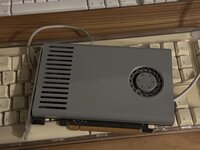
This is what mine came with.image.jpg
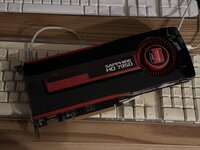
then I got this:image.jpg
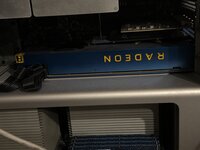
and finally got this, a Radeon Frontier Edition. Yeah not exactly period correct but with Open Core it works as a native GPU in Monterey.

image.jpg
i am using this machine for production and I am terrorized as the moment to change machine is approaching and I cannot afford a mid to high range Mac Studio, with all the stuff that need to replaced as well.

ETA: there was a time I had a 5870 in it but I sold it long ago for the reference 7850 you see here.
 
Sorry, no way to run a 580 in snow leopard or Lion, or anything like that. I think the minimum for it is Sierra, I took a lot of time to study which GPU would work with what OS, there's a huuuuuge thread on Mac Rumors for this.
Is it OK to post a link here? Mods, advise - in case, remove.
GPU compatibility list
The cMP is very well loved by a lot of people.
 
Back
Top