Hi,
A couple years ago, I bought a dual 1.25GHz MDD. It has always had a very weird problem, the CPU speed would sometimes show as 917 MHz and it would crash every so often. I found out that heating up the CPU board had an effect on this but up until recently, I never really took the time to look into the problem any more than that.
Yesterday I decided to try to overclock it to 1.5 or 1.42GHz. I removed the necessary resistors and reflowed the rest thinking a cracked solder joint caused the issues it previously had. It booted up and showed the CPU Speed was 1.5GHz. I ran geekbench to see what the performance was and... it crashed again.
Since that crash I've tried reflowing more resistors and capacitors around the jumper area but it will now only boot if I point a hair dryer at it for a while. Then it usually just kernel panics on the Apple logo. After changing the speed to 1.42GHz and heating it up more I've gotten it to get to the login screen but it just froze there (probably cooled down too much by then).
Besides the CPU speed jumpers I know nothing about how these cards work so I have no idea what could be wrong. I'm pretty sure it's cracked solder joints but I have no clue which ones could be at fault.
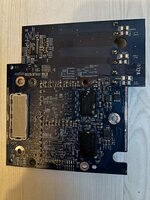
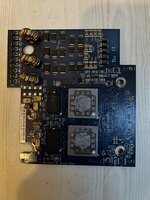
I have attached pictures of the front and back of the card but I can send more detailed ones if anybody wants them.
I'd be interested to see if anyone here has an idea what could be the problem.
A couple years ago, I bought a dual 1.25GHz MDD. It has always had a very weird problem, the CPU speed would sometimes show as 917 MHz and it would crash every so often. I found out that heating up the CPU board had an effect on this but up until recently, I never really took the time to look into the problem any more than that.
Yesterday I decided to try to overclock it to 1.5 or 1.42GHz. I removed the necessary resistors and reflowed the rest thinking a cracked solder joint caused the issues it previously had. It booted up and showed the CPU Speed was 1.5GHz. I ran geekbench to see what the performance was and... it crashed again.
Since that crash I've tried reflowing more resistors and capacitors around the jumper area but it will now only boot if I point a hair dryer at it for a while. Then it usually just kernel panics on the Apple logo. After changing the speed to 1.42GHz and heating it up more I've gotten it to get to the login screen but it just froze there (probably cooled down too much by then).
Besides the CPU speed jumpers I know nothing about how these cards work so I have no idea what could be wrong. I'm pretty sure it's cracked solder joints but I have no clue which ones could be at fault.
I have attached pictures of the front and back of the card but I can send more detailed ones if anybody wants them.
I'd be interested to see if anyone here has an idea what could be the problem.