• Hello MLAers! We've re-enabled auto-approval for accounts. If you are still waiting on account approval, please check this thread for more information.

Macintosh IIci does not shut down

I have a IIci that powers-up a moment after it's connected to power. It boots normally but when it' supposed to shutdown, it reboots.

What I have done so far:
- recapped logic board
- recapped PSU
- checked each cap for continuity and correct polarity/capacitance/voltage
- measured voltages on the floppy port and got 11.8/5.15/-12V
- checked the PSU switch in horizontal and vertical position - same result
- cleaned the boards with IPA
- Took a PSU from a known working Iici and installed in the troubled IIci. It showed the same symptom

Any other ideas what I could check?

Here's a picture of the logic board:
 

Attachments

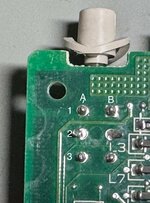
I checked continuity of the switch's pins.

Switch off position: Continuity from pins 1A to 2A & 1B to 2B
Switch on position: Continuity from pins 2A to 3A & 2B to 3B

Does this make sense?
IMG_1402.jpeg
 
I picked up a IIci about a month ago and it's got the same power issue as yours.

The logic board in my IIci was recapped. Not sure about the power supply.

I'm leaning toward it being a switch issue.

Looking forward to seeing if you are able to resolve this.
 
Remove UB13, UD13, UE13 with ChipQuik or hot air. The chips and solder are available on Digi-Key.

After chip removal, clean the area well.

You will then have a clear view of all the traces. Tone them out with a multimeter to make sure there aren't any microscopic breaks.

Replace the chips with new ones.

I've recapped a dozen Macintosh IIci computers. Never had a bad switch. Nearly every time I've had a bad UD13 or trace nearby it. A couple of times I've had a bad UB13 or UE13. It is much easier to remove all three, clean, check traces, and replace.

Here are photographs:
 
Concur with @David Cook . Most of the IIcis I have seen in person had cap goo all over these chips. One of mine had damaged traces under those chips. Replacements are available for those chips on Mouser.
 
Remove UB13, UD13, UE13 with ChipQuik or hot air. The chips and solder are available on Digi-Key.

After chip removal, clean the area well.

You will then have a clear view of all the traces. Tone them out with a multimeter to make sure there aren't any microscopic breaks.

Replace the chips with new ones.

I've recapped a dozen Macintosh IIci computers. Never had a bad switch. Nearly every time I've had a bad UD13 or trace nearby it. A couple of times I've had a bad UB13 or UE13. It is much easier to remove all three, clean, check traces, and replace.

Here are photographs:

I'm new to this so please forgive the noob question.

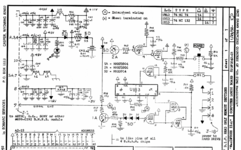
I see that I'll need 2x 74HC132 and 1x 74HC74.

I've looked on DigiKey and Mouser and it seems there are many variants of each IC.

Which are the correct ones to purchase? Or how do I figure out which ones are correct?

Is there a site that lists all the ICs for each Mac with links to DigiKey and/or Mouser?

Or is there a kit of common 74 series ICs I should buy?

Also, is there a flux you recommend?
 
I'm new to this so please forgive the noob question.

I see that I'll need 2x 74HC132 and 1x 74HC74.

I've looked on DigiKey and Mouser and it seems there are many variants of each IC.

Which are the correct ones to purchase? Or how do I figure out which ones are correct?

I replaced a 74HC132 with:
https://www.digikey.com/en/products/detail/toshiba-semiconductor-and-storage/74HC132D/6198924
and the corresponding 74HC74 is:
https://www.digikey.com/en/products/detail/toshiba-semiconductor-and-storage/74HC74D/6198950

Note if you're replacing these 14SOIC packages, the legs can be easily snipped off without the need for hot air.

This power circuit is infamous for a range of issues. In my case, the symptom was a failure to startup from ADB after being on standby power but powered-off for a few hours! The 132 was fine underneath and it turned out to be a weak short/leak under a replaced capacitor. Check that traces are adequately masked!

The IIcx has a similar circuit and I had a reapped machine for which only the power button worked. Turned out two caps were installed with the wrong polarity!

Also, is there a flux you recommend?
I favor AMTECH NC-559-V2-TF.
 
I replaced a 74HC132 with:
https://www.digikey.com/en/products/detail/toshiba-semiconductor-and-storage/74HC132D/6198924
and the corresponding 74HC74 is:
https://www.digikey.com/en/products/detail/toshiba-semiconductor-and-storage/74HC74D/6198950

Note if you're replacing these 14SOIC packages, the legs can be easily snipped off without the need for hot air.

This power circuit is infamous for a range of issues. In my case, the symptom was a failure to startup from ADB after being on standby power but powered-off for a few hours! The 132 was fine underneath and it turned out to be a weak short/leak under a replaced capacitor. Check that traces are adequately masked!

The IIcx has a similar circuit and I had a reapped machine for which only the power button worked. Turned out two caps were installed with the wrong polarity!


I favor AMTECH NC-559-V2-TF.

Thank you for the tips and advice.
 
@David Cook, thanks for your timely advice about those three logic chips.

My IIci won't turn on at all now, but at least I have a plan to fix the problem.

I took a look at that section of the board. Whoever recapped the board didn't change the caps in that section and there's obvious crust on the IC pins. The rest of the board is immaculate.
 
Remove UB13, UD13, UE13 with ChipQuik or hot air. The chips and solder are available on Digi-Key.

After chip removal, clean the area well.

You will then have a clear view of all the traces. Tone them out with a multimeter to make sure there aren't any microscopic breaks.

Replace the chips with new ones.

I've recapped a dozen Macintosh IIci computers. Never had a bad switch. Nearly every time I've had a bad UD13 or trace nearby it. A couple of times I've had a bad UB13 or UE13. It is much easier to remove all three, clean, check traces, and replace.

Here are photographs:
Thanks, it was UE13 in my case. Chip was replaced and the IIci powers up normally.
 
Back
Top