• Hello MLAers! We've re-enabled auto-approval for accounts. If you are still waiting on account approval, please check this thread for more information.

Powerbook 1400 16mb ram module upgrade to 24mb

My RAM setup is

8 MB MoBo
8 MB factory
2x 16 MB user
= total 48 MB

The expansion cards have 4 unpopulated spaces each, so I wanted to bring them from 16 to 24 MB. So I soldered additional KM48C2100CS-6 (each 2 MB) chips on it. The same as the thread opener intended to do with his expansion card. But with these additional chips the PB1400 throws an error and does not recognize the additional RAM at all. It stays at a total of 48 MB.
 
My RAM setup is

8 MB MoBo
8 MB factory
2x 16 MB user
= total 48 MB

The expansion cards have 4 unpopulated spaces each, so I wanted to bring them from 16 to 24 MB. So I soldered additional KM48C2100CS-6 (each 2 MB) chips on it. The same as the thread opener intended to do with his expansion card. But with these additional chips the PB1400 throws an error and does not recognize the additional RAM at all. It stays at a total of 48 MB.
Yes, so that makes sense. If the 16MB user cards are 1x 16MB banks, then you can't add 8MB to make them 24MB. You'd have to somehow reconfigure them as 3x8MB. Then, depending on the PB1400 model, you can get either 56MB or 64MB.
 
So I assume it’s the same issue for the G3 Kanga? I have a 96 MB expansion card and wanted to bring it to 128 MB by adding the 4 missing chips in order to get the full 160 MB (128 MB expansion + 32MB MoBo). I found 4Mword x 16 bit chips on eBay. Will this at least work or will i have the same issue then?
 

Attachments

  • IMG_1048.jpeg
    IMG_1048.jpeg
    2.1 MB · Views: 11
Last edited:
So I assume it’s the same issue for the G3 Kanga? I have a 96 MB expansion card and wanted to bring it to 128 MB by adding the 4 missing chips in order to get the full 160 MB (128 MB expansion + 32MB MoBo). I found 4Mword x 16 bit chips on eBay. Will this at least work or will i have the same issue then?
The information you need about banks and cards should be here:


"The PSX+ does not support RAM expansion modules designed for the PowerBook 3400 using 64-megabit DRAM devices configured as 4M x 16 bits. Those modules have address bits 9 and 10 swapped; modules for the Macintosh PowerBook G3 must have those address bits connected directly and not swapped."

A 4MWord x 16-bit chip will be a 64-megabit DRAM of the kind described above, so it seems as though they aren't supported.
 
These are the chips I found


So they are not compatible if i understood you correctly.

The chips soldered on the expansion are HM5165165ALTT6 but the eBay ones are HM5165165LTT6 (without the A). Are they such different? I can’t find a datasheet nowhere.
 
Yes, so that makes sense. If the 16MB user cards are 1x 16MB banks, then you can't add 8MB to make them 24MB. You'd have to somehow reconfigure them as 3x8MB. Then, depending on the PB1400 model, you can get either 56MB or 64MB.
I’m intrigued by this. The RAM card has pads to support up to 24MB so the PCB clearly supports 3x8MB and would have been sold in this configuration. So if it is an issue with the way the banks are organised, then something else on the card must set this - perhaps a logic chip?
 
I’m intrigued by this. The RAM card has pads to support up to 24MB so the PCB clearly supports 3x8MB and would have been sold in this configuration. So if it is an issue with the way the banks are organised, then something else on the card must set this - perhaps a logic chip?
index.php

Both 4MB (32Mb x 8) and 2MB (16Mb x 8) chips have the same number of pins, so... I think you ought to be able to take the same PCB and populate them with 4x4MB to give 16MB of 32-bit wide DRAM. But you can't use those 4MB chips to give 24MB of 32-bit DRAM, because the last 8MB is just 16-bits wide. Instead, you'd use 12 x 2MB DRAM chips, hence this board (marked 24M) has space for 12 chips.

Ergo: a 16MB board can be a single bank, but the same PCB with 24MB needs to be 3 banks.

Now, going back to:
These are the chips I found


So they are not compatible if i understood you correctly.

The chips soldered on the expansion are HM5165165ALTT6 but the eBay ones are HM5165165LTT6 (without the A). Are they such different? I can’t find a datasheet nowhere.
I'm afraid I was just reading the developer note. No! I've just realised my mistake, I misread the note! I thought it was saying "you can't use 4Mb x 16-bit chips in a G3 Kanga as you can with a PB3400..." It's only really saying that you can't take a PowerBook 3400 RAM module containing 64MBit chips and expect them to work in a G3 Kanga, because address bits 9 and 10 are swapped.

My apologies. I hope I haven't messed things up for you.
 
Thank you both for the information. As suitable chips are very rare and i was only able to find the Samsung ones (1x16), I will scrap the project and stick with 48 MB in the 1400c.

I hope i will be at least able to make the 96 MB expansion card of the Kanga to an 128 MB one. I ordered the chips from eBay now.
 
Both 4MB (32Mb x 8) and 2MB (16Mb x 8) chips have the same number of pins, so... I think you ought to be able to take the same PCB and populate them with 4x4MB to give 16MB of 32-bit wide DRAM. But you can't use those 4MB chips to give 24MB of 32-bit DRAM, because the last 8MB is just 16-bits wide. Instead, you'd use 12 x 2MB DRAM chips, hence this board (marked 24M) has space for 12 chips.

I have to admit that I'm still kind of confused by your explanation. Are you saying that some 16MB RAM cards are made up of only 4x4MB chips? Because I'm pretty sure that the 16MB RAM cards which use 28-pin TSOP chips, like @surfer150 's, are all composed of 8x2MB chips. I have never seen a 4MB chip in this form factor.

What has lead you to believe that either @EtherRad 's or @surfer150 's cards would have a single bank of memory?

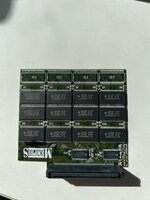
I attempted to do the same with my 16 MB RAM extensions and soldered additional chips ordered from China on the empty spaces of the PCB to bring them to 24 MB for a total of 64 MB of RAM (currently i have to extensions á 16 MB and one base module with 16 MB bringing it to 48 MB). But my 1400c still does only recognize the 16 MB which were soldered on originally. What I’m doing wrong?

How does you card look on the other side? It's the same, right? Before you did the upgrade, did it have 4x chips populated and 2x unpopulated on both sides? You should be able to just add 4x2MB chips and have it work. One of your donor chips could be bad.
 
Last edited:
IMG_8293.jpeg
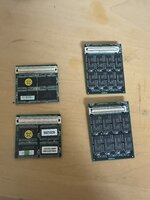
If it helps at all, here’s an image I have of two 24MB memory modules for the 1400. They are the ones on the right, ignore the left ones (took the photo originally to compare PB 1400 memory with WinBook FX memory as they're both very similar, and laptops released in 1996 built by Quanta)
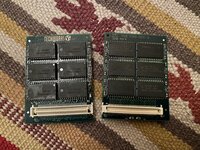
They have chips on both sides.
 
Here is an image of my homemade 24MB RAM cards. One was originally 8MB and the other was originally 16MB. They have chips on both sides.

IMG_7312.jpg
 
@croissantking Yes, the card looks the same on both sides and there were indeed 4 chips populated and 2 unpopulated on each side. But as I said, with all the spaces populated still only the original 16 MB are recognized by the system and not the additional 8 MB. And i get an RAM error whilst boot which I need to dismiss my clicking on OK.
 
@croissantking Yes, the card looks the same on both sides. But as I said, with all the spaces populated still only the original 16 MB are recognized by the system and not the additional 8 MB. And i get an RAM error whilst boot which I need to dismiss my clicking on OK.
One of the chips could be faulty, or perhaps there is a dry joint.
 
Also, I note there seem two be two different offsets on your card for each RAM chip. I also note that you've installed the donor chips differently from the factory ones. I am not sure if the offset pads are just to accomodate different sized chips or if it's for some other reason. It's worth investigating -- personally, I would have positioned the new chips the same as the originals.
 
But with only one chip faulty it should at least recognize the working ones?

Usually, a RAM card with a bad chip would result in death chimes. The 1400 series handles things differently, seemingly it's able to disable faulty banks and continue booting up. I'm not sure how it works things out, though, and it might disable the whole card.
 
Back
Top