• Hello MLAers! We've re-enabled auto-approval for accounts. If you are still waiting on account approval, please check this thread for more information.

Stuck Miniscribe

Ttpilot

6502
Hello. Dumb question:

I picked up a Mac SE recently. At the moment I’m working overhauling the floppy drive, but the Miniscribe 8425SA seems to be stuck. I haven’t tried powering it up in the Mac, since I’ve got it apart. Will plugging it into power on a pc let it spin up (if it can) without being plugged into the controller via the interface cable?
 
Hello. Dumb question:

I picked up a Mac SE recently. At the moment I’m working overhauling the floppy drive, but the Miniscribe 8425SA seems to be stuck. I haven’t tried powering it up in the Mac, since I’ve got it apart. Will plugging it into power on a pc let it spin up (if it can) without being plugged into the controller via the interface cable?
How do you mean stuck?

Don't move the arm on the stepper, or you'll have to spend ages realigning it.
 
How do you mean stuck?

Don't move the arm on the stepper, or you'll have to spend ages realigning it.
I plugged into power from a pc (the SE is still disassembled) but it wouldn’t spin up. I just wondered if it needs to also be plugged into the SCSI controller to power up
 
I may have missed it in the Youtube video associated with this Reddit post, but the miniscribe that is on the card, although plugged into power and technically plugged into a data cable, is still not plugged into a slot and so does not have an active controller connection, when it spins, so that may help with your question. The video also shows the lubrication process that the person used, which is handy for me, since I just got an SE with one of these that I was going to work on as well.
 
I may have missed it in the Youtube video associated with this Reddit post, but the miniscribe that is on the card, although plugged into power and technically plugged into a data cable, is still not plugged into a slot and so does not have an active controller connection, when it spins, so that may help with your question. The video also shows the lubrication process that the person used, which is handy for me, since I just got an SE with one of these that I was going to work on as well.
Thanks, this helps a lot. I hadn’t run across this video when I searched
 
That video seems to be about issues where the head is struggling to seek. Its perhaps good to put a little oil on the stepper bearings, but if your main spindle isn't spinning at all - i.e. the disk doesn't spin up (and trust me, you know about it if it does) then you have a separate issue.

I've had three MiniScribes in the recent past one was fine, one struggles to spin up and the third has some more... unknown issue. First things first, these are horrifically unreliable drives. They're famous for it. A working MiniScribe is the exception, not a broken one.

But this said... There is a slight chance you might get the drive working again if you carefully unplug the connectors on the controller board (photograph it first so you know how to put them back) then unscrew and remove the controller board on the bottom. This reveals a large flywheel that is actually on the same spindle as the platters. Very gently try to rotate it with your finger. Does it rotate freely? Or is it stick solid?

If it is stuck solid, put the drive in the freezer for an hour, take it out, and try to rotate the flywheel again, this time I'd say try with a bit more force. If the head is welded to the disk surface, this might break the head, but... lets be honest, if the head is welded to the disk, its probably done for anyway.

If either before or after freezing, the flywheel does move, but is a bit stiff, sit there and rotate it by hand for a few minutes. See if you can free it up some.

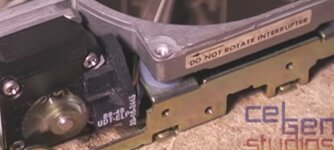
All the while, as mentioned, DO NOT move the stepper motor arm (the thing you see moving in the second video following), or you'll have to spend ages manually repositioning it.

Here is a video of one of my MiniScribes for reference, so you know what one spinning up and seeking sounds like, so you know when things are going better.



 
All the while, as mentioned, DO NOT move the stepper motor arm (the thing you see moving in the second video following), or you'll have to spend ages manually repositioning it.
I doubt small movements of the arm really do matter..
How would the drive memorise the stepper position when the power is suddenly disconnected? Isn‘t this warning not just to warn not to rotate the arm beyond the sensor or prevent the heads inside the drive from slipping off the platters?
 
I doubt small movements of the arm really do matter..
How would the drive memorise the stepper position when the power is suddenly disconnected? Isn‘t this warning not just to warn not to rotate the arm beyond the sensor or prevent the heads inside the drive from slipping off the platters?
Ok, but if you move it it can cause the drive not to initialise.
 
To expand, perhaps it is just specific positions, or a quirk of mine, but it won't initialise in some positions. From others it does return home. But there is a huge warning sticker on the disk saying do not rotate the interruptor, which is the name for the arm (it interrupts the gate sensor thingy).

Perhaps it actually means don't loosen it on the shaft, but given it doesn't specify, I'd assume the most obvious meaning which is don't rotate it at all. Plus personal experience says it does seem to affect behaviour. But I wasn't exactly planning to spend my time experimenting, because I didn't want to crash the head carriage into the endstops or spindle and I was doing the minimum to get it working again, which was looking at an old photo and trying to click it to the exact same location until it started behaving normally again.

At this considered, especially the warning sticker, you might as well do what they ask and not add another factor to the troubleshooting process.

1000017647.jpg
 
Last edited:
Coincidentally, in the last week I've watched like three or four different videos of people working with old machines with Miniscribe drives. In every instance, one or more heads were stuck to the platter. Attempts to fix resulted in the head torn off.
Not saying this will happen to you, but just saying.
 
Coincidentally, in the last week I've watched like three or four different videos of people working with old machines with Miniscribe drives. In every instance, one or more heads were stuck to the platter. Attempts to fix resulted in the head torn off.
Not saying this will happen to you, but just saying.
Yup. I was able to rotate the spindle flywheel with no trouble, so I’m assuming the heads are free (or torn off already lol). I’ll probably stick a SCSI Blue in it, but it’s worth playing with the drive to see if it can be made to work
 
Follow up: I hooked the LED to the drive and tried to power it up. It would not spin up, and the stepper motor didn’t do anything, either. It did flash a 1110 ‘E’ code, basically meaning it couldn’t detect a spin up. I inspected the pcb under magnification but didn’t see anything suspicious. I also reflowed the power connector solder joints. Same result, unfortunately. That’s about as far as I can go with this thing, I’m afraid. The SCSI Blue I ordered should be here tomorrow. I’ll report back on how that turns out
 
It would not spin up
You could try "rotating" the whole drive clockwise/counterclockwise.

Grab the drive in your hand - thumb on one side, fingers on the other - then 'rotate' your wrist back and forth - sort of like screwing a large bottle lid on and off. Make sure you keep the drive horizontal and level while you do this.

The inertial changes might free the platter up. Of course, I make no g'tees here, so YMMV.
 
You could try "rotating" the whole drive clockwise/counterclockwise.

Grab the drive in your hand - thumb on one side, fingers on the other - then 'rotate' your wrist back and forth - sort of like screwing a large bottle lid on and off. Make sure you keep the drive horizontal and level while you do this.

The inertial changes might free the platter up. Of course, I make no g'tees here, so YMMV.
No luck. I don’t think the motors are getting power
 
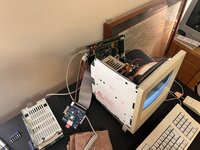
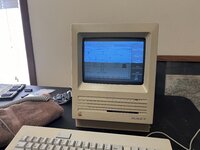
I installed a SCSI Blue, which works fine. I'm hunting for one of the brackets which would mount it to the expansion slot in the back of the SE. Until then, it'll have to remain in an exploded state
 

Attachments

  • IMG_6994.jpeg
    IMG_6994.jpeg
    3.4 MB · Views: 4
  • IMG_6992.jpeg
    IMG_6992.jpeg
    2.6 MB · Views: 7
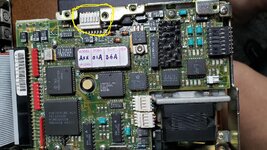
Hi all, I have a MAC SE with Miniscibe 8425S. Last reboot of the old MAC about a year ago showed the MAC boot up to the last running app that I had used a few years prior. However, I was having some Sony PSU issues, so I powered down (mouse works but KB did not respond in either port). I recapped the PSU and my voltages are fine. SCSI is getting 12v and 5v where applicable. But the harddrive would not spin. I removed the PCB and cleaned/lubed the stepper. No joy, no spin. I took it apart again and repeated the cleaning/lube. Next test resulted in the SCSI spinning but not attempting to boot (no stepper motor motion or head seek). I will try the rotational "exercises" (or exorcism? LOL) next. I also checked the voltages on the small white connector (circled in yellow) and they are good. Not sure why the MAC does not "see" the hard drive. Anybody have any ideas? Would buying a disk repair tool help troubleshoot this drive now that it is spinning? Even though it is spinning, I do not know whether or not software in the floppy could help the MAC detect the drive.

Strange, I tried a Restart of the MAC and it never reboots from the floppy. I get the Welcome to Macintosh but it never loads to the desktop. The restart still does not recognize the SCSI drive. I tried the rotation moves and a easy slap on the bottom of the drive, but the stepper does not respond. The disk continues to spin though.

I am thinking about recapping the Analog board. Anybody agree that this may help??
 

Attachments

  • Miniscribe 8425C.jpg
    Miniscribe 8425C.jpg
    320.7 KB · Views: 5
Last edited:
disk is probably shot. recapping the analog board isn't likely to bring it back to life.
 
Hi all, I have a MAC SE with Miniscibe 8425S. Last reboot of the old MAC about a year ago showed the MAC boot up to the last running app that I had used a few years prior. However, I was having some Sony PSU issues, so I powered down (mouse works but KB did not respond in either port). I recapped the PSU and my voltages are fine. SCSI is getting 12v and 5v where applicable. But the harddrive would not spin. I removed the PCB and cleaned/lubed the stepper. No joy, no spin. I took it apart again and repeated the cleaning/lube. Next test resulted in the SCSI spinning but not attempting to boot (no stepper motor motion or head seek). I will try the rotational "exercises" (or exorcism? LOL) next. I also checked the voltages on the small white connector (circled in yellow) and they are good. Not sure why the MAC does not "see" the hard drive. Anybody have any ideas? Would buying a disk repair tool help troubleshoot this drive now that it is spinning? Even though it is spinning, I do not know whether or not software in the floppy could help the MAC detect the drive.

Strange, I tried a Restart of the MAC and it never reboots from the floppy. I get the Welcome to Macintosh but it never loads to the desktop. The restart still does not recognize the SCSI drive. I tried the rotation moves and a easy slap on the bottom of the drive, but the stepper does not respond. The disk continues to spin though.

I am thinking about recapping the Analog board. Anybody agree that this may help??

UPDATE 05-07-2025 - Got the SCSI Miniscribe spinning each time I turn on the MAC SE. Booting to floppy works. I unplugged the SCSI Ribbon to test what the drive would do (for the bus). The drive blinks "ON" for a second then follows with 3 quick flashes. That pattern continues, so it's as if the miniscribe is still looking to connect even though the cable is unplugged. I am going to leave it running for about 30-45 minutes since I dabbed a small amount of oil on the stepper motor. I also had cleaned the SCSI PCB with some Isopropyl Alcohol (99/9%).

My main goal is to see if I can get the Miniscribe to a point where I can offload as much data as possible. I'm not sure how to do that so if anyone can help, that would be awesome!
 
Back
Top