• Hello MLAers! We've re-enabled auto-approval for accounts. If you are still waiting on account approval, please check this thread for more information.

Wide vertical bars on a Mac Plus - help, please

alexGS

6502
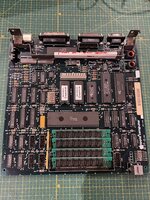
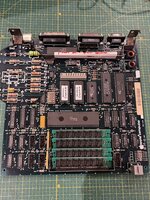
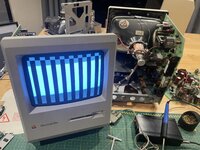
This logic board is clean and tidy (unlike some others I deal with that have had battery leakage or damp storage…) and yet unfortunately, it displays the vertical bars typical of a ROM fault.

I’ve swapped the ROMs and the RAM with a working logic board, to determine that they are OK.

Could you please give me some guidance on how to test further - could it be the CAS chip at fault, or something else responsible for addressing ROM or RAM? I have a 10MHz handheld oscilloscope but have never had much skill with recognising signals with it - I need to know what to look for :)

I have various other Plus logic boards for spare parts, including one that worked a few months ago but will not power on now. At least this one with the vertical bars powers on…

I tried searching far and wide and found someone else on Reddit with the same screen display - unfortunately, not solved.

Thanks for any advice
 

Attachments

  • IMG_8541.jpeg
    IMG_8541.jpeg
    2.8 MB · Views: 18
  • IMG_8542.jpeg
    IMG_8542.jpeg
    2.6 MB · Views: 27
Found this:
 
Found this:
Thanks - I’ve seen that one :)
In that case, it was the ROMs and the RAM that were faulty. That isn’t the case with this Plus, unfortunately, since the ROMs and the RAM both work ok in another logic board.
 
Is this the Redidt thread you were looking at?

sersoniko fixed it by replacing the VIA 6522!


Ah - thanks - that isn’t the Reddit thread I’d found - the one I found didn’t go anywhere :) Great to see a solution, and interesting that it was the 6522 as I’ve previously replaced that in a different board to correct a fault with a mouse not working. My guess is that the 6522 is used for timing.

I have already seen the Dead Mac Scrolls, which identify it as a ROM fault, such as ROMs in backwards.

So I guess I’d better try replacing the 6522. I’ll report back.
 
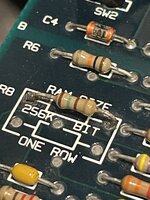
Hi, the only thing i can see that doesn’t look right is the ram size and corresponding resistor.

From you picture, you have got 1 Mb of ram, but the ram size resistor has one leg lifted, when both should be soldered (top left part of the board)
 

Attachments

  • 17361760-EA04-49E1-9A6D-A1916DD816D3.jpeg
    17361760-EA04-49E1-9A6D-A1916DD816D3.jpeg
    1.3 MB · Views: 14
Hi, the only thing i can see that doesn’t look right is the ram size and corresponding resistor.

From you picture, you have got 1 Mb of ram, but the ram size resistor has one leg lifted, when both should be soldered (top left part of the board)
Thanks biblit - I appreciate your inspection - unfortunately my photo was not clear and I agree, it looked like the resistor wasn’t connected when, in fact, it is. Sorry about that… it does look like I should clean up those solder joints!

IMG_8568.jpeg
 
Is this the Redidt thread you were looking at?

sersoniko fixed it by replacing the VIA 6522!

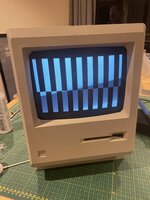
I’ve now replaced the 6522 - which has changed the display to that below (please disregard the 512K Mac case/analog board used for testing - this is a Plus logic board producing this display)

It’s now bars alternated with slightly-shorter bars below - I don’t know what it means, does anyone recognise this please? :)
 

Attachments

  • IMG_8626.jpeg
    IMG_8626.jpeg
    1.7 MB · Views: 8
I replaced the 6522 twice more, using chips taken from old 512K boards that don’t work for other reasons. I’ve installed a 40-pin socket so the 6522 is easy to swap.

Both of the older 6522s produce a new result - the startup tone sounds (yay!), and then the screen is blank (boo!). Floppy drive goes crazy if that is plugged in. However, and this is keeping me going here, turning the power off and on with the older 6522 actually produced the correct display once!

Reinstalling the original 6522, or the replacement from a newer Plus board, produces the vertical bars as shown above. This proves there’s no video fault with the display/analog board, and voltages measure correctly. Are the vertical bars produced by something different to whatever produces the grey background/disk icon?

I mean, it seems replacing the 6522 fixes the ROM/RAM problems and gets it past the vertical-bar stage, but then I’m straight into the failed-video problem caused by another chip?

‘Troubleshooting your Macintosh’ suggests failed video is caused by the PAL chips D1 and E1 (these locations seem to correspond to LAG and BMU2). I guess I’ll try swapping those now.

I have already swapped the ROMs and RAM into another board again to prove that they still work fine.
Thank you for any suggestions you can give.
 
Last edited:
Back
Top