
Hi all. I have a problem with an SE30 in which I assembled a new motherboard from Boll's project. The computer worked from the first boot, however, there is a problem. A few moments after booting, the screen starts to show artifacts in the form of dashes or single pixels. After about two minutes, they stop appearing and are gone until the next cold boot. I have replaced: Video ROM, Video memory, all four F253 (UA8,UB8,UC8,UD8), LS166 (UE8) and UG6 (PAL Beginning). The fault looks like a memory addressing problem. I think I have replaced all the chips that could be responsible for this... Do you have any idea where to look? I forgot to add that despite these problems, the computer runs completely normally and stably.

You are using an out of date browser. It may not display this or other websites correctly.
You should upgrade or use an alternative browser.
You should upgrade or use an alternative browser.
SE30 Screen artifacts problem
- Thread starter bromaster
- Start date
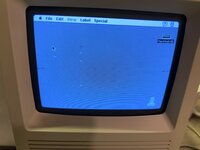
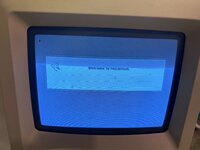
I have some conclusions and observations about this problem.
There was a window open on the desktop. After closing it, such an o this trash remained.
And now look. When I open the context menu at the top, the trash, despite the fact that it is covered, does not disappear, but when I open the window-directory it disappears after closing. It seems to me that if it was a graphical problem strictly, some errors with memory addressing, etc. then rather they should always disappear as they are obscured. Am I right?
There was a window open on the desktop. After closing it, such an o this trash remained.
And now look. When I open the context menu at the top, the trash, despite the fact that it is covered, does not disappear, but when I open the window-directory it disappears after closing. It seems to me that if it was a graphical problem strictly, some errors with memory addressing, etc. then rather they should always disappear as they are obscured. Am I right?
Attachments
Does the stuff appear on a screenshot?
Ooo good question! How do you make Screenschot in OS 7.1?Does the stuff appear on a screenshot?
Ooo good question! How do you make Screenschot in OS 7.1?
Command-Shift-3


@croissantking was having that same issue over here:
 68kmla.org
I couldn't reproduce it with any of my boards yet. Playing with pullup/pulldown resistors of different values on the /NUBUS signal might be worth a try.
Macintosh SE/30 logicboard recreation (thread revival)
This is a great project! How many different logic boards have been recreated so far, just the SE/30? Plus, SE, Classic, IIcx? and some LCs
68kmla.org
I couldn't reproduce it with any of my boards yet. Playing with pullup/pulldown resistors of different values on the /NUBUS signal might be worth a try.


Hi @bromaster !
As Bolle mentioned, I have the same issue on all three of my Reloaded boards. I have done an immense amount of troubleshooting on the issue and cannot, for the life of me, get to the bottom of it.
I have done a write-up here: https://diydiyguy.wordpress.com/2023/11/21/my-macintosh-se-30-reloaded-journey/
@Garrett B also has the same issues on his reloaded board.
From all my testing I believe the GLUE chip is putting out interference on the Nubus line and corrupting video data through the PAL at UE7.
As Bolle mentioned, I have the same issue on all three of my Reloaded boards. I have done an immense amount of troubleshooting on the issue and cannot, for the life of me, get to the bottom of it.
I have done a write-up here: https://diydiyguy.wordpress.com/2023/11/21/my-macintosh-se-30-reloaded-journey/
@Garrett B also has the same issues on his reloaded board.
From all my testing I believe the GLUE chip is putting out interference on the Nubus line and corrupting video data through the PAL at UE7.
Yes, you can capture the anomalies on a screenshot with these symptoms.Does the stuff appear on a screenshot?
To the Glue chip I have not yet reached. However, as far as I can see, the problem is more with the RAM and its peripherals. The problem at first was minor. Individual pixels or lines that appeared a few minutes after booting the computer and disappeared after a few moments later. Now as I started swapping individual chips from another board (not yet rebuilt) paterns and times of appearance change. Until now, however, the artifacts could be covered up by the catalog window, but since I replaced the UH7 chip I can no longer cover it up and there are many more than before.Hi @bromaster !
As Bolle mentioned, I have the same issue on all three of my Reloaded boards. I have done an immense amount of troubleshooting on the issue and cannot, for the life of me, get to the bottom of it.
I have done a write-up here: https://diydiyguy.wordpress.com/2023/11/21/my-macintosh-se-30-reloaded-journey/
@Garrett B also has the same issues on his reloaded board.
From all my testing I believe the GLUE chip is putting out interference on the Nubus line and corrupting video data through the PAL at UE7.
Unfortunately, in my case, playing with the antenna on the Nubus connector does not work....@croissantking was having that same issue over here:
Macintosh SE/30 logicboard recreation (thread revival)
This is a great project! How many different logic boards have been recreated so far, just the SE/30? Plus, SE, Classic, IIcx? and some LCs
I couldn't reproduce it with any of my boards yet. Playing with pullup/pulldown resistors of different values on the /NUBUS signal might be worth a try.
You will find that it is not a problem with any of your chips. Believe me, because I have three complete builds and they’re all doing the same thing. One of those builds has all original parts, so it is not a case of wrongly selected components either.To the Glue chip I have not yet reached. However, as far as I can see, the problem is more with the RAM and its peripherals. The problem at first was minor. Individual pixels or lines that appeared a few minutes after booting the computer and disappeared after a few moments later. Now as I started swapping individual chips from another board (not yet rebuilt) paterns and times of appearance change. Until now, however, the artifacts could be covered up by the catalog window, but since I replaced the UH7 chip I can no longer cover it up and there are many more than before.
The issues do indeed come and go with varying severity.
See if pressing down firmly with your finger on pin 6 of the PAL at UE7 alleviates the symptoms for you, while they are exhibiting themselves.
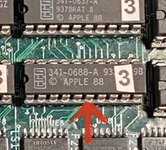
Also, if you have a hot air station, you should find that applying a little heat to the GLUE chip also alleviates the symptoms temporarily.
If you’re interested, I could send you an assembled board to experiment with.I couldn't reproduce it with any of my boards yet. Playing with pullup/pulldown resistors of different values on the /NUBUS signal might be worth a try.
Nothing happened.. I touch the pins, knead the logic board, press each IC, and in no way are these actions related to artifactsYou will find that it is not a problem with any of your chips. Believe me, because I have three complete builds and they’re all doing the same thing. One of those builds has all original parts, so it is not a case of wrongly selected components either.
The issues do indeed come and go with varying severity.
See if pressing down firmly with your finger on pin 6 of the PAL at UE7 alleviates the symptoms for you, while they are exhibiting themselves.
View attachment 65680
See also my post here: https://68kmla.org/bb/index.php?thr...d-recreation-thread-revival.39485/post-499776Nothing happened.. I touch the pins, knead the logic board, press each IC, and in no way are these actions related to artifacts
Do you have a set of 0637-A and 0688-A PALs that you can swap in place of your 0754-A and 0755A? It would be interesting to see if the symptoms switch to the other set.
I have replaced all the PAL chips. The result is that it only gets worseDo you have a set of 0637-A and 0688-A PALs that you can swap in place of your 0754-A and 0755A? It would be interesting to see if the symptoms switch to the other set.
What are your part numbers fitted to UE6 and UE7?
The UE7 that is now on the logic board, has the number 341-0755-A Unfortunately, the UE6 has worn out letteringWhat are your part numbers fitted to UE6 and UE7?
Similar threads

- Replies
- 5
- Views
- 241


- Replies
- 4
- Views
- 536


- Replies
- 2
- Views
- 373