• Hello MLAers! We've re-enabled auto-approval for accounts. If you are still waiting on account approval, please check this thread for more information.

Problem with Mercury Electra SSD in beige MiniTower G3?

ktkm

6502
I have an OWC Mercury Electra SSD with 120 GB in beige MiniTower G3 with a C ROM. The drive has two partitions about 60 GB each, but the MiniTower won’t boot unless the SSD is in slave mode and I run the system from a CD-ROM. If I change the jumper to master I only get a dark display. What to do?
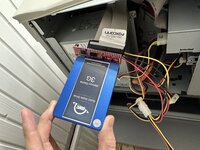
MercurySSD_beigeMT.jpg
 
Those SSD to IDE adapters are very very unlikely to work in those older machines. I think that some have used them in G4 towers, but anything older than that I don't think they work terribly well.
 
The IDE implementation on those is particularly finicky... I haven't had any luck with those on my G3.
I ended up just sticking a CF card on an adapter which worked perfectly. You could also go with a flashed SIL3112 PCI SATA card.
 
Just another warning, SIL3112 cards play up on some beige G3 ROM versions.

The Beige and B&W G3s just... Aren't the best for hard disks ;)
 
I believe the limitation on these is that the boot partition has to be within the first 8GB of the disk.

So in your case, you would need to partition it with 8GB first, then your remaining partitions. Your system folder/boot volume would need to be on the 8GB one.

It's an IDE limitation.
 
I believe the limitation on these is that the boot partition has to be within the first 8GB of the disk.

So in your case, you would need to partition it with 8GB first, then your remaining partitions. Your system folder/boot volume would need to be on the 8GB one.

It's an IDE limitation.
Yes, but the 8GB rule is just for OS X. Not sure what OS @ktkm has in mind?

For the SSD route I would either:

Spring for a flashed SATA card if you want to run that SSD. I’ve got an Adaptec 1210SA in my Beige G3 with the Rev C ROM and it’s working quite well now.

Or:

Use the onboard IDE bus, and get one of those ‘industrial’ SSDs that Sean of ActionRetro (and maybe others) reviewed some time ago on their YouTube channel with great results.
 
I only have MacOS 8 to 9 in mind, so the 8 GB limit for OSX shouldn’t affect me. Hence, The drive I pulled was 60 GB running MacOS 9.
I have decided to try a PCI IDE/ATA card with a 2.5-inch SSD drive and a 3.5-inch adapter. I’m very tempted to get an industrial solution SCSI SSD, but they start at 1,295 USD at Redrocktech <https://www.redrocktech.com/products/scsissd> -- where I got the quotes yesterday.
 
I wouldn't use a zulu or scsi2sd in a Power Mac G3.

Honestly, just grab a 16 or 32 gig CF card and stick it in an IDE adapter. should work fine.
 
I did try a SCSI2SD, and I use them with my 68K systems, but felt it was a tad too slow for a G3. Anyway, I just ordered the PCI IDE/ATA card with a 2.5-inch SSD drive and a 3.5-inch adapter. It set me back 200 USD, hope it works!
 
...uh... does that card even have MacOS support? I know some do... but they're somewhat uncommon.

gonna be real with you here... you were given several suggestions, and yet you decided to go with something that is not only questionable, but more expensive.

fingers crossed it works for you! 😁 (y)
 
...uh... does that card even have MacOS support? I know some do... but they're somewhat uncommon.
The ATA PCI card is a vintage “Acard AEC-6280M”. According to the seller, it supports MacOS 8.5 and above. I figured if the G3 bus is picky maby this card will keep the system more relevant for future upgrades?

gonna be real with you here... you were given several suggestions, and yet you decided to go with something that is not only questionable, but more expensive
Thank you for all the suitable suggestions. I’ll keep posting my findings 🙂
 
Back
Top