• Hello MLAers! We've re-enabled auto-approval for accounts. If you are still waiting on account approval, please check this thread for more information.

Macintosh SE and a HyperCharger '020 Accelerator

I'll give it a shot!
I'm still thinking it could be those jumpers… I'm wondering if there's any point of reference for their config.
The photos of someone else's show the jumpers set the same as yours with 4MB, so the jumpers are more likely correct than not. I wouldn't randomly swap them, so I'd say what you have already is the best option unless you get a manual.
 
I agree too - I cleaned the SIMMs but no changes - I’m going to leave well enough alone unless we find anything else. :)
 
I have not - could you pass those exact two for me please? :) I’m going to try either one, but I want to make sure I can control which one is which, lol
 
I have not - could you pass those exact two for me please? :) I’m going to try either one, but I want to make sure I can control which one is which, lol
The page says...

GCC HyperCharger v1 and 2 (19 k) GCC's drivers for their HyperCharger 020 accelerator for the Mac SE. Version 1 works with early OS only. Version 2 is known to work with System 6.0.3-6.0.7 May work with System 7 when used with the Mobius drivers?

Guess they're both in the same archive. Not near a mac ATM.
 

Attachments

I think something might be up with this one, lol - I grabbed this file last night and was able to get the v2 driver, but there was an “endless” .hqx file that never gave me a v1 driver.

I tried this one out to be safe (the v2 driver) but nothing changed.

I might try extracting these in Mac OS 9 on my Performa
 
It looks like your card is recognized by the drivers so I think the card simply doesn’t see the Ram.

If you know the RAM is good, then I would suspect it’s your jumpers config. There’s usually a few sets of jumpers on these types of boards. I would look for the ones close to the crystal oscilator or close to the RAM slots and just experiment moving them around. You might see two jumpers and both of them have to be in the correct position.
 
Oops, I didn’t see your picture. Looks like you have a total of 7 jumpers right next to each other - that is what like 128 possible combinations? Ouch, I’d be looking for a manual of a picture from someone who has it in 4MB configuration.
 
It looks like your card is recognized by the drivers so I think the card simply doesn’t see the Ram.

If you know the RAM is good, then I would suspect it’s your jumpers config. There’s usually a few sets of jumpers on these types of boards. I would look for the ones close to the crystal oscilator or close to the RAM slots and just experiment moving them around. You might see two jumpers and both of them have to be in the correct position.
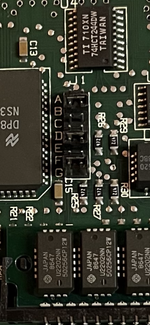
There’s no crystal on this one that I’m aware of, but here are the set of jumpers - @Phipli noticed that my jumper config was identical to one he found on the forums a while back. I’ve attached mine close-up, as well as another one with the same config (this might be how it arrived in the factory.).

I noticed that in the other thread where I grabbed this reference image, this board had 2.5 MB installed on the logic board, but it appeared to have more RAM installed on the accelerator, but it wasn’t being utilized.

Link to other thread:

It looks like your card is recognized by the drivers so I think the card simply doesn’t see the Ram.

If you know the RAM is good, then I would suspect it’s your jumpers config. There’s usually a few sets of jumpers on these types of boards. I would look for the ones close to the crystal oscilator or close to the RAM slots and just experiment moving them around. You might see two jumpers and both of them have to be in the correct position.
It looks like your card is recognized by the drivers so I think the card simply doesn’t see the Ram.

If you know the RAM is good, then I would suspect it’s your jumpers config. There’s usually a few sets of jumpers on these types of boards. I would look for the ones close to the crystal oscilator or close to the RAM slots and just experiment moving them around. You might see two jumpers and both of them have to be in the correct position.
There’s no crystal on this one that I’m aware of, but here are the set of jumpers - @Phipli noticed that my jumper config was identical to one he found on the forums a while back. I’ve attached mine close-up, as well as another one with the same config (this might be how it arrived in the factory.).

I noticed that in the other thread where I grabbed this reference image, this board had 2.5 MB installed on the logic board, but it appeared to have more RAM installed on the accelerator, but it wasn’t being utilized.

Link to other thread:

Images:
 

Attachments

  • B4749E18-FC62-4119-859C-5850CD1A8039.png
    B4749E18-FC62-4119-859C-5850CD1A8039.png
    9.1 MB · Views: 0
Oops, I didn’t see your picture. Looks like you have a total of 7 jumpers right next to each other - that is what like 128 possible combinations? Ouch, I’d be looking for a manual of a picture from someone who has it in 4MB configuration.
That’s a lot of possible combinations, lol! 😅
I’ll probably need to go that route in order to get it sorted out!

Overall, the SE runs well!
 
I’ve got good photos of those jumper positions, so I’m wondering if I should maybe try a few combinations at this point - there’s a chance I could get some of the ram to show up, lol
 
I’ve got good photos of those jumper positions, so I’m wondering if I should maybe try a few combinations at this point - there’s a chance I could get some of the ram to show up, lol
I don't recommend this. This is how things get broken.
 
I’ve got good photos of those jumper positions, so I’m wondering if I should maybe try a few combinations at this point - there’s a chance I could get some of the ram to show up, lol

That’s what I would be doing. I had the same issue with an accelerator for which I couldn’t find a manual - it showed up in the driver but the RAM was zero. I moved jumpers around randomly, and the RAM showed up.

A power cord extension would be helpful so you can just have the board outside the computer for instead of having to reinstall it every time you move the jumpers. @JDW made an awesome video about it.
 
I'm with @Phipli on this one - experimenting with the jumpers is risky. This is a very old card, we don't know what sort of protection is built-in if the jumpers are misconfigured...
 
At work at the moment, but I'll hold off on doing anything with the jumpers – I'll check out those reviews as soon as I can. :)
 
Really, with accelerators this old, you tend to either get the system RAM or the accelerator RAM, not both. The extra accelerator RAM can be used as a RAM disk but that's about it, so even if it did recognise it, its of limited use. If the system is able to see/use 4MB then you should be good to go as that's a good amount for an SE. The real benefit is from the CPU upgrade itself and sometimes an FPU.
 
Back
Top