• Hello MLAers! We've re-enabled auto-approval for accounts. If you are still waiting on account approval, please check this thread for more information.

Blurry iMac G3 DV External VGA

Snial

68000
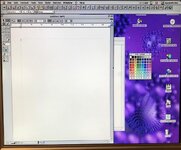
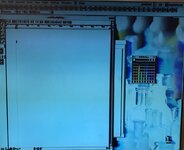
I tried to raise this as a topic a little while ago, but here's the same thing, but with more pictures! I have 2x iMac G3 DV 400s (Blueberry). They both boot OK and have a decent (if a bit dim) CRT image. One of them has a good external VGA out and the other has a terrible external VGA out. Is this easy to fix?

iMacCrt.jpg
iMacLcdGood.jpg
iMacLcdBad.jpg
 
Assuming the monitor and cables are known good, I would suspect one of two things.

First, I would try some contact cleaner in the VGA port, in case there’s dirt/gunk/etc in there preventing good contact. It’s simple enough, and no disassembly required.

After that, I would suspect maybe some cracked solder joints on the VGA port. Not a simple fix, but it should be fairly obvious, once you disassemble things to check. Probably not worth risking a repair if you’re not confident in your soldering skills. I’d personally just leave it alone if it has no other issues, unless you really need video out for some reason.

Beyond that, I’m not sure bad caps would only affect mirrored external video. I’m no expert on iMac video, but is there really anything that needs to be done beyond sending the same signal to the VGA port? I would assume straight pass through since it’s just external mirroring and not dual displays, right?

 
Assuming the monitor and cables are known good, I would suspect one of two things.

First, I would try some contact cleaner in the VGA port, in case there’s dirt/gunk/etc in there preventing good contact. It’s simple enough, and no disassembly required.

After that, I would suspect maybe some cracked solder joints on the VGA port. Not a simple fix, but it should be fairly obvious, once you disassemble things to check. Probably not worth risking a repair if you’re not confident in your soldering skills. I’d personally just leave it alone if it has no other issues, unless you really need video out for some reason.

Beyond that, I’m not sure bad caps would only affect mirrored external video. I’m no expert on iMac video, but is there really anything that needs to be done beyond sending the same signal to the VGA port? I would assume straight pass through since it’s just external mirroring and not dual displays, right?
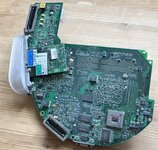
Hi I had a go at doing both of those things last week: I resoldered all the VGA connections on the underside of the iMac G3 DV's Motherboard, but it didn't make any difference. Does anyone have any other ideas as to the cause of the problem?

iMacDvMoboRear.jpg
 
The iMac DV has an EL2386 triple op-amp (U5) on board like the aforementioned Molar Mac. Presumably the Rage 128 drives the pre-amp IC on the CRT neck board directly, and U5 buffers the Rage 128's outputs to drive the external monitor. The -5V for U5 is generated by VR2 (79L05) on the flip side of the board. Measuring the output from VR2 with the motherboard installed may be difficult (heatsink on Rage 128 prevents you from getting a probe on the right pin of U5 depending on board revision), but you could start by taking a resistance measurement between pins 1 and 5 of VR2 to see if its output is shorted to ground. The likelihood of VR2 being faulty is fairly low. Also not sure where the input voltage for VR2 is generated, that would require further investigation.
 
The iMac DV has an EL2386 triple op-amp (U5) on board like the aforementioned Molar Mac. Presumably the Rage 128 drives the pre-amp IC on the CRT neck board directly, and U5 buffers the Rage 128's outputs to drive the external monitor. The -5V for U5 is generated by VR2 (79L05) on the flip side of the board. Measuring the output from VR2 with the motherboard installed may be difficult (heatsink on Rage 128 prevents you from getting a probe on the right pin of U5 depending on board revision), but you could start by taking a resistance measurement between pins 1 and 5 of VR2 to see if its output is shorted to ground. The likelihood of VR2 being faulty is fairly low. Also not sure where the input voltage for VR2 is generated, that would require further investigation.
Thanks for that!
 
Also not sure where the input voltage for VR2 is generated, that would require further investigation.
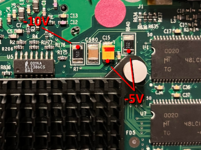
Hopefully the junk iMac board I have is roughly similar to yours. With the motherboard installed, this is the side that's exposed, in the area between the Rage 128 and the external VGA port. Sorry for the crudity of the drawing:

iMacDV_videoout.png

The -10V input to VR2 is generated on the analog board. If you measure the voltage on R7 on the logic board and it's low/missing, I'd suspect bad solder joints on the analog board/CRT neck board. If you find both -10V and -5V on the logic board, the EL2386 may be bad.
 
Back
Top