

You are using an out of date browser. It may not display this or other websites correctly.
You should upgrade or use an alternative browser.
You should upgrade or use an alternative browser.
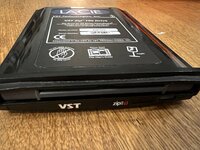
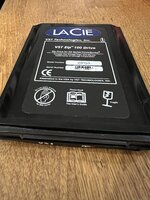
VST Zip 100 Drive PowerBook G3 Lombard/Pismo DEAD
- Thread starter Classicman
- Start date



Managed to track down the manual (attached). In the Troubleshooting section, it says :
3. The Iomega software cannot find the Zip drive or the Zip drive is not recognized.
a. Make sure the drive is properly inserted (The green power light on the drive should be ON.) Try removing the Zip drive and then reinserting.
Does the green light come on on yours?
3. The Iomega software cannot find the Zip drive or the Zip drive is not recognized.
a. Make sure the drive is properly inserted (The green power light on the drive should be ON.) Try removing the Zip drive and then reinserting.
Does the green light come on on yours?
Attachments
Yes it comes green
It’s macOS that refuses to boot with the driver and the drive ( and if I remove it for boot ; it’s also not recognised later )
Weird !
It’s macOS that refuses to boot with the driver and the drive ( and if I remove it for boot ; it’s also not recognised later )
Weird !
I also tried disabling all extensions except this one ; same result
That is odd behaviour... it could still be a dead drive - I've had that, but don't recall it keeping the PB from booting. Is there anything in the right bay? Have you tried it in the right bay? I know on the 3400/Kanga there is a little flap that drops down when you use a "narrower" drive... I'm not that familiar with the PDQ.
It freezes just after the dvd extension so something in me believes this is some kind of conflict
Stock macOS boots with the zip in the slot ; it’s the minut you add the driver that it stops working and freezes at boot
Also ejecting the drive while the boot process is stuck ; unstucks it and the boot process finishes
Stock macOS boots with the zip in the slot ; it’s the minut you add the driver that it stops working and freezes at boot
Also ejecting the drive while the boot process is stuck ; unstucks it and the boot process finishes
I tried in the right ; with and without the CD-ROM drive …
So the issue moves with the drive (assuming your CD drive works OK in the right bay). Unless you know the Zip was working when you got it, it's sounding like a faulty drive. One other thing to try... boot from "stock" MacOS with the Zip drive installed, then open Drive Setup and see if it appears in the list.I tried in the right
Good idea
If nothing works I’ll open it and see if anything looks like serviceable in there …
If nothing works I’ll open it and see if anything looks like serviceable in there …
I just saw your other posts about replacing your HD with a compact flash / sd card alternative... are you using one of those now? If so I've had some weirdness with those - but on a PB1400. If you are using one I'd try popping the old IDE HD back in and trying the Zip drive. If the same behaviour, you'd at least eliminate one variable.
Ok I checked ; It even appears in the system properties ; without driver ; recognised as Iomega zip100
On the drive setup it appears as « expbay bus 1 number 1 « ( not managed )
Again without drivers loaded of course
Again without drivers loaded of course
It is a bit difficult to try because I’ll not only change disks but also use a completely different version of macOS if I do that ; but before tearing the thing apart I’m gonna try that indeed
Sure... but if that's the issue, you'll know your Zip drive is good.It is a bit difficult to try
I seem to be reading that Zip drives are actually known to be unreliable and break ; I didn’t know that
There's plenty of ~30yr old tech that breaks. Zip drives pushed the limits in the day, and if abused I'm sure prone to failure. I have a bunch of drives I use all the time. In my own experience, the disks themselves tend to be more prone to failing than the drives.
I also *know* that your success varies widely with these CF (and SD) to ATA adapters. It was early days for IDE back then...
I also *know* that your success varies widely with these CF (and SD) to ATA adapters. It was early days for IDE back then...
Yeah, spinning HD or CF, same result. Freeze at boot until you eject.
The thing is broken, sorry for wasting your time... And I didn't get it for cheap so I'm pissed.
Nothing seems to be repairable in this (super tightly integrated)
The thing is broken, sorry for wasting your time... And I didn't get it for cheap so I'm pissed.
Nothing seems to be repairable in this (super tightly integrated)
Last edited:
Well it either does not work or is not compatible with a PDQ
I'm starting to wonder what the difference is between the ZIPG3 and the ZIPG32
ZIPG3 (the one I have) is smaller and can go left or right
ZIPG32 seems more recent but a bit of a downgrade as it only goes right, why ? Maybe more compatible ?
Not sure
Or the thing is just dead
I'm starting to wonder what the difference is between the ZIPG3 and the ZIPG32
ZIPG3 (the one I have) is smaller and can go left or right
ZIPG32 seems more recent but a bit of a downgrade as it only goes right, why ? Maybe more compatible ?
Not sure
Or the thing is just dead
Bummer. That does seem to point to the Zip being faulty.spinning HD or CF, same result. Freeze
Yeah, I didn't want to dent your optimism when you suggested having a look inside. Not a lot you can do with them. It is possible to swap in the mechanism from a PC (laptop) Zip drive - they do come up time to time - usually cheaper than the "Mac" ones.Nothing seems to be repairable in this
I would not chuck it - the casing and PDQ connector are useful, and the electronics board can be removed and may be fine - just the head / motor / etc. that's died.
As far as I can tell, it should be compatible. As you've surmised, the "G32" is newer, and meant for the Lombard/Pismo.is not compatible with a PDQ
Similar threads
- Replies
- 1
- Views
- 273

- Replies
- 11
- Views
- 1K
- Replies
- 2
- Views
- 251

- Replies
- 13
- Views
- 2K